4 Simple Steps to Import JSON to MongoDB Database
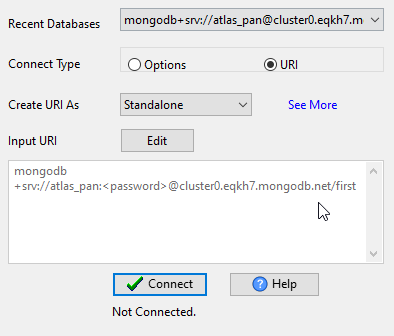
Connect MongoDB
Configure MongoDB connection (URI/host:port, authentication) — for MongoDB Atlas or self-hosted MongoDB.
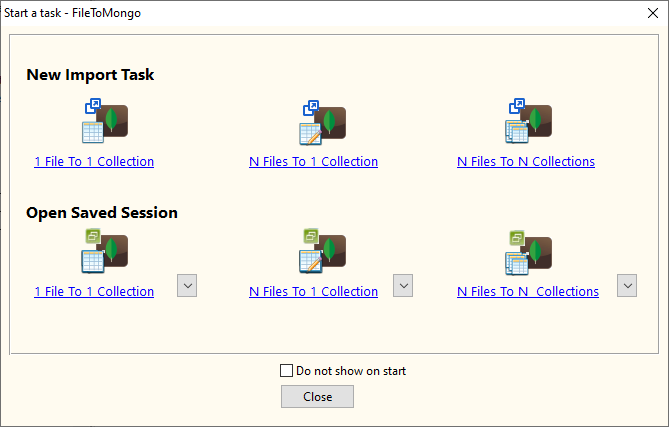
Select JSON File
Choose local JSON/JSON Lines (NDJSON) files (support batch import of multiple files).
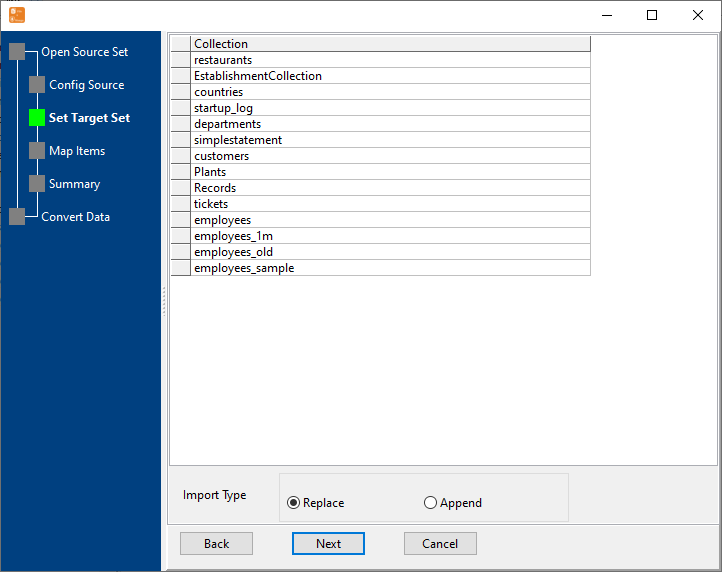
Map JSON Fields to MongoDB Collection
Auto-detect JSON structure and match with MongoDB collection fields, support nested JSON parsing, set data types — preview JSON data before import to MongoDB.
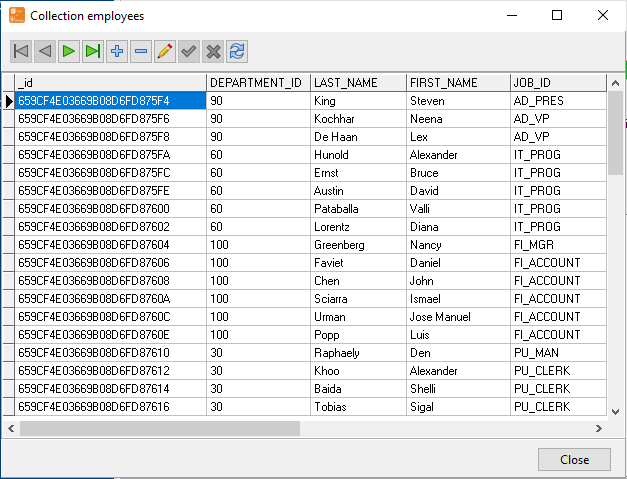
Start JSON Import & View Real-Time Progress
Real-time display of import speed, success/failure count, and remaining time.
100% Local JSON Processing
Support 10GB+ Large JSON Files
Batch & Scheduled JSON Import
Support MongoDB Atlas/Cloud
Key Features of JSON to MongoDB Importer
JSON File Support for MongoDB Import
Multiple JSON Formats
Support standard JSON, JSON Lines (NDJSON), minified JSON, and JSON with comments — auto-detect format settings for seamless import to MongoDB.
Large JSON File Optimization
Stream processing to avoid memory overflow, split large JSON files for incremental import to MongoDB — support 10GB+ JSON files without performance issues.
JSON Data Cleaning for MongoDB
Automatically remove special characters, trim whitespace, convert data types, and handle null/empty values in JSON files before import to MongoDB.
MongoDB Compatibility for JSON Import
All MongoDB Versions
Compatible with MongoDB 3.x, 4.x, 5.x, 6.x, MongoDB Atlas, Azure Cosmos DB (MongoDB API), and self-hosted MongoDB servers for JSON import.
Flexible MongoDB Collection Operations
Auto-create MongoDB collection, append JSON data, overwrite data, or update existing documents (by _id/unique key) during import.
Security Compliance for MongoDB
Support SSL/TLS encryption, authentication (SCRAM-SHA-1/SHA-256), and role-based access control for secure JSON import to MongoDB.
Automation & Integration for JSON to MongoDB
Batch JSON Import to MongoDB
Import multiple JSON files to different MongoDB collections in one task — save JSON import configurations for repetitive use.
Scheduled JSON Import to MongoDB
Set daily/weekly/monthly scheduled JSON import tasks to MongoDB — auto-run in background.
CLI for JSON to MongoDB Automation
Command Line Interface support — integrate JSON import commands into shell scripts, cron jobs, or CI/CD pipelines for MongoDB.
Common Use Cases for JSON to MongoDB Import
E-Commerce JSON Data Import to MongoDB
Import product/customer/order JSON data from e-commerce platforms (Shopify, WooCommerce) to MongoDB for analytics and reporting — support large JSON datasets from e-commerce systems.
Log Data Ingestion (JSON) to MongoDB
Import JSON-formatted application/server logs to MongoDB for centralized log management and real-time analysis — optimize for high-volume JSON log files.
IoT Sensor JSON Data Import to MongoDB
Import nested JSON data from IoT sensors/devices to MongoDB, support high-frequency batch import of time-series JSON data to MongoDB collections.
Relational DB to MongoDB (JSON) Migration
Convert relational database data to JSON format and import to MongoDB — support complex join data parsing and mapping for JSON migration to MongoDB.
Frequently Asked Questions About JSON to MongoDB Import
Q: Does JSON to MongoDB Importer support nested JSON structures?
A: Yes! The JSON to MongoDB Importer automatically parses nested JSON objects/arrays and maps them to MongoDB's nested document structure. You can also customize how nested JSON fields are stored (e.g., flatten nested JSON to flat fields in MongoDB collections).
Q: Can I import JSON files to MongoDB Atlas (cloud)?
A: Absolutely! As long as your MongoDB Atlas cluster is accessible (whitelist your IP), you can import JSON files directly to MongoDB Atlas — all JSON data processing is local, no data upload to third-party servers.
Q: What is the maximum size of JSON files supported for MongoDB import?
A: No strict limit — the JSON to MongoDB Importer uses stream processing to read JSON files (instead of loading the entire file into memory), so it can handle JSON files larger than 10GB. The only limit is your local disk space and MongoDB storage capacity.
Q: Can I schedule daily JSON imports to MongoDB?
A: Yes! The built-in task scheduler in JSON to MongoDB Importer allows you to set daily/weekly/monthly JSON import tasks to MongoDB.
Ready to Import JSON to MongoDB Effortlessly?
Free trial of JSON to MongoDB Importer available — no credit card required, full features for 30 days. Support Windows/Linux/macOS for JSON import to MongoDB.
Download FileToMongo Free Trial Buy FileToMongo - Starting at $75