OraCmd - Oracle access without client tool »
Unload Oracle data to flat file
parameters:
delimiter: delimiter char ("|",",","#","TAB","WHITESPACE")
quote: quote char (quote="'" => single quotes, quote="chr(34)" => double quotes)
quotestringonly: set "y" to put quotes around string columns only and not ones with values or numbers
recorddelimiter: record delimiter, default is CRLF
header: y|n, print field name at first line
exportclob: y|n, export clob data to file
table: table name ("all" for unload all table)
query: sql query string (can not use multi-line sql)
sqlfile: sql script file contains the query you want to unload
schema: schema name, use this prameter to unload specific schema's data, if not set, use logon user's default schema
datafile: data file name
folder: data files folder (for unload all table)
dateformat: date format (e.g. "YYYY-MM-DD HH24:MI:SS")
timestampformat: timestamp format (e.g. ''YYYY-MM-DD-HH24.MI.SS.FF6'')
buffer: Number of rows that will be transferred across the network at the same time.
This property can have a great impact on performance.
So it is preferable to choose the optimal value of buffer for each SQL statement and software - hardware configuration experimentally.
The default value is 25.
unicode: set "unicode=y" to make unloaded file unicode encode.
quit = y|n (quit OraCmd after run batch file)
example:
OraCmd> unload table=jobs datafile=e:\temp\tables\jobs.txt delimiter="," header=y;
 datafile: jobs.txt
OraCmd> unload query="select job_id,job_title from jobs"
2 datafile=e:\temp\tables\jobs_part.txt
3 delimiter=","
4 header=y;
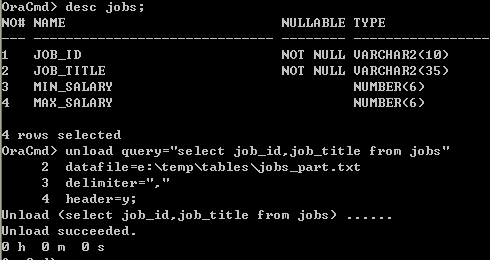 datafile: jobs_part.txt
sqlfile content: unload_jobs.sql
select job_id,job_title from jobs
OraCmd> unload sqlfile=e:\temp\tables\unload_jobs.sql
2 datafile=e:\temp\tables\jobs_part2.txt
3 delimiter="," quote="chr(34)"
4 header=y;
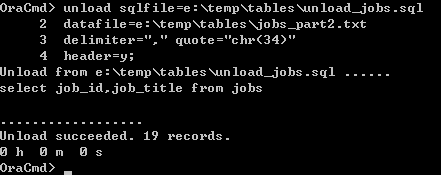 datafile content: jobs_part2.txt
"JOB_ID","JOB_TITLE"
"AD_PRES","President"
"AD_VP","Administration Vice President"
"AD_ASST","Administration Assistant"
"FI_MGR","Finance Manager"
"FI_ACCOUNT","Accountant"
"AC_MGR","Accounting Manager"
"AC_ACCOUNT","Public Accountant"
"SA_MAN","Sales Manager"
"SA_REP","Sales Representative"
"PU_MAN","Purchasing Manager"
"PU_CLERK","Purchasing Clerk"
"ST_MAN","Stock Manager"
"ST_CLERK","Stock Clerk"
"SH_CLERK","Shipping Clerk"
"IT_PROG","Programmer"
"MK_MAN","Marketing Manager"
"MK_REP","Marketing Representative"
"HR_REP","Human Resources Representative"
"PR_REP","Public Relations Representative"
datafile content: jobs_part2.txt
"JOB_ID","JOB_TITLE"
"AD_PRES","President"
"AD_VP","Administration Vice President"
"AD_ASST","Administration Assistant"
"FI_MGR","Finance Manager"
"FI_ACCOUNT","Accountant"
"AC_MGR","Accounting Manager"
"AC_ACCOUNT","Public Accountant"
"SA_MAN","Sales Manager"
"SA_REP","Sales Representative"
"PU_MAN","Purchasing Manager"
"PU_CLERK","Purchasing Clerk"
"ST_MAN","Stock Manager"
"ST_CLERK","Stock Clerk"
"SH_CLERK","Shipping Clerk"
"IT_PROG","Programmer"
"MK_MAN","Marketing Manager"
"MK_REP","Marketing Representative"
"HR_REP","Human Resources Representative"
"PR_REP","Public Relations Representative"
OraCmd> unload table=all folder=e:\temp\tables delimiter="," header=y;
