SqlToTxt - SQL Server export Csv (Txt) »
Download SqlToTxt Free Trial »
Logon to Sql Server
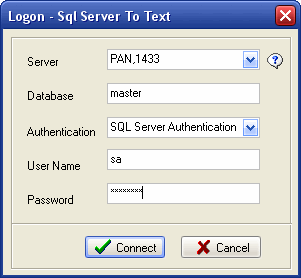
"Server" is your database server hostname or ip address, if you want to connect to remote server, use "host,port", or "ip,port", like "192.168.0.2,1433".
"Database" is your Sql Server database name, default is "master".
"Authentication" have two mode: "Windows Authentication" and "SQL Server Authentication".
User Name and Password are your Oracle system username and password.
1. Connect to local server
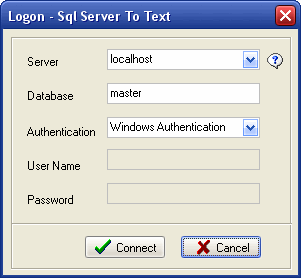
Set "Server" to "localhost" or your hostname.
If your Sql Server support Set "Windows Authentication", you can set "Authentication" to "Windows Authentication", you need not input user name and password.
Set "Authentication" to "SQL Server Authentication", you need input user name and password.
2. Connect to remote server
"Server" should be "host,port" like "PAN,1433" , or "ip,port" like "192.168.0.2,1433".