Want to batch convert Apple HEIC images to JPG? Or PNG, GIF, and other formats?
Using Withdata Batch Image Converter, a desktop Apple HEIC to JPEG converter, you can batch convert Apple HEIC (High Efficiency Image Container) photos to jpg, gif, png, and other formats. Batch convert in one go, just in a few mouse clicks.
- Convert locally and privately, avoid uploading photos to online services.
- Repeat converting easily, support schedule and automate converting task.
- Support Windows, Linux, macOS.
Download Withdata BatchImageConverter 
Batch convert Apple HEIC images to JPG
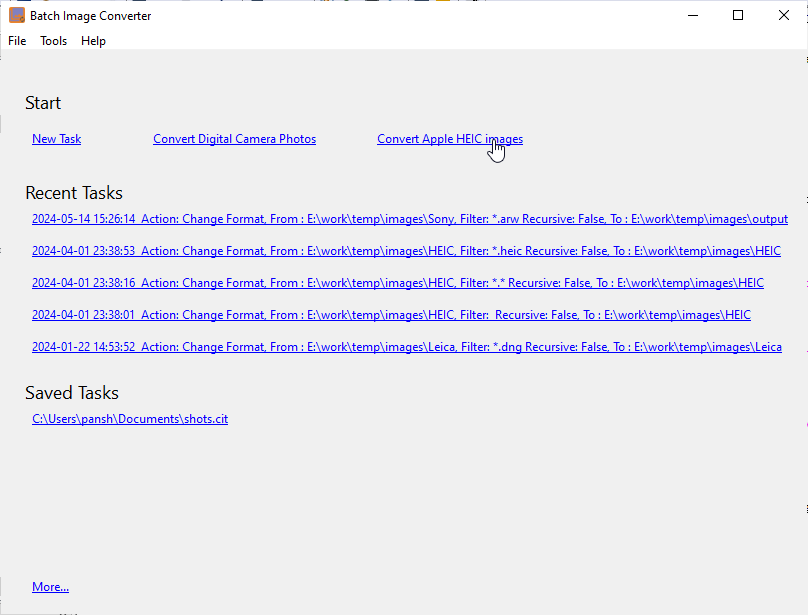
Run BatchImageConverter, start a new “Apple HEIC images” task.
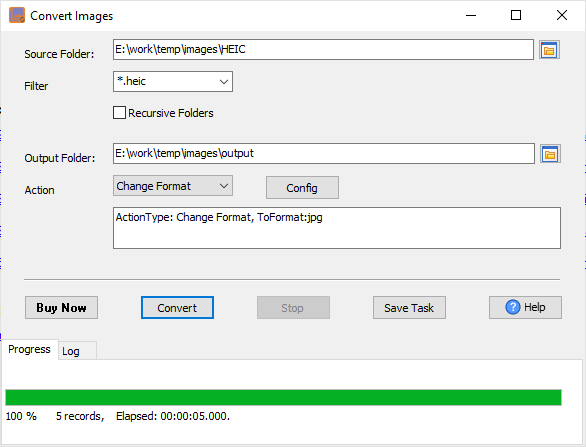
Then show the converting form, the “Filter” will be set to “*.HEIC”, and the “Action” will be set to “Change Foramt”, and the “To Format” will be set to “jpg”, you can change it by click “Config” button.
Enter “Source Folder” and “Output Folder”, then click “Convert” button.
HEIC stands for High Efficiency Image Container, and it’s a container format that Apple uses on its modern iPhone and iPad models. It’s part of the HEIF standard, and this format allows you to capture high-quality photos and videos on your devices while saving on storage space.
FAQ
More about Withdata BatchImageConverter – Apple HEIC converter
Download Withdata BatchImageConverter
Batch Image Converter without the manual work
For batch jobs, large files and scheduling use the Batch Image Converter converter — an offline desktop app for Windows, Linux and macOS. Free trial.


