September 11, 2026 — Withdata Software announces BigTextFileSplitter 4.3, a cross-platform desktop tool for splitting oversized text files. This release adds a new “split into a number of files” mode, delivers faster splitting performance, and fixes a crash when splitting UTF-16 files.
What’s New in BigTextFileSplitter 4.3
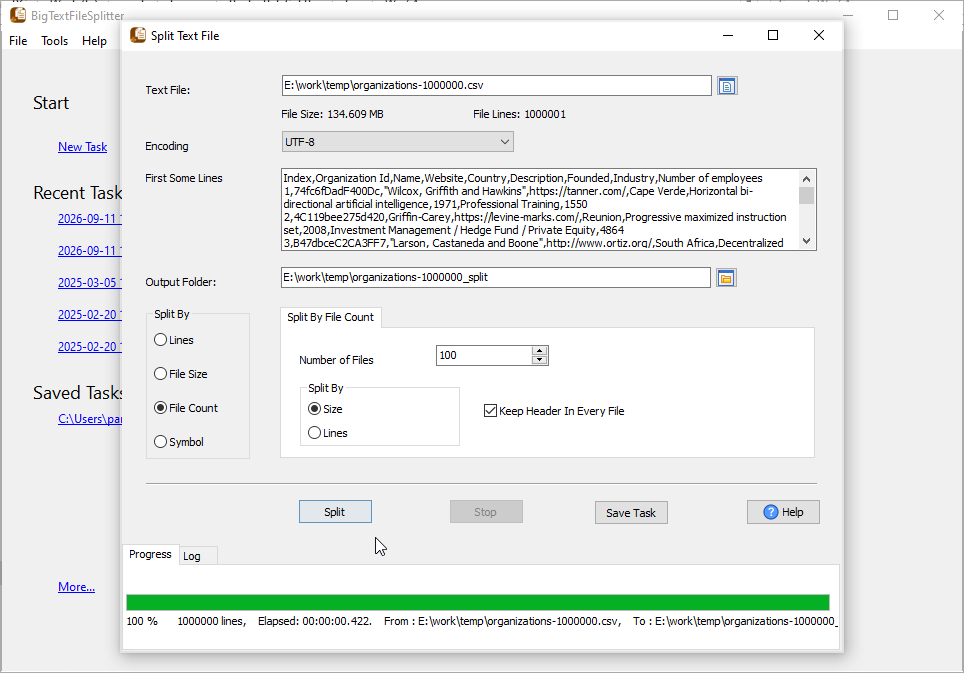
1. Split into N Files (by File Size or by Line Count)
Until now, you told BigTextFileSplitter how big each output file should be — for example “10 MB per file” — and the tool decided how many files to create. Version 4.3 flips that around: just tell it how many files you want (N files), and it works out the rest.
You can split into N files in two ways:
- By file size — the output is split into N files of roughly equal size.
- By line count — each output file gets a balanced number of lines, so no file ends up much larger than the others.
For example, split a 50 GB log into 10 files of about 5 GB each, or split a huge CSV into 20 files with an equal number of rows. This is handy when a platform limits upload size, when you want to process the same data in parallel, or when you need to hand a large file out to several people.
2. Faster Splitting Performance
The splitting engine has been optimized further, so large text files are processed faster while memory usage stays low. The improvement is most noticeable on multi-gigabyte TXT, CSV, LOG and JSON files, and it applies to every split mode — not only the new “into N files” mode.
3. Fixed a Crash When Splitting UTF-16 Files
Version 4.3 fixes a crash that could occur when splitting UTF-16 encoded files. UTF-16 text is common in Windows environments and in files exported by some tools, and it is now handled correctly, so the split output keeps the original encoding intact.
About BigTextFileSplitter
BigTextFileSplitter splits huge text files into smaller, easy-to-handle files — fast, locally, and without coding.
- Split by line count, by file size (KB/MB/GB), by keywords/strings, by symbol, or into a fixed number of files (N files)
- Works with TXT, CSV, TSV, LOG, JSON, JSONL, XML and other text-based files
- Handles GB-level files with low memory usage and no practical file size limit
- Preserves the original encoding and format (including UTF-8 and UTF-16)
- Batch splitting, saved sessions, and command-line support for automation
- Cross-platform: Windows, Linux, macOS
- Fully local offline processing; no data uploaded to cloud servers
Upgrade Today
BigTextFileSplitter 4.3 is ready for download: https://www.withdata.com/big-text-file-splitter/download.html. Existing users may update directly. New users can download a free trial to try the new “split into N files” mode and the faster splitting performance.
Withdata Software continues optimizing BigTextFileSplitter for real-world large text file processing scenarios based on user feedback.
Convert your data online, free
Free in-browser converters for CSV, Excel, JSON, XML and SQL: Withdata Online Data Conversion. Large files, batch conversion or scheduling? See the offline desktop apps, or browse all data conversion tools.


