A FoxPro application rarely dies quietly. It runs for fifteen years, becomes the only system that knows how a business actually works, and then someone needs its data in SQL Server — for reporting, for a new web app, or because the machine that can still open the forms is about to fail.
The data itself is not the hard part. A DBF file is a simple, well-documented format. What makes FoxPro migrations fail is everything around it: the four different files that make up a single table, the types that have no direct equivalent, and the ids that quietly change on the way across. This guide covers those, in the order you will hit them.
1. Why FoxPro migrations stall
Three things go wrong, and none of them is “the file is corrupted”:
- The table is not one file. A Visual FoxPro table is
customers.dbfpluscustomers.fpt
(memo and general fields), and often customers.cdx (the index). Copy the .dbf alone and it looks fine — until someone opens a notes field and finds it empty.
- The values do not survive a naive conversion.
Currency,DateTime,Integerand
Double are stored as binary numbers, not text. Any route that converts through CSV or a text dump has to get the precision, the date format and the codepage right on both ends.
- Ids and deleted rows change silently. VFP auto-increment values are not SQL Server
IDENTITY values, and a VFP table with 105 records may only expose 100 of them because five are flagged deleted. Both regressions show up after the migration is declared finished.
2. DBC, DBF, CDX, FPT — what each file actually does
| File | Holds | What happens if you ignore it |
|---|---|---|
.dbf |
The table: header, field definitions, fixed-length records | The only file people think about; contains everything except memos |
.fpt |
Memo (M), General (G) and Blob (W) field contents, stored out of line |
Notes, comments, images and documents disappear — the record still looks valid |
.cdx |
Compound index: tags, keys, and the index expressions | Queries get slow; worse, an application that relies on SET ORDER sees a different row order |
.dbc |
Database container: long field names, validation rules, defaults, triggers, and stored procedures | The long names and rules are lost; you migrate short 10-character names into SQL Server |
The .dbc is the one that surprises people in a good way: it is an ordinary table that lists the other tables and records the long names. Reading it is the only way to recover a schema that was designed with names like customer_credit_limit instead of CRLIMIT.
3. Two ways in: the GUI copier, and scripting the same load
Route A — the GUI copier (what most people actually do)
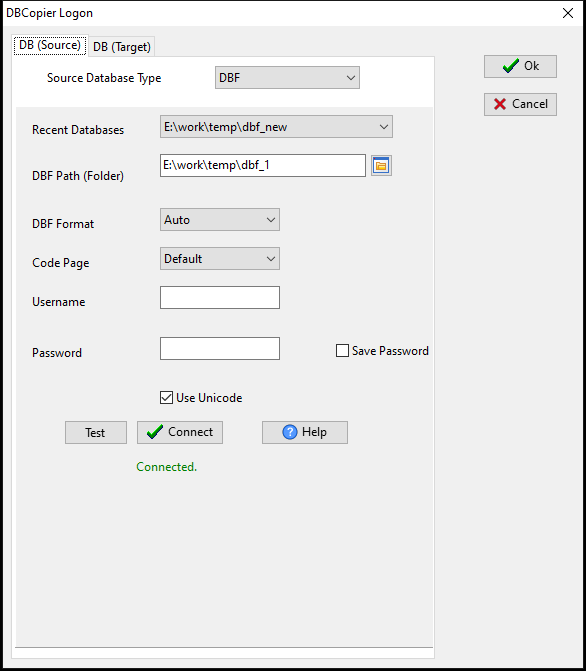
Start DBCopier. The first window is DBCopier Logon, with two tabs, DB (Source) and DB (Target).
- On
DB (Source)setSource Database TypetoDBF. The form changes to the DBF fields:
DBF Path (Folder)— a folder, not a file. Point it at the directory that holds the
.dbf/.fpt/.cdx files; every table in it is offered on the next step.
DBF Format=Auto— let it read the version byte instead of telling it the dialect. This
matters: dBase III and VFP write different header sizes, and a tool that assumes one of them fails on the other with Unknown type n or Type "0" of the field "".
Code Page=Default— this is the field that decides whether your text arrives readable.
A Chinese, Cyrillic or Greek .dbf written under a DOS code page needs the matching code page here; leave it on Default and you get the right shape with the wrong characters.
Press Test; for a folder of .dbf files it answers with a single Direct access confirmation, and the status line under the buttons goes from Not Connected. to Connected.
- Switch to
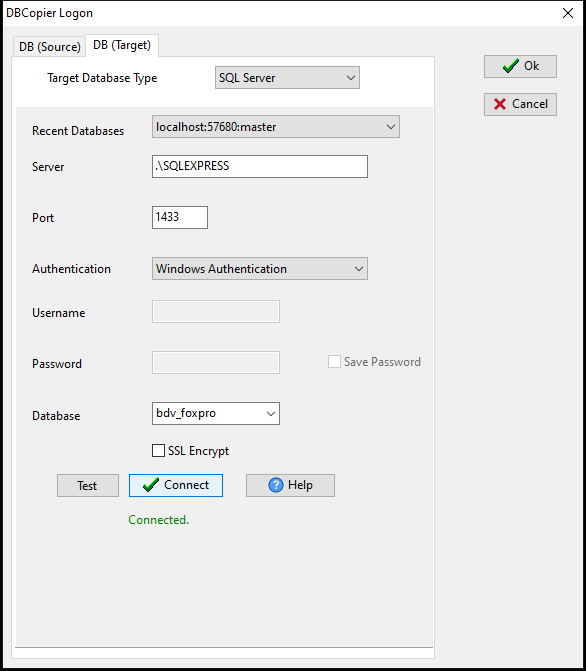
DB (Target)and setTarget Database TypetoSQL Server:Server
(.\SQLEXPRESS for a named instance), Port, Database. With Authentication left on Windows Authentication the Username/Password fields stay empty. Test answers with the server version, Connect turns the status line into Connected., and only then does Ok close the dialog — press it earlier and it says Please connect to target database.
- The main window now names both sides — `DBCopier — Source DBF:
Target SQL Server:
— and lists the tables it found in the folder. Start the copy from Wizard > Table To Table Copy; the Start a task – DBCopier dialog offers the same thing as Convert From Table`.
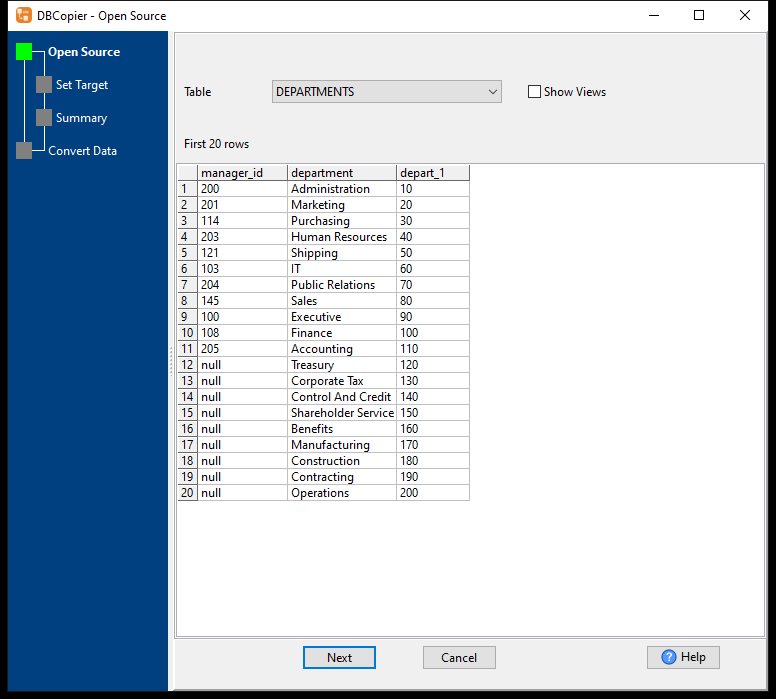
Open Source— theTabledropdown lists every.dbfin the folder. Picking one fills the grid
with the first 20 rows, which is where the D-type dates, the numeric types from §4 and the memo columns can be inspected before anything moves.
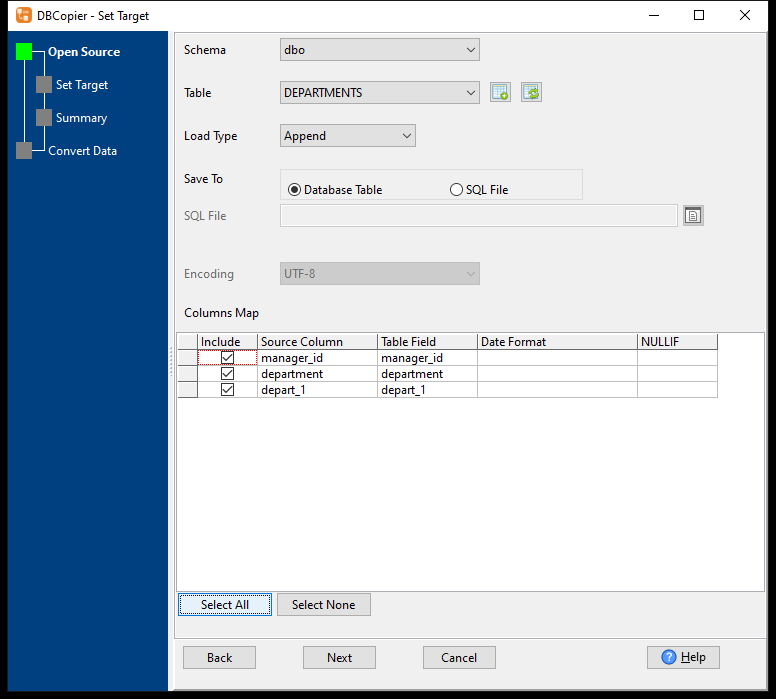
Set Target—SchemaandTableon the SQL Server side,Load Type,Save To(Database Table
or SQL File), Encoding, and the Columns Map: one row per field with Include, Source Column, Table Field, Date Format (for the date fields) and NULLIF. Fields with the same name are matched for you; Select All ticks the ones you keep. If the target table does not exist yet, the button next to Table opens Create Table (Field Type = Auto Detect), generates the DDL and runs it with Execute.
Summary—From :andTo :on one line each, the first ten rows as they will arrive,
Convert Rows, Skip Rows, Errors to allow and the Log File path.
Convert Data— it asksStart Converting?, then reports
27 records, Elapsed: 00:00:00.109. From Table: DEPARTMENTS, To Table: [dbo].[DEPARTMENTS]. and closes the log with Total Convert Records: 27 / End Convert.
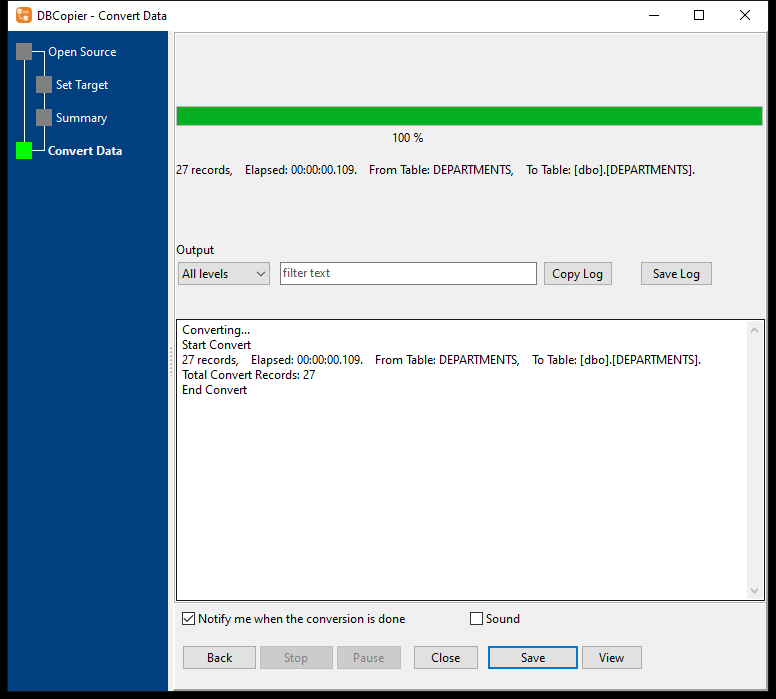
The reason this route wins for FoxPro data is not speed, it is that the memo file is read for you: the .fpt blocks are followed by offset and length, so the 4 KB / 64 KB / 1 MB values in §6 arrive whole, and the target column is created wide enough (varchar(max) for a W/M field) instead of being truncated at 8,000 bytes.
Route B — scripting the same load
When the copy has to run inside your own pipeline, export from FoxPro to a delimited file and load it with bcp or BULK INSERT: set MAXERRORS or the whole batch dies on the first bad row, pin the date format and the codepage on both ends, and load the memo fields in a separate pass joined on the primary key — a delimited export cannot carry them.
For a cutover without downtime, do not read the live table while users are writing to it: copy the files and sync from the copy. Two patterns hold up — a high-watermark on an auto-increment id or a last-modified column (only if the FoxPro application actually maintains one), or a nightly full copy followed by a row count and a per-table hash, alerting on drift.
Both are scripts you will own and re-test at every schema change; the GUI route above is the same load with the memo offsets and the type mapping already written.
4. Type mapping: the four fields that need a decision
| VFP type | Stored as | SQL Server | Watch for |
|---|---|---|---|
Currency (Y) |
8-byte scaled integer, 4 decimal places | money or decimal(19,4) |
money rounds to 4 decimals; decimal does not. Pick one and keep it |
DateTime (T) |
8 bytes: Julian day + milliseconds | datetime2(3) |
datetime truncates to 3.33 ms; datetime2 does not |
Memo (M) |
Block in the .fpt |
nvarchar(max) |
The content is in another file; the column alone is not enough |
General (G) |
OLE object block in the .fpt |
varbinary(max) |
It carries 4–8 bytes of OLE header in front of the actual document |
The rest map cleanly: Integer (I) → int, Double (B) → float, Logical (L) → bit, Date (D) → date, Varchar (V) → varchar, Blob (W) → varbinary(max).
Verify the mapping on one table before doing twenty: check information_schema.columns in the target, not the tool’s summary screen.
5. Ids, deleted rows and NULL flags
- Auto-increment is a per-table counter, not a sequence. SQL Server will hand out its own
IDENTITY values, so ids can be renumbered — and any external reference (an invoice number stored in a document archive, a URL, a barcode) breaks. Either keep the original value in an explicit column and enable SET IDENTITY_INSERT, or treat the new ids as internal and keep the old ones as a business key.
- Deleted rows are still in the file. VFP marks them with a
*in the first byte of the
record; most readers skip them. Decide explicitly whether they should be migrated (usually not), and check the counts against what the application shows, not against the file size.
- Nullable fields add a hidden
_NullFlagscolumn to the.dbf. Any tool that reads the raw
header has to understand it, or it will trip over a field type it has never seen.
6. Memo (.fpt) and indexes (.cdx): what survives
We tested the memo side rather than guessing, because it is where most migrations quietly lose data. Three values — 4 KB, 64 KB and 1 MB — were written into an .fpt and migrated to SQL Server:
| Memo size | Landed in SQL Server | Result |
|---|---|---|
| 4 KB | 4,085 characters | intact |
| 64 KB | 65,526 characters | intact |
| 1 MB | 1,048,568 characters | intact |
The target column was created as varchar(max), so nothing was truncated at the 8,000-byte varchar boundary. If your target column is varchar(n) or nvarchar(n), that limit will truncate long memos — check the schema before you load.
Indexes are a different story. .cdx files store keys and expressions, not just field names; a tool can rebuild the indexes it recognizes, but it cannot reproduce VFP SET ORDER behaviour or index expressions exactly. We did not test index migration in this round, so the honest statement is: assume the index does not travel, and re-create the ones the new application needs.
7. Target-by-target notes
The same source table goes to different databases with different consequences:
| Target | Notes |
|---|---|
| SQL Server | datetime2 and varchar(max) are the safe landing types; watch the money rounding |
| PostgreSQL | numeric and timestamptz; the codepage question becomes an ENCODING question at CREATE DATABASE |
| MySQL / MariaDB | DATETIME(3) and LONGTEXT; utf8mb4 from the start, not after the fact |
| Oracle | NUMBER(19,4) for currency; CLOB for memo, which is a locator, not a string — reads need care |
| DB2 | DECIMAL(19,4) and CLOB; LOB limits are per-table, check before the load |
| Access | Memo has a 65,535-character limit; the 1 MB case will not fit |
| Teradata | Fast for bulk loads, but the SET tables have no primary key — decide how you will deduplicate |
Direct pair pages: FoxPro to PostgreSQL · FoxPro to MySQL · FoxPro to Oracle · FoxPro to DB2 · FoxPro to Access · FoxPro to SQLite.
8. How long it takes, measured
One hundred thousand rows with a realistic mix — integer id, character name, currency amount, date, and a memo on every thousandth row (2 KB each) — from a Visual FoxPro .dbf/.fpt pair into a local SQL Server instance:
| Rows | 100,000 |
| Source | DBF + FPT, 12.4 MB of memo data |
| Time | 23.2 seconds (wall clock, includes creating the target table) |
| Rows after | 100,000, memo contents verified |
That is a laptop-class machine with SQL Server on the same box, so a networked target will add transfer time. The 27-row table in Route A finished in 0.109 s — that is the other end of the scale, where the number is connection setup and table creation, not rows.
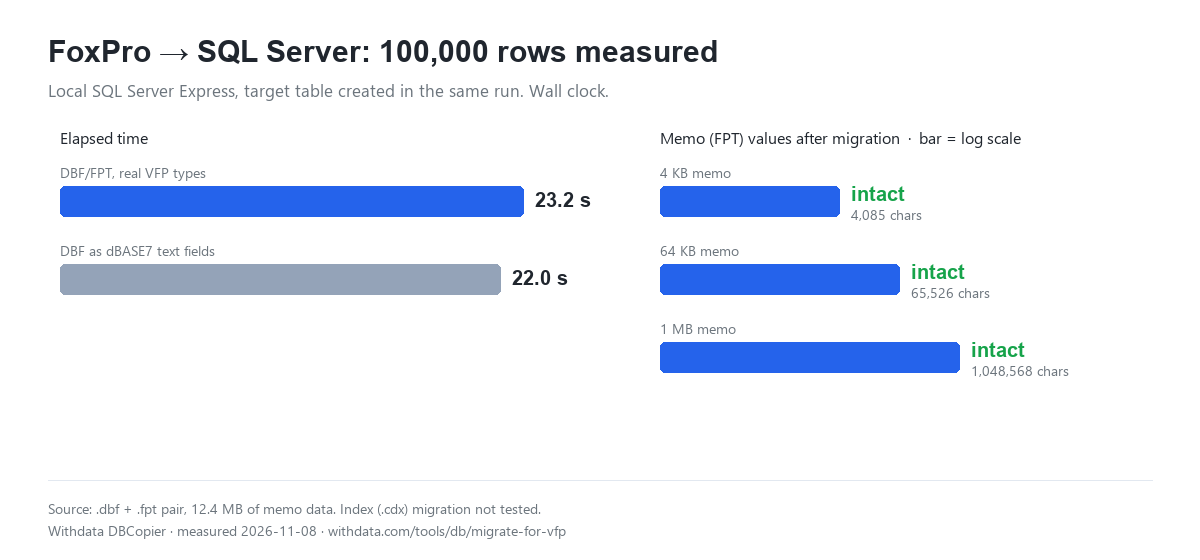
Measure your own tables with the same method: pick one representative table, run it twice (the first run creates the schema), and use the second number. Small tables are dominated by connection setup, not by rows.
9. Verifying the migration (do this before you switch off the old system)
- Row counts per table, with deleted rows accounted for — the numbers should match what the
application shows, not the raw record count.
- A checksum per table over the columns that matter (
CHECKSUM_AGGin SQL Server, or a
hash of the concatenated columns) computed on both sides with the same rules.
- A sample of 20 rows read back through the application, including at least one memo, one
currency and one nullable field.
- Spot-check the extreme memos: the largest
.fptvalue in the table is the one that gets
truncated first.
FAQ
Is a DBF file the whole table?
No. The .dbf holds fixed-length records; memo and general fields live in the matching .fpt file, and indexes live in .cdx. Copying only the .dbf loses the note fields silently.
Can I migrate FoxPro data without FoxPro installed?
Usually yes — DBF is a documented format and readers exist for it. You need the whole file set (.dbf + .fpt, and .dbc if the database used a container), and the codepage the table was written in.
Why are some rows missing after migration?
Most often they were flagged deleted (* in the first byte) and the reader skipped them. Compare counts against what the VFP application displays, not against the file length.
Will the ids stay the same?
Only if you preserve them deliberately. SQL Server IDENTITY generates its own sequence, so keep the original values in a column (and use SET IDENTITY_INSERT if the ids must be the primary key).
How do I handle memo fields that are larger than varchar(max)?
varchar(max) holds 2 GB, so in practice memo fields fit. The failure mode is a target column defined as varchar(n) or an Access Memo (65,535 characters) — check the destination type first.
Do FoxPro indexes migrate?
Not reliably. .cdx keys and expressions are close to VFP-specific; plan to recreate the indexes the new application needs rather than expecting the old ones to arrive intact.
What about .dbc long field names?
The .dbc is itself a table that records long names, rules and triggers. If the migration ignores it, short 10-character names arrive instead — usable, but every query and report has to be rewritten.
Can this be scheduled?
Yes, both GUI ETL tools and command-line routes can run on a schedule. Do the first load manually and verify it; automate only the repeatable incremental pass.
Which route to pick
- Get the data across this week and keep the app running — Route A above. No format files, and the
preview in Open Source lets you check a table before moving twenty of them.
- You need the load inside your own pipeline — Route B, with the
bcpnotes above as the checklist
(the date and bit conversions are where it bites).
- You cannot stop the old application while the data moves — the second half of Route B: load the bulk
once, then sync from a copy until the cutover weekend.
A GUI ETL tool and a command-line route can both run on a schedule; do the first load by hand, check it, then automate the repeats.
Trying it on your own tables
Move a Visual FoxPro table into SQL Server without exporting to CSV or writing a loader first. Try DBCopier — Windows / macOS / Linux, 20+ databases, one-time price.
Facts checked 2026-11-08; the Route A walkthrough was re-run and re-photographed 2026-11-10 against SQL Server Express 16.0 on a named instance (Windows Authentication). Timings are wall clock on a single machine; memo sizes and row counts are from the test data described in §8. Index migration was not tested and is not claimed.