Moving a MySQL database to PostgreSQL is not one task. It is three, and choosing the wrong route is why the migration “works” for two hours and then fails on the 600,000th row.
These four routes are what people actually use. I tested them on a MySQL 8.0.35 → PostgreSQL 15.1 pair with a 100,000-row table (8 columns: int auto_increment primary key, varchar, decimal, int, tinyint(1), enum, datetime, text), then checked what survived.
1. First, decide which of the three problems you have
| What you have | What usually hurts | Route |
|---|---|---|
| A small database (< 100 MB), clean schema | Type mapping only | pgloader or a dump rewrite |
| A large database, or a migration with a downtime window | mysqldump size, restore time, sequences |
dump + rewrite, or a direct copy |
| A schema that does not line up (different column names, only part of the tables, a filtered subset) | Rewriting INSERTs by hand | direct copy with a field map |
The third case is the one that eats weeks, and it is the one the command line tools handle worst.
2. Route one: pgloader
pgloader is the default answer in every forum thread, and it is a good tool.
“ pgloader mysql://user:pass@127.0.0.1:3306/shop postgresql://user:pass@127.0.0.1:5432/shop “
It reads the MySQL catalog, writes the DDL, and streams the rows. When the schema is clean and the types are ordinary, it just works.
Where it breaks: the cast rules. tinyint(1), enum, set, unsigned ints, zero dates, and json are all types MySQL allows and PostgreSQL does not have. pgloader ships with a default cast list that covers most of them, so a run can finish while a handful of columns land wrong, or it can stop on a type nobody wrote a rule for. A community answer describes the usual outcome exactly: “pretty good success with pgloader” — after fixing the parts it got wrong.
3. Route two: dump, then rewrite
“ mysqldump --compatible=postgresql --no-create-info --complete-insert shop > shop_data.sql mysqldump --no-data shop > shop_schema.sql # the DDL still has to be edited by hand “
--compatible=postgresql helps with the data, not the schema. Backticks, ENGINE=InnoDB, AUTO_INCREMENT, UNSIGNED, ENUM(...), ON UPDATE CURRENT_TIMESTAMP, and the key definitions all need editing. It is fine for one table and painful for forty.
The failure mode is not an error message, it is a 300 MB .sql file that half-loaded and a COPY that stopped at line 2 million with a column count mismatch.
4. Route three: CSV in the middle
“ mysql -e "SELECT * FROM orders" shop > orders.tsv psql -c "\copy orders FROM 'orders.tsv'" “
This is the route people fall back to, and it is honest work: it is verifiable, it needs no tool, and it works when both databases can be reached from the same machine. A PostgreSQL regular summed it up in a 2026 thread: export the data into CSV table by table, then import table by table “if it’s tiny”. Add millions of rows and you are back to writing an ETL. The real cost is not the copy, it is the bookkeeping: column order, quoting, NULL versus \N, timestamptz versus timestamp, and foreign keys that have to load in the right order.
5. Route four: connect both databases and copy table by table
The fourth route removes the file in the middle. You connect the MySQL source and the PostgreSQL target, pick the tables, map the fields, and let the tool write the rows in batches. It is what DBeaver’s and dbForge’s migration wizards do, and the dbForge answer in that same thread is worth quoting because it names the real requirement: import “through ODBC”, with “control over mapping, which is useful when the schemas don’t line up perfectly.”
DBCopier is our tool of that shape, so this is the route I can show end to end.
The GUI path. Start it and the first window is DBCopier Logon, with two tabs, DB (Source) and DB (Target).
- On DB (Source): choose the source type (
MySQL / MariaDB), fill host / port / database / user /
password, press Test (the status line under the buttons replaces Not Connected. with the server version), then Connect.
- Switch to DB (Target): the same for PostgreSQL, Test, Connect, and close the dialog
with Ok.
Start a task - DBCopierappears: press Convert From Table (the other three are query, all
tables, and tables with a similar name).
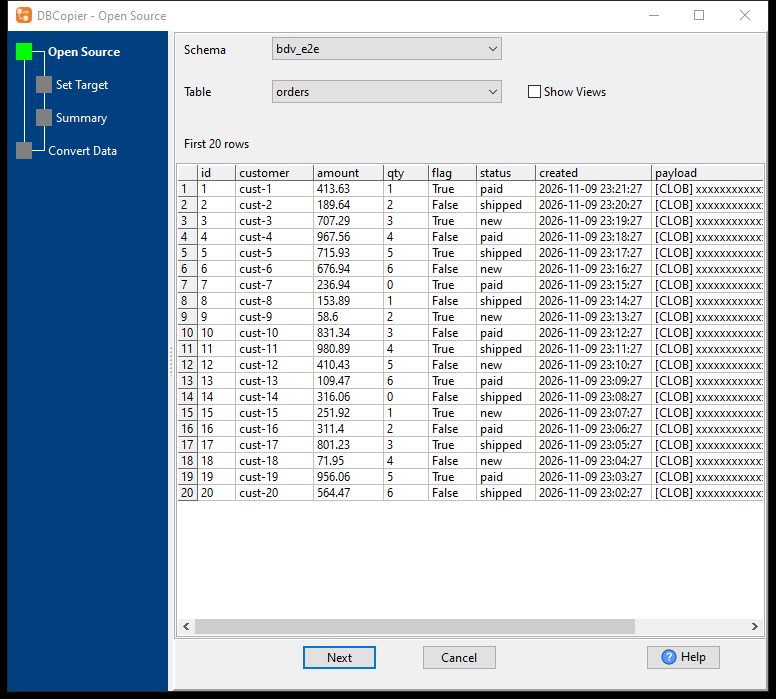
- Open Source: pick the schema and the table. The grid below previews the first 20 rows, so you
can see what you are about to move before moving it.
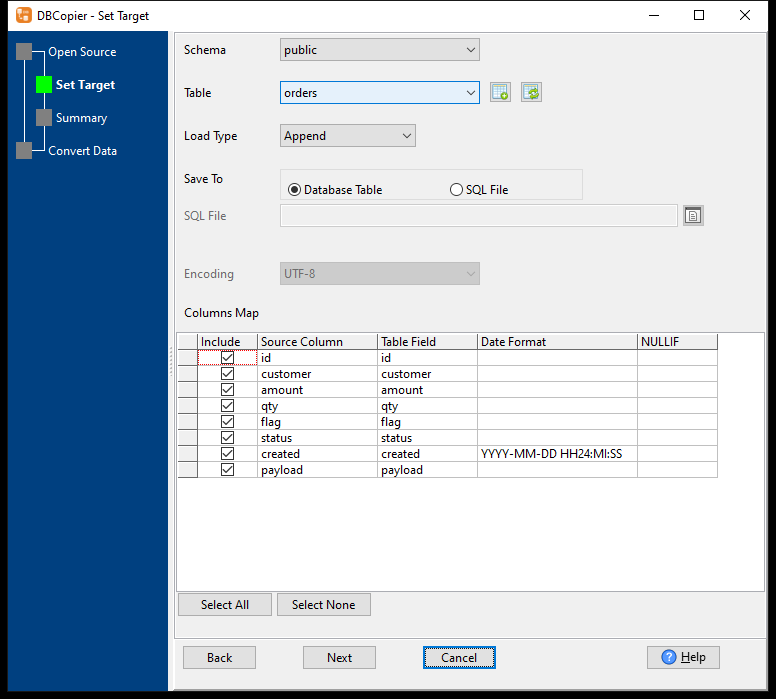
- Set Target: the schema and the table name on the PostgreSQL side, the Load Type
(Append here), and the Columns Map – one row per field, with Include, the source column, the target field, an optional Date Format (YYYY-MM-DD HH24:MI:SS for created) and NULLIF. Fields with the same name are matched for you.
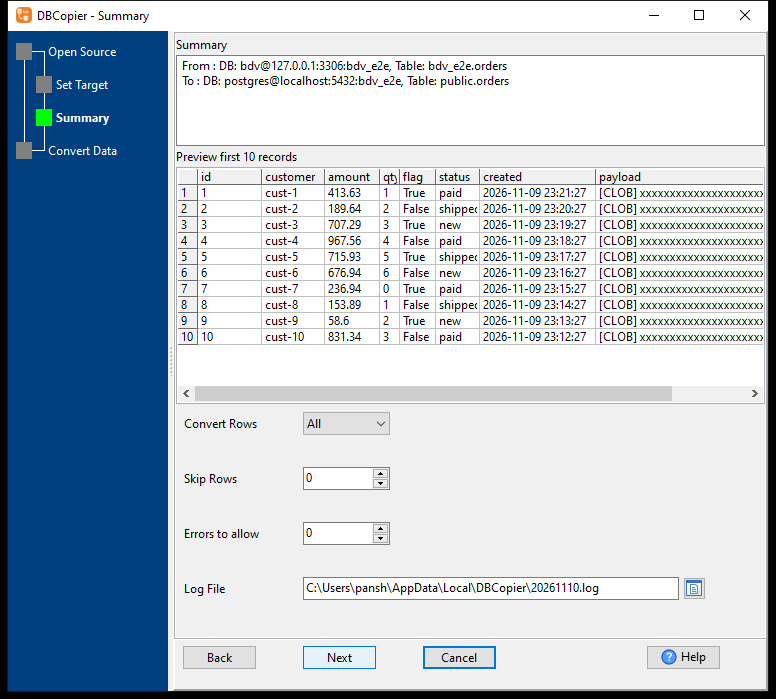
- Summary: the two connection strings, the first 10 rows as they will arrive, and the knobs that
matter when something goes wrong – Convert Rows, Skip Rows, Errors to allow, and the log file path.
- Convert Data asks
Start Converting?, then shows progress and ends with the three numbers
worth screenshotting:
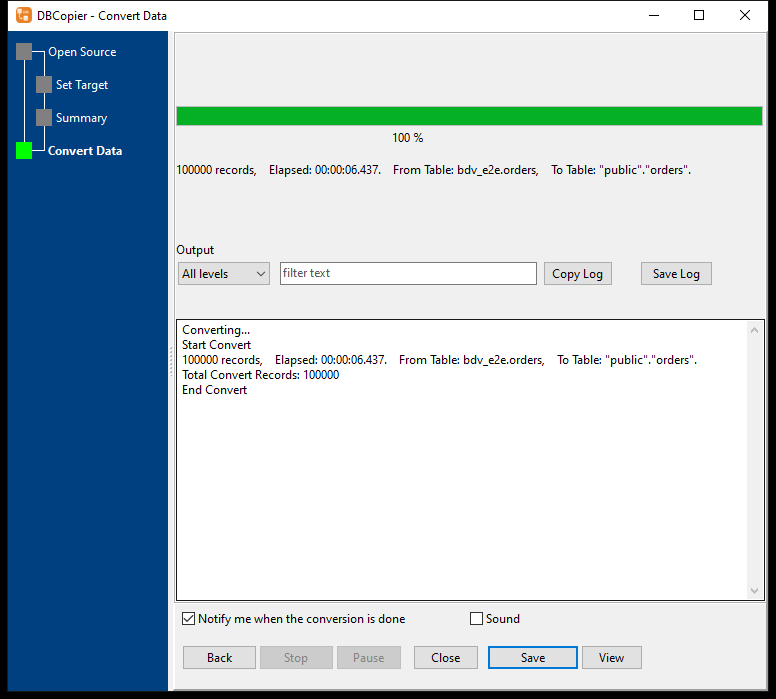
“ 100000 records, Elapsed: 00:00:06.437. From Table: bdv_e2e.orders, To Table: "public"."orders". Total Convert Records: 100000 End Convert “
The same copy from the command line — for a nightly run instead of a hand click:
“bat DBCopier.exe copy --from="MySQL:user:pass@127.0.0.1:3306/shop" --from-table=orders ^ --to="PostgreSQL:user:pass@127.0.0.1:5432/shop" --to-table=orders ^ --loadtype=append --yes “
No --from-schema, no pre-created table: the target table is created from the source (columns, types, not null, defaults, the primary key), the rows are written in batches, and the source’s secondary indexes are built after the rows are in.
On the command line the same copy reported a peak working set of 27 MB for those 100,000 rows: the rows are committed in batches of a few hundred to a thousand instead of being materialised, which is why the number stays flat as the table grows. (Elapsed time varies with the machine and the disks; the GUI run above is the one quoted.)
The same route works when the source is not MySQL at all — the DBF to PostgreSQL walkthrough (copy a DBF table to PostgreSQL) is the same three steps with a different connection string.
6. The three things that actually break
These are the failures that survive a “successful” migration. All three were reproduced here.
Sequences do not follow the data. AUTO_INCREMENT becomes serial/GENERATED, the rows come in with explicit ids, and the sequence stays at 1. The first application insert then fails:
“ ERROR: duplicate key value violates unique constraint "orders_pkey" DETAIL: Key (id)=(1) already exists. “
The fix is one statement, after the copy:
“sql select setval(pg_get_serial_sequence('orders','id'), (select max(id) from orders)); “
tinyint(1) is a boolean, not a number. MySQL has no boolean type; tinyint(1) is the convention. Copy it into a bigint column and every query that expects true/false breaks; copy it into a type that keeps MySQL’s display width (bigint(1)) and PostgreSQL refuses the whole create table with a syntax error at (.
Trailing spaces that were never there. MySQL’s enum has no PostgreSQL equivalent, so the driver hands it over as a fixed-width CHAR and the value arrives padded: 'paid ' instead of 'paid'. The column looks right and the data compares wrong. Either trim on export, or use a tool that trims it (DBCopier trims enum values when it reads MySQL).
Two more worth knowing: MySQL identifiers are case-insensitive and quoted with backticks, so "OrderItems" copied verbatim becomes a different table name; and 0000-00-00 dates are rejected by PostgreSQL outright.
7. How to check the copy, not just the row count
Row counts lie when a table has been appended to twice. Compare something that aggregates:
“sql -- source and target must print the same numbers select count(*), sum(qty), round(sum(amount),2), max(length(payload)) from orders; “
Then check the shape, because a type that silently widened still passes the sum:
“sql \d orders “
and check that the indexes came over:
“sql select indexname from pg_indexes where tablename = 'orders'; “
If the list holds only the primary key, the copy moved data and left the query plans behind: a where customer = ? on a 100,000-row table reads every row (measured: 99,999 rows removed by filter) instead of an index-only scan (0.2 ms). Build them after the load:
“sql create index idx_customer on orders(customer); “
8. FAQ
Can I migrate with a downtime window?
Yes, and it is the simple case: stop writes, copy, verify, switch. The four routes above all work.
Can I migrate without stopping writes?
Not by copying tables. PostgreSQL can read MySQL through mysql_fdw, and logical replication tools move changes, but the initial load still happens while the target is being built.
Does the tool convert stored procedures and triggers?
No. They are MySQL’s dialect; they have to be written again for PostgreSQL.
What about MySQL datetime and time zones?
datetime has no zone; PostgreSQL’s timestamp matches it, timestamptz does not. Choose the column type on purpose, not by default.
Is pgloader enough on its own?
For a clean schema, often yes. Check tinyint(1), enum, unsigned integers, and the indexes afterwards; they are the parts that finish quietly and wrong.
Can I copy only some rows?
With a direct copy, yes — a query source or a row limit. A dump rewrite means editing the dump.
9. What this is not
DBCopier copies data and structure between databases; it is not an ORM migration and does not rewrite application code. If the two schemas disagree on purpose (different column names, merged tables), map the fields explicitly — that is the case it exists for.
Older walkthroughs
If you are still on the older MySQLToPostgres product, its step-by-step pages are here: MySQL to PostgreSQL · switch an existing task · schedule a task. The four routes above are product independent; those pages are the per-product instructions.
10. Doing the same copy on your own database
Copy a MySQL database into PostgreSQL without a dump file in the middle. Try DBCopier — Windows / macOS / Linux, 20+ databases, one-time price.