A .dbf file looks like the simplest database in the world: fixed-width records, a header, no server. That is why it is so often the file that arrives by email with no explanation — payroll exports, a shipping list, a fifteen-year-old application’s table.
It is also why it fails in ways that look like corruption but are not. Almost every “this .dbf is broken” case is one of three things: the table is missing a file it depends on, the text was written in a codepage nobody recorded, or the rows are there but deleted.
1. A .dbf is not always one file
A Visual FoxPro table is customers.dbf plus customers.fpt, which holds the memo (variable length text) blocks. Older dBase versions use .dbt for the same job. Only the .dbf holds the records and the field definitions; only the memo file holds the long text.
Copy the .dbf alone, or receive just that one file, and there is nothing inside it that can reconstruct the memos. What happens next depends on the tool:
- some tools open the table and show the memo columns empty — quiet data loss, the worst outcome;
- others refuse the whole table.
Here is the second behaviour, verbatim, from a table whose .fpt was left behind (Windows path abbreviated):
[error] Unable to open file "…\dbf_nofpt\feed.FPT": The system cannot find the file specified.No rows, no warning about which column is affected — the table simply does not open. If you are about to send someone “the database”, send the .fpt (and the .cdx index if there is one) with it. If you already received one file, ask for the rest before assuming the data is gone.
2. The text is garbled because the codepage is not in the file
A .dbf stores text as bytes, one byte per character, and the file may declare which codepage those bytes belong to in a single header byte (the “language driver ID”). Old exports frequently carry 0x00 there — “no idea”.
When the byte is missing, the reader falls back to the machine’s own ANSI codepage, which is whatever that PC was installed with. The same file therefore reads correctly on one machine and produces question marks on another, and neither user did anything wrong.
The demonstration below is a two-file A/B: identical content, identical bytes, one field differs — the codepage marker. Below, the same file read by DBToFile with Code Page left on Default:
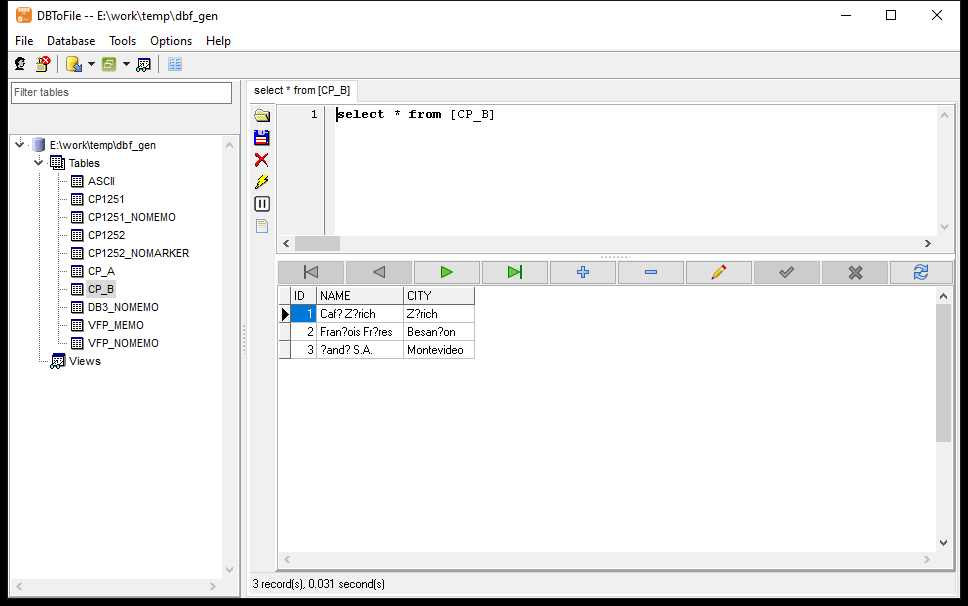
Café Zürich → Caf?? Z??rich, François Frères → Fran?ois Fr?res, Ñandú S.A. → ?and? S.A.. Every non-ASCII character is replaced, silently, and the rest of the row looks perfectly sane.
The same table, this time with the codepage declared in the file (or selected explicitly in the tool):
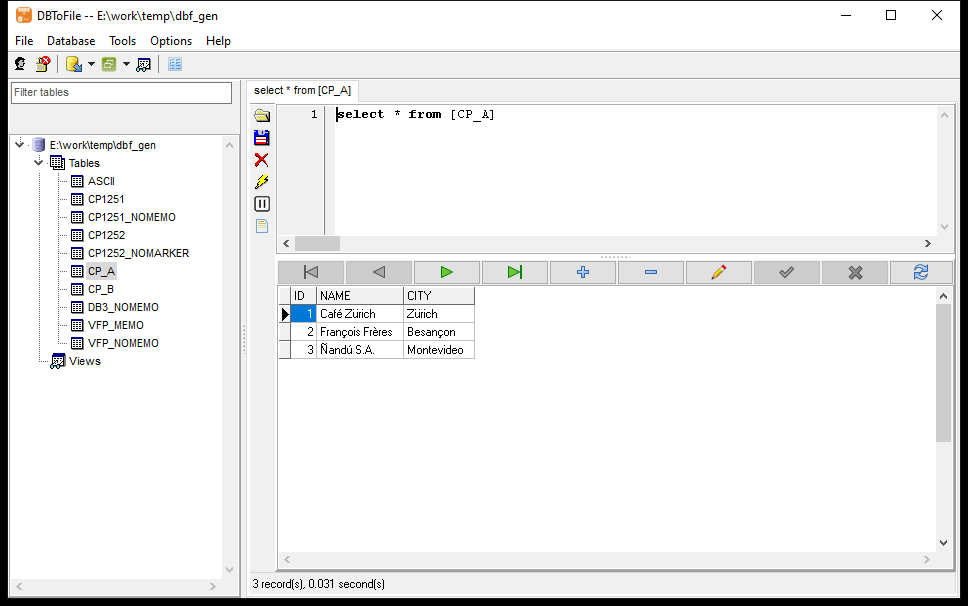
So the fix is not a repair tool, it is a setting. In DBToFile it lives on the logon dialog, next to the folder — and it is a named list, not a number: Default, UnitedStatesOEM, WesternEuropeanANSI, CentralEuropeanANSI, CyrillicANSI, GreekANSI, TurkishANSI, HebrewANSI, ArabicANSI, BalticANSI, Japanese, ChineseSimplified, ChineseTraditional, Korean, and the matching DOS pages (24 entries in all).
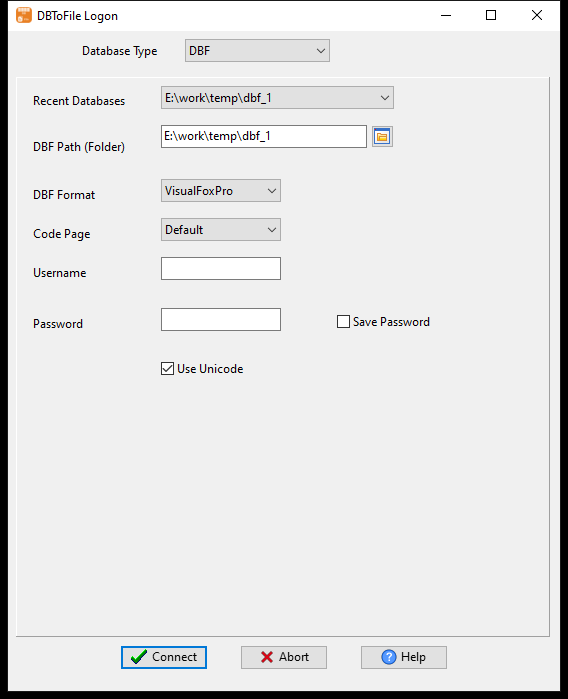
Try WesternEuropeanANSI for accented Latin text, CyrillicANSI for Cyrillic, and leave Default when the file does declare its own codepage. The setting applies to the whole folder, which is correct: one folder is normally written by one application in one codepage.
3. The rows are there, but some of them are deleted
Visual FoxPro deletes a record by flipping a byte, not by removing it. The row stays in the file, fully readable, and is skipped only if the reader honours the flag.
Measured on three real tables:
| File | Records in the header | Marked deleted | What a reader should show |
|---|---|---|---|
feed.dbf |
64 | 58 | 6 |
authors.dbf |
105 | 5 | 100 |
bom.dbf |
118,043 | 95,681 | 22,362 |
The middle column is not a defect — it is how the format works, and a tool that ignores the flag reports 64 rows where the application has always shown 6. Row counts are the first thing anyone checks, so get them from a reader that honours the flag (or compare with the count the application itself displays).
4. Reading it: three steps, no driver
Nothing above needs FoxPro, a dBase install, or an ODBC driver. The Access/DBF engines that other tools insist on are an OLE DB layer; a reader that understands the file format can parse the pages directly and never asks Windows for a provider. Access files are the same story with a different container — opening an .mdb or .accdb without the ACE provider.
- Start DBToFile. The first window is
DBToFile Logon. Database Type=DBF, then give the folder inDBF Path (Folder)— a folder, not a file.
DBF Format = Auto lets the reader decide the dialect from the version byte; set VisualFoxPro explicitly if Auto ever guesses wrong. Code Page as described in §2.
- Press
Connect. The left pane lists every table in the folder. Double-click one and the grid
fills; the status line reports the count and the time, e.g. 6 record(s), 0.031 second(s).
Memo columns show a placeholder in the grid ((WIDEMEMO)) because they can hold megabytes; a double-click opens the value on its own:
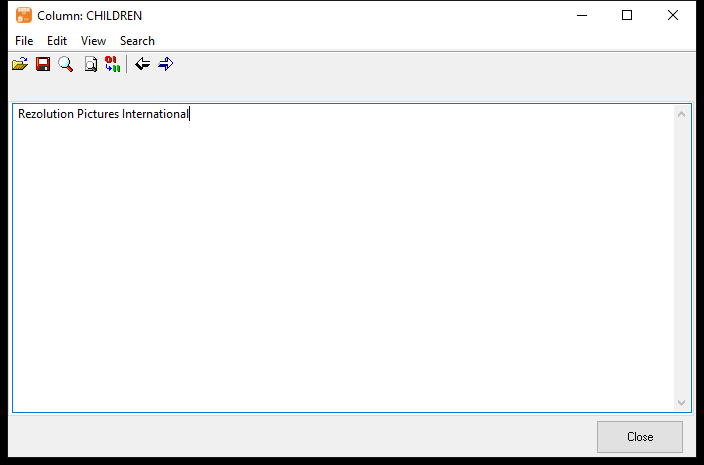
That is the whole check: the count matches what the application shows, the memo text is there, the accented characters are right. If all three pass, the file is fine and anything else is a conversion question.
If you need a file instead of a grid
Once the count and the text look right, the same window exports the table — CSV, Excel (.xlsx), SQL, TXT, TSV, XML, JSON, Html, Fixed or Yaml:
Start a task - DBToFile → Export From Table → pick the table → Set Target chooses the format and the output file → Convert Data writes it. A clean .dbf → .csv or .dbf → .xlsx job is two clicks past the point where the grid already showed you the data was fine.
From the command line
DBToFile.exe export --from="DBF:E:/data/dbf" --table=feed --to=csv --out=feed.csvAdd --set=SourceDB.CodePage=dpWesternEuropeanANSI when the file does not declare its codepage — the same setting as the dialog, spelled for the session file.
Need the .dbf in Excel? Convert DBF to Excel (.xlsx) keeps the DBF field types, decodes the code page and pulls the memo (DBT/FPT) fields in as text, instead of a half-empty sheet (free trial, Windows/macOS/Linux).
FAQ
Is one .dbf file the whole table?
Only if the table has no memo and no index. A Visual FoxPro table is .dbf + .fpt (memo) + .cdx (index); older dBase uses .dbt for the memo. Without the memo file the long text is not recoverable from the .dbf alone.
Why do I get question marks instead of accented letters?
The bytes are one-byte characters, and the reader has to be told which codepage they belong to. If the file does not declare it, the machine’s ANSI codepage is used, which is often not the one the file was written in. Set the codepage on the logon dialog and the same file reads correctly.
Do I need FoxPro, dBase or an ODBC driver installed?
No, for reading. A reader that parses the format itself does not go through OLE DB, so the “Provider cannot be found” class of error does not apply. If your own program opens the file through ODBC, then yes, and the driver’s bit-ness has to match your program.
Why does the row count differ from the file’s record count?
Deleted records stay in the file with a flag set. A 64-record file can legitimately show 6 rows. Count what the application shows, not what the header says.
Can it read a .dbf written by a Chinese/Greek/Cyrillic application?
Yes, when the codepage is selected or declared — that is exactly what the Code Page list is for. The risk is only that non-ASCII characters are replaced when the codepage is unknown.
Can I do this on a schedule?
Yes. Save the task once in the GUI, then run the same session from the command line or the scheduler.
Trying it on your own .dbf
Open a
.dbfthat has no FoxPro and no driver behind it, and see the memo and the text before you export anything. Try DBToFile — open the folder, check the memo and the non-ASCII text in the grid, then export to CSV, Excel or JSON. Windows / macOS / Linux, one-time price. To move the same table into SQL Server, MySQL or PostgreSQL instead of a file, that is DBCopier‘s job — the type, id and memo details of that move are in the Visual FoxPro migration walkthrough.