Want to batch export SQL Server [TEXT, NTEXT, VARCHAR(MAX), NVARCHAR(MAX)] (CLOB) to TXT (Text) files ?
Try Withdata DBBlobEditor, a SQL Server [TEXT, NTEXT, VARCHAR(MAX), NVARCHAR(MAX)] (CLOB) editor, Bulk export SQL Server [TEXT, NTEXT, VARCHAR(MAX), NVARCHAR(MAX)] (CLOB) to TXT files, East and Fast.
- Can run in GUI mode, just a few mouse clicks.
- Can run in Command line, for Scheduled Tasks and Streams.
- Support Windows, Linux, and macOS.
Download Withdata DBBlobEditor 
Batch extract TXT files from SQL Server [TEXT, NTEXT, VARCHAR(MAX), NVARCHAR(MAX)] (CLOB) column
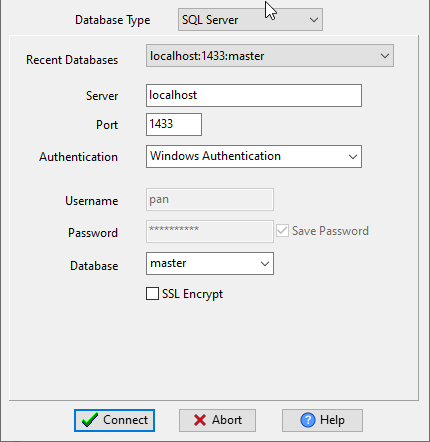
Run DBBlobEditor, login to SQL Server.
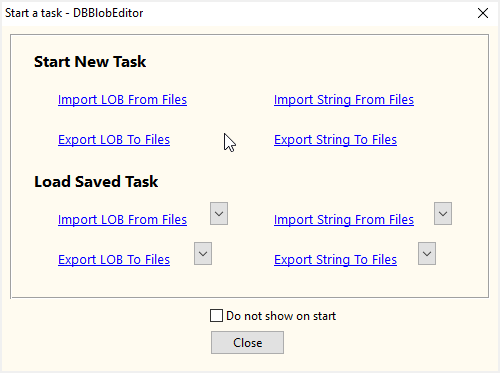
Click “Start New Task – Export LOB To Files” at task dialog.
then show the wizard.
1. Configure export settings.

2. Bulk export SQL Server [TEXT, NTEXT, VARCHAR(MAX), NVARCHAR(MAX)] (CLOB) to TXT (Text) files.

then you can see exporting results

More about SQL Server [TEXT, NTEXT, VARCHAR(MAX), NVARCHAR(MAX)] (CLOB) exporter
Download Withdata DBBlobEditor
SQL Server → TXT reference
Type mapping
| Value kind | in SQL Server | in TXT |
|---|---|---|
| Int | int | 1234, or right-aligned in a fixed-width column |
| Bigint | bigint | 9007199254740993 |
| Decimal | decimal(p,s) | 1234.56 |
| Float | float | 1.234e+10 |
| Text | nvarchar(n) | written as-is; padding depends on the chosen layout |
| Long text | nvarchar(max) | written as-is |
| Date | date | whatever the writer chose |
| Datetime | datetime2 | whatever the writer chose |
| Binary | varbinary(max) | not representable |
| Boolean | bit | Y / N, or 1 / 0, or TRUE / FALSE |
Dialect differences
SQL Server is a database server and TXT is a file format, so the gap is wider than a dialect difference – the rows below are where values and structure stop lining up.
| Property | in SQL Server | in TXT |
|---|---|---|
| port | 1433 | — |
| identifiers | [square brackets] | None by convention |
| row limit | SELECT TOP n | — |
| dates | datetime, datetime2, date, time | Whatever the writer produced; no convention is guaranteed |
| long text | nvarchar(max) | — |
| binary | varbinary(max) | Not supported |
| separator | — | Whatever was chosen - often fixed column widths |
| encoding | — | No declaration - UTF-8 works only with a BOM |
| typing | — | None - every field is text |
| shape | Tables of rows and columns | Free form; a parser has to be told the layout |
| ceiling | — | No formal limit |
Command line
| Side | Command |
|---|---|
| SQL Server | bcp |
| SQL Server (load) | bcp, or BULK INSERT |
Convert your data online, free
Free in-browser converters for CSV, Excel, JSON, XML and SQL: Withdata Online Data Conversion. Large files, batch conversion or scheduling? See the offline desktop apps, or browse all data conversion tools.