Working with MySQL BLOB data often feels like a daunting task for developers and DBAs alike. Whether you’re trying to view, edit, replace or manage binary large objects like images, PDFs and other binary files stored in MySQL BLOB fields, the lack of intuitive tools can turn simple operations into time-consuming work. But it doesn’t have to be this way. With the right tool—DBBlobEditor, you can streamline all your MySQL BLOB data editing workflows and resolve common BLOB handling pain points in just a few clicks.
Why MySQL BLOB Editing Is a Headache
MySQL BLOB fields are designed to store binary data, but their non-human-readable format creates unique challenges:
- Native MySQL clients offer no visual way to preview BLOB content, leaving you with only a
(BLOB)label in query results - Manually updating BLOB data requires complex SQL statements and binary data conversion
- Editing different types of BLOB content (images, PDFs, text) demands separate handling methods
- Command-line operations for BLOB import/export are error-prone and lack batch processing capabilities
These issues not only slow down daily database maintenance but also increase the risk of data corruption during manual edits.
A One-Click Solution: DBBlobEditor
DBBlobEditor is a dedicated visual tool for MySQL BLOB data management, built to solve all the above pain points. It offers a user-friendly graphical interface that eliminates the need for complex SQL or command-line operations, making BLOB editing accessible to both novice and experienced DBAs. What’s more, it supports Windows, Linux and macOS—a cross-platform solution for all your team’s devices.
Key Features That Simplify BLOB Editing
- Intuitive Visual Preview
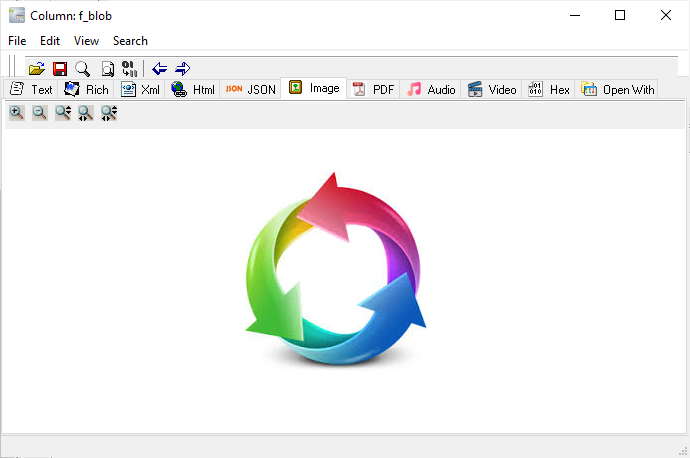
No more guessing what’s inside a BLOB field. DBBlobEditor lets you view BLOB content in multiple formats: Text, Rich Text, XML, HTML, JSON, Hex, as well as direct previews for Images and PDFs—the most common binary file types stored in BLOBs. - One-Click Editing & Replacement
Updating BLOB data is as simple as clicking the BLOB cell in your query results. You can directly load new binary data from local files to replace existing BLOB content, with zero manual data conversion required. - Simplified MySQL Connection
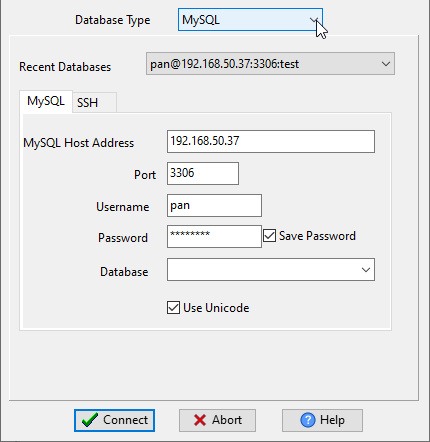
Connect to your MySQL database with basic credentials—host address, port, username and password—and support for MySQL SSH connections for secure remote database access. You can even save your password for quick reconnection to frequently used databases. - Fast Query & Result Display
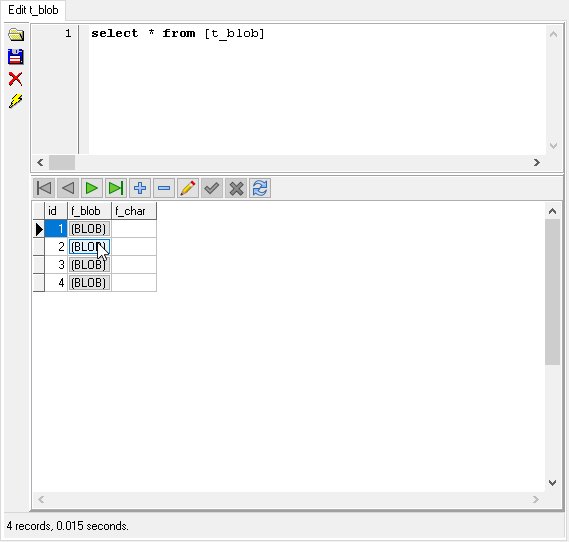
Execute standard SQL queries to fetch BLOB-containing tables, with query results displayed in a clear table format. Even for tables with multiple BLOB fields, the tool loads and renders results in milliseconds (e.g., 4 BLOB records in just 0.015 seconds).
Step-by-Step Guide to Editing MySQL BLOB Data
Using DBBlobEditor to edit your MySQL BLOB data is straightforward—follow these 3 simple steps:
Step 1: Launch and Connect to MySQL

- Run DBBlobEditor on your device
- Enter your MySQL connection details: Host Address, Port, Username and Password
- Check Use Unicode for proper character encoding (critical for text-based BLOB content)
- Click Connect—the tool will instantly establish a connection to your database
Step 2: Fetch BLOB Data with SQL Query

- Enter a standard SELECT query to retrieve the table with BLOB fields (e.g.,
select * from t_blob) - Execute the query—the tool will display all records with a clear
(BLOB)marker for binary fields - Locate the BLOB cell you need to edit in the query results
Step 3: View and Edit BLOB Content

- Click the target BLOB cell to open the content preview window
- The window will automatically detect and display the content in the appropriate format (Image, PDF, Hex, Text, etc.)
- To replace the BLOB data: Use the File option to load a new local binary file, and the tool will automatically update the BLOB field with the new data
- Save your changes—no additional SQL statements needed
Beyond Basic Editing: Streamline BLOB Workflows
DBBlobEditor isn’t just for one-off BLOB edits—it’s built to optimize your entire MySQL BLOB management workflow:
- Batch Operations: Support for batch import/export of BLOB data to/from local storage, ideal for migrating large numbers of binary files
- Format Flexibility: Edit and preview BLOB content in 8+ formats, covering all common binary and text-based data types
- Error Prevention: The tool validates binary data before saving, reducing the risk of data truncation or corruption (a common issue with manual SQL edits)
- Time Savings: Eliminate the need for manual binary data conversion and complex SQL writing, cutting BLOB editing time by up to 90%
Download DBBlobEditor Today
Ready to say goodbye to MySQL BLOB editing frustrations? DBBlobEditor is available for free download with dedicated installers for all major platforms:
- Windows: 64 bit / 32 bit
- Linux: .deb (Debian/Ubuntu) 64 bit / .rpm (Red Hat/Fedora/SUSE) 64 bit
- macOS: 64 bit
With DBBlobEditor, you’ll turn MySQL BLOB data management from a tedious chore into a fast, intuitive process—freeing up your time to focus on more important database tasks.
Final Thoughts
MySQL BLOB data doesn’t have to be a black box. With the right visual tool, you can manage binary fields with the same ease as regular text or numeric data. DBBlobEditor simplifies every step of BLOB editing, from connection to content replacement, and delivers cross-platform support for your entire team.
Whether you’re a DBA managing production databases, a developer building applications with binary data storage, or a tester validating BLOB content, DBBlobEditor is the ultimate solution for fast, error-free MySQL BLOB editing.
This entry was posted in MySQL Tools and tagged MySQL BLOB, BLOB Edit, Database Management, DBBlobEditor. Bookmark the permalink.