Want to batch convert Nikon NEF images to JPG? Or PNG, GIF, and other formats?
Using Withdata Batch Image Converter, a desktop Nikon NEF photos to JPEG converter, you can batch convert Nikon NEF images to JPG, PNG, GIF, and other formats. Batch convert in one go, just in a few mouse clicks.
- Convert locally and privately, avoid uploading photos to online services.
- Repeat converting easily, support schedule and automate converting task.
- Support Windows, Linux, macOS.
Download Withdata BatchImageConverter 
Batch convert Nikon NEF images to JPG
Run BatchImageConverter, start a new “Convert Digital Camera Photos” task.
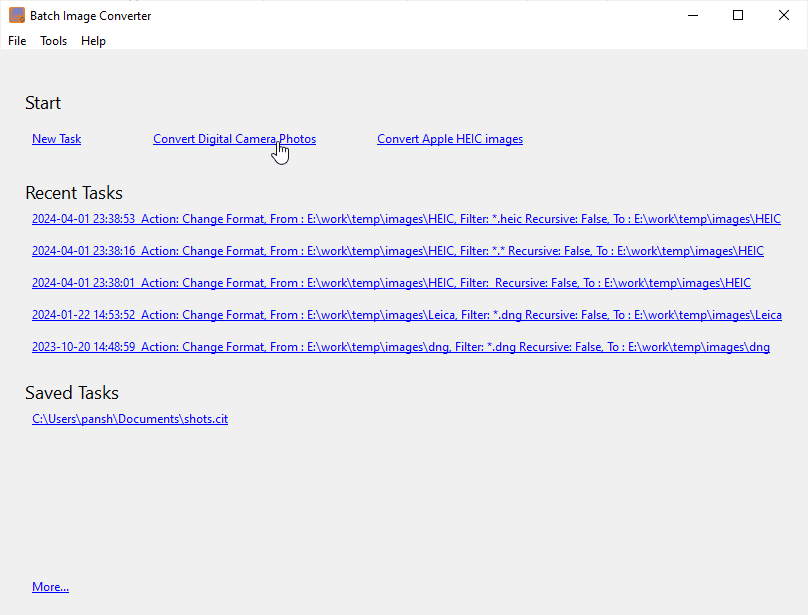
Choose digital camera type “Nikon”
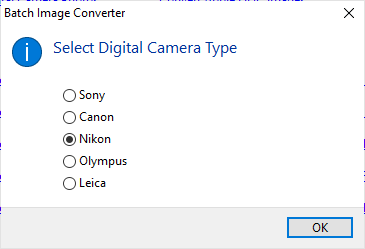
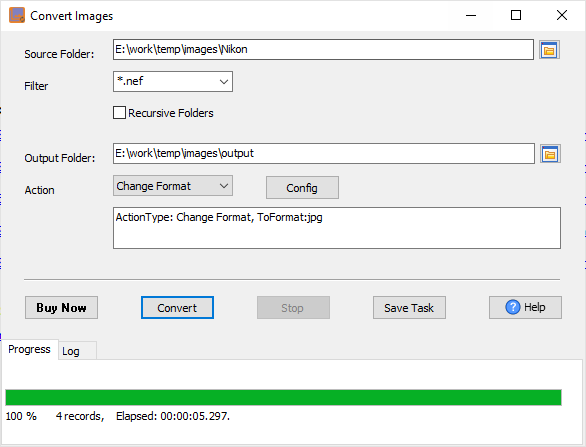
Then show the converting form, the “Filter” will be set to “*.NEF” (Nikon), and the “Action” will be set to “Change Foramt”, and the “To Format” will be set to “jpg”, you can change it by click “Config” button.
Enter “Source Folder” and “Output Folder”, then click “Convert” button.
NEF, which is the short form for Nikon Electronic Format, is a RAW file extension format mostly used in Nikon cameras. NEF is a digital negative where all the image information that the camera captures through the sensor and the image metadata is contained. With NEF files, your original images are maintained since photographs taken with NEF suffer no resolution nor quality loss.
FAQ
More about Withdata BatchImageConverter – Nikon NEF converter
Download Withdata BatchImageConverter
Batch Image Converter without the manual work
For batch jobs, large files and scheduling use the Batch Image Converter converter — an offline desktop app for Windows, Linux and macOS. Free trial.


