Want to batch update Oracle CLOB data from files ?
Try Withdata DBBlobEditor, a Oracle CLOB editor, Bulk update Oracle CLOB data from files, East and Fast.
- Can run in GUI mode, Step by step, Just a few mouse clicks.
- Can run in Command line, for Scheduled Tasks and Streams.
- Support Windows, Linux, and macOS.
Download Withdata DBBlobEditor 
Batch update Oracle CLOB data from files
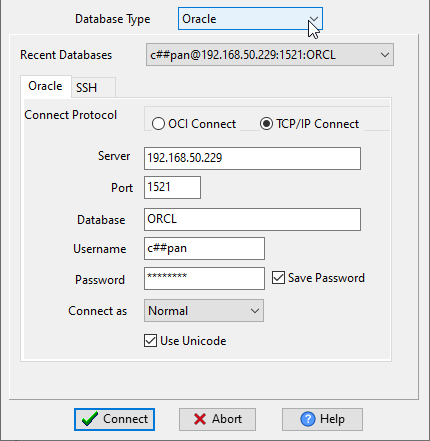
Run DBBlobEditor, login to Oracle.
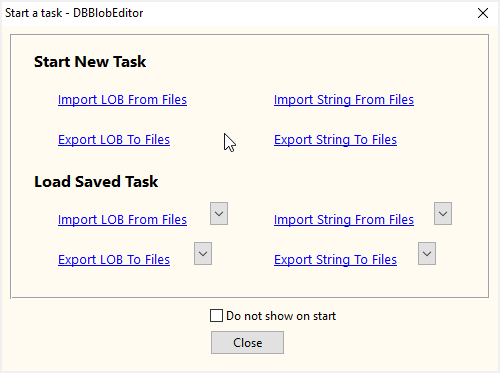
Click “Start New Task – Import LOB From Files” at task dialog.
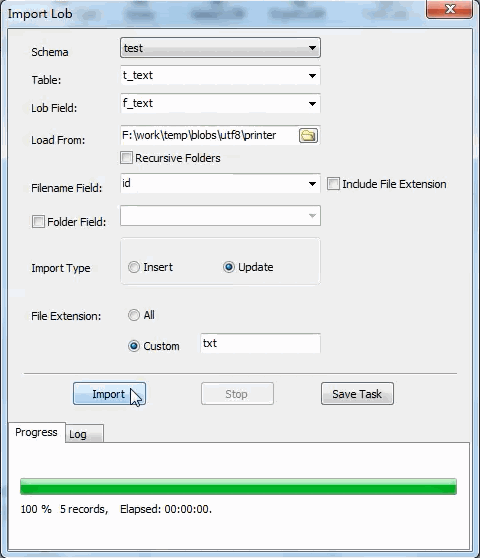
then choose Oracle table to update CLOB.
Batch update Oracle CLOB data from files in command line
Save “Bulk updating Oracle CLOB to files” session, then you can:
- Batch update Oracle CLOB data from files in Windows command line.
- Batch update Oracle CLOB data from files in Linux command line.
- Batch update Oracle CLOB data from files in macOS command line.
Set scheduled tasks for bulk updating Oracle CLOB data from files
You can schedule and automate this converting task by:
- Save session and create .bat (Windows) or .sh (Linux/macOS) file for “Bulk updating Oracle CLOB data from files” conversion.
- Set scheduled task for “Bulk updating Oracle CLOB data from files” conversion.
More about Oracle CLOB importer
Download Withdata DBBlobEditor

