November 12, 2026 — Withdata Software announces BigDataFileViewer 1.0, a read-only viewer that opens CSV, Excel (.xlsx), JSON and XML files of any size in a grid — 817 MB and twelve million rows, or a 300 MB workbook, without loading the file into memory. It is the answer to the question the other tools keep raising: the file is too big for Excel, and too structured for a text editor.
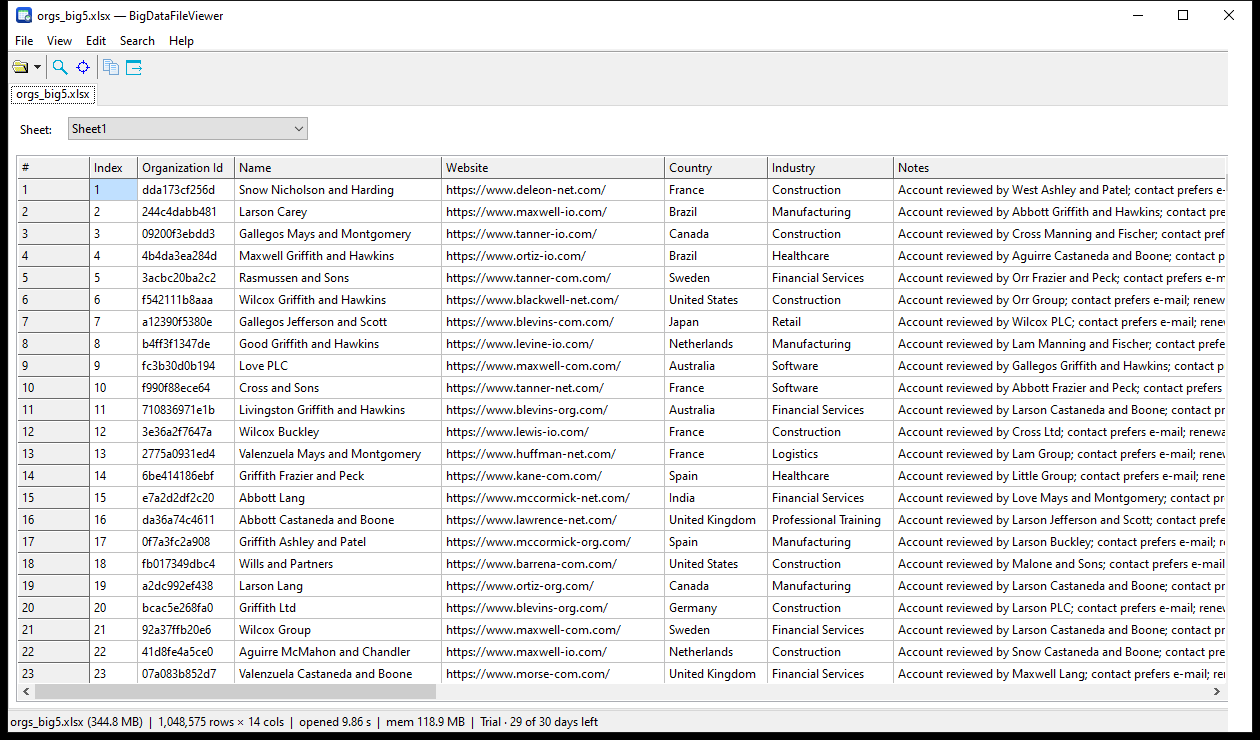
A 345 MB Excel workbook with 1,048,575 rows and 14 columns — as many rows as a .xlsx can hold — in the grid: Sheet1 picked in the top bar, opened in 9.9 s and using 119 MB. Excel itself refuses a workbook this size; BigDataFileViewer shows it, scrolls it and searches it. The file was produced by converting a JSON file with DataFileConverter and then opened here — which is how the two tools are meant to be used together.
What’s New in BigDataFileViewer 1.0
1. Four Kinds of Big Files, One Grid
Delimited text (CSV, TSV, TXT — the delimiter and the header row are detected and can be changed by hand), Excel .xlsx and .xlsm, JSON and JSON Lines, and XML. Each file opens in its own tab; each type gets a view that knows what the rows are: a worksheet picker for Excel, and a structure tree for JSON and XML where you click the record array or record node you want to see.
The grid keeps one page of 50,000 rows in memory and moves that page as you scroll, so memory does not grow with the file. Measured on an 817 MB CSV with 12,000,000 rows: opens in 1.7 s, stays around 21 MB, a jump anywhere in the file takes about 15 ms, and smooth scrolling costs about 1 ms per step.
2. Go to Row, and the Rest of Navigation
Type a row number in Go to row (Ctrl+G), press Ctrl+Home for the first row or Ctrl+End for the last one. The status bar always says which rows the page covers and how many rows the file has, so “where am I in 12 million rows” is answered without a map.
3. Excel Without Excel
Numbers and dates are shown the way the workbook formats them — 0.00, #,##0.00, 0%, thousands separators, dates — and not as raw serial numbers. First Row Is Header switches the header when the automatic guess is wrong, and formulas show the cached value that Excel stored (BigDataFileViewer does not recalculate).
4. Find at Byte Speed
The search scans the raw bytes of the file instead of reading row by row: the same 817 MB CSV is searched in about 0.7 s (the row-by-row path needed three minutes), and the hit list lets you jump straight to a hit. For Excel the file has to be decompressed, so searching a very large workbook is slower — the program says so while it works.
5. Copy, Export, and the Small Things You Use Every Day
- Copy a rectangle, a whole column (click the column header), a whole row (click the row number) or the whole page (Ctrl+A) as TSV; export the current view as CSV or TSV.
- Auto-fit columns; hover a clipped cell to read it in full; the window size and the column widths are remembered next time.
- Several files in tabs, with a recent-files list.
- A file that is not one of the four supported types is named as such, with a suggestion (save as .xlsx, unzip first) instead of being shown as garbage.
6. Windows, Linux and macOS
Windows 32-bit and 64-bit installers, .deb and .rpm packages (also in the Withdata apt and dnf repositories), and a universal macOS package with a Homebrew cask. A single-user licence is $45; the 30-day trial is fully functional, and after it the free version still opens files up to 100 MB and 1,000,000 rows.
About BigDataFileViewer
- Read-only grid viewer for very large CSV/TSV/TXT, Excel (.xlsx/.xlsm), JSON/.jsonl and XML files.
- Memory does not grow with the file size; rows are paged 50,000 at a time.
- Go to row, find in the whole file, copy as TSV, export the current view as CSV or TSV.
- Excel: worksheet picker, cell number/date formats, header detection.
- JSON and XML: record-path tree and optional expansion of nested values into columns.
- Unsupported or binary files are refused with a reason and a “request support” dialog.
Upgrade Today
Download BigDataFileViewer 1.0 for Windows, Linux or macOS, or read what it opens and what it deliberately does not do. Withdata Software keeps improving its products: this is the first release, and the next ones will add what the first users ask for.
Convert your data online, free
Free in-browser converters for CSV, Excel, JSON, XML and SQL: Withdata Online Data Conversion. Large files, batch conversion or scheduling? See the offline desktop apps, or browse all data conversion tools.