November 3, 2026 — Withdata Software announces FileToDB 3.7, a cross-platform desktop tool for importing files into databases. This release makes the command line import complete, fixes importing a folder of files, and corrects the way text and Excel files are read.
What’s New in FileToDB 3.7
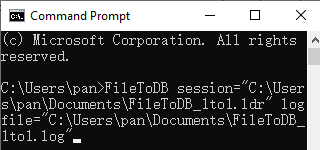
1. A Complete Command Line for Import Jobs
One command imports a file into a table, and when the source carries its own table name — an HTML table or a SQL dump — that name is used. A run that imports nothing, or only some of the rows, now reports an error, so a batch file or a scheduled job can tell a clean import from a broken one.
FileToDB import --from=orders.csv --to="MySQL:user:pass@host:3306/shop" --table=orders
2. Importing a Folder
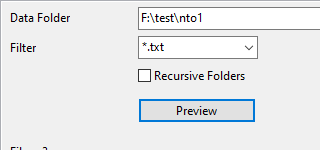
One filter can name several file types, so a folder that mixes CSV and TSV files is imported in one run. The “file name without extension” option is kept when the session is saved, and a filter that matches no file is reported as an error instead of an empty success.
3. Text Files Read Correctly
Skipping the first lines of a text file no longer shifts the columns, a doubled quote inside a quoted field becomes one quote, and UTF-16 files are recognised by name.
4. Excel: Every Sheet
Importing all worksheets no longer reads the next sheet’s header as a row or drops the last row of a sheet.
5. macOS and Downloads
On macOS the wizard now loads its steps when it is started from the main window, Back no longer reloads the step, and the preview no longer deadlocks. A download that fails says so, instead of leaving an old file behind.
About FileToDB
FileToDB imports data files into database tables, fast and locally, without coding.
- Input formats: CSV, TSV, TXT, fixed-width text, Excel, JSON, XML, HTML table, YAML and SQL
- Databases: MySQL, Oracle, SQL Server, PostgreSQL, DB2, SQLite, Access, Redshift, Azure SQL, MariaDB, Percona, DBF and more
- 1 file to 1 table, 1 file to N tables, N files to N tables, and each sheet / table to its own table
- Insert, update and upsert (including multi-column keys), with field mapping and preview
- Batch import, command line, and scheduled tasks for automation
- Cross-platform: Windows, Linux, macOS
- Fully local offline processing; no data uploaded to cloud servers
Upgrade Today
FileToDB 3.7 is ready for download: https://www.withdata.com/file-to-db/download.html. Existing users may update directly. New users can download a free trial to try the command line import and the folder import.
Withdata Software continues optimizing FileToDB for real-world file import and database loading scenarios based on user feedback.
Convert your data online, free
Free in-browser converters for CSV, Excel, JSON, XML and SQL: Withdata Online Data Conversion. Large files, batch conversion or scheduling? See the offline desktop apps, or browse all data conversion tools.