November 5, 2026 — Withdata Software announces RedisDataStudio 3.0, a rebuilt desktop client for Redis. This is a new program rather than a new dialog: the key browser, the editors, the import and export engine and the command line were all rewritten, and the result covers every Redis type in the key list, moves data between Redis and files or databases, and can write a readable snapshot of a dataset that outlives the server it came from.
What’s New in RedisDataStudio 3.0
1. A Rebuilt Interface
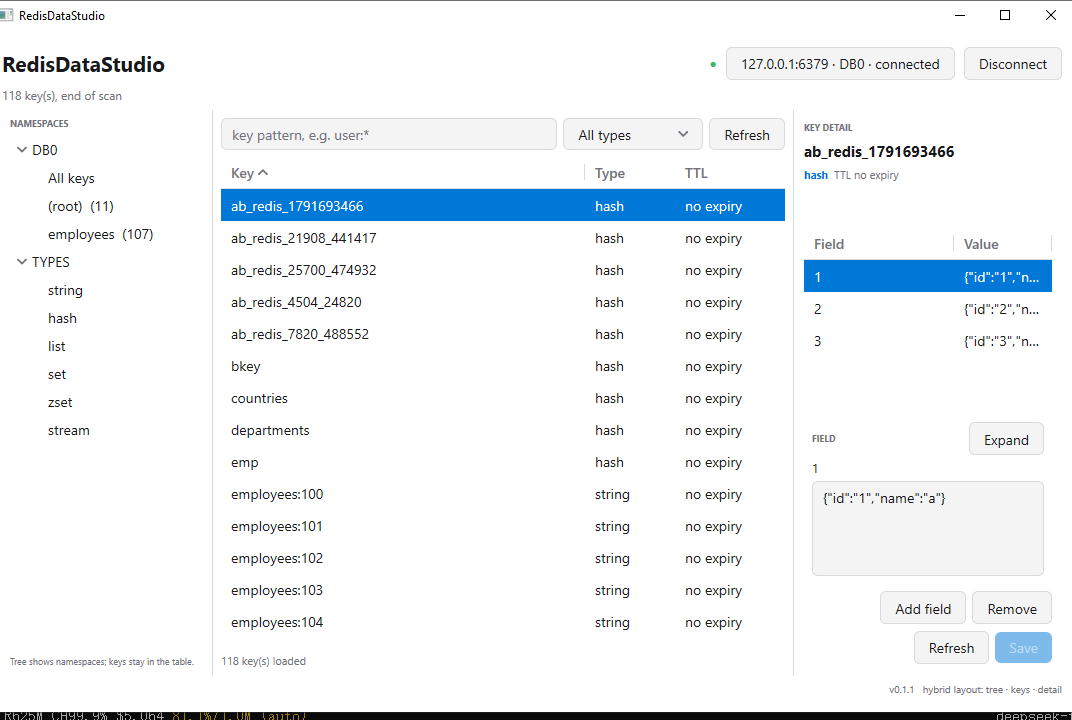
The window is now a browser and a detail pane. A namespace tree on the left groups keys by prefix and shows how many each holds; above the table, a key pattern box and a type filter narrow the list; the table itself lists the key, its type and its TTL, and says how many keys are loaded and whether the scan has finished. Selecting a key opens the editor for its type in the pane on the right, with the full value of the selected field in a multi-line editor instead of a one-line cell.
Every type has an editor: strings, hashes (one row per field, with Add field, Save, Refresh and a value editor that does not truncate), lists, sets, sorted sets with decimal scores, and streams. JSON documents get a formatted editor, and bitmap, HyperLogLog and geo keys get their own views. TTL is visible in the table and editable from the key actions, next to rename and delete.
2. Import and Export Between Redis, Files and Databases
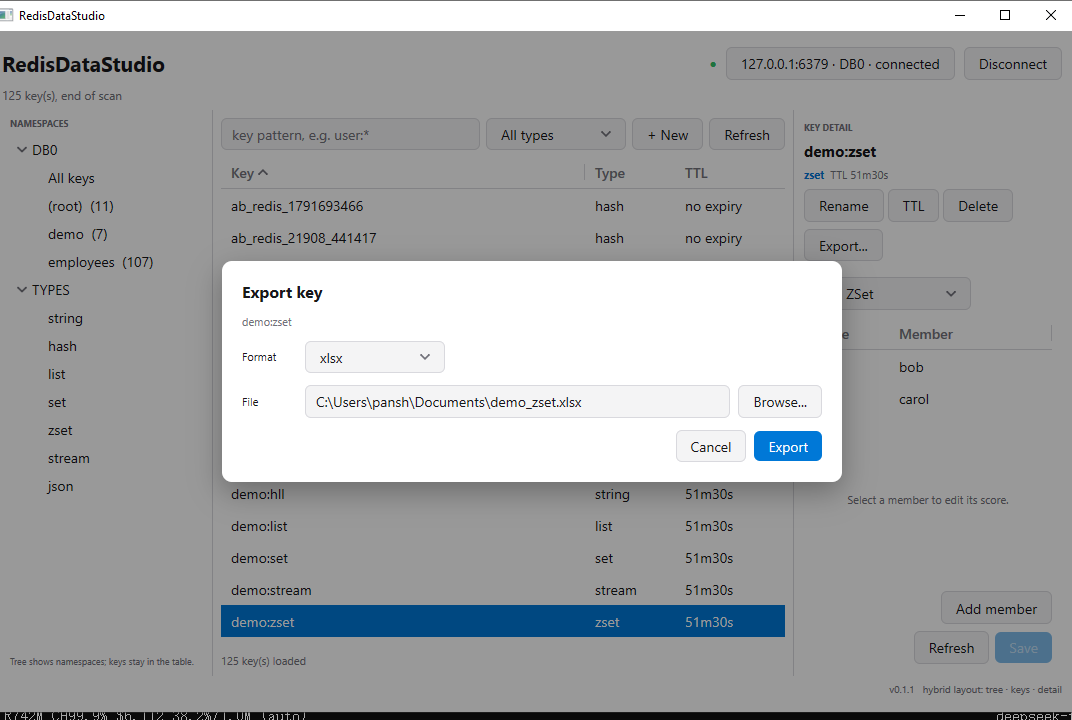
Files come in four formats — xlsx, csv, tsv and json — and the scope is one key, a pattern such as user:*, or a whole namespace. With Files = one, all selected keys go into a single file with a Key column; with Files = per-key, each key becomes its own file in a directory, plus a _manifest.json that keeps the original key name and type.
Importing is the same dialog in reverse: browse to the file, preview the columns, map the Field and Value columns (or tick No header), and choose Append, Replace or Skip existing. Append merges into the existing hash, Replace deletes the key first, and Skip existing leaves a key that is already there untouched, so a re-run is safe.
The database side covers SQLite, MySQL (and MariaDB/TiDB), PostgreSQL (and CockroachDB/YugabyteDB), SQL Server and Oracle. A single key goes to a table; a pattern or namespace goes to one table with a Key column or to one table per key, and the table is created when it does not exist yet.
3. Readable Snapshots
Snapshot… writes a directory that a person can read: one file per key, a _manifest.json with the original key and type, a snapshot.json recording the source and the counts, and a README. It is meant for review and diffing — a dataset you can open six months later, after the server is gone — and the program says so plainly: this is not an RDB/AOF backup and does not guarantee restoration.
4. Streams and JSON Documents
Stream keys open in a viewer that flattens each entry into ID, Field and Value rows, and importing into a stream writes with XADD. RedisJSON documents appear as their own key type, formatted for reading and validated before a save; import uses JSON.SET. Both need the corresponding server support: without the RedisJSON module, JSON keys stay plain strings, and the editor does not pretend otherwise.
5. Menu Bar, Start With Windows, Recent Connections
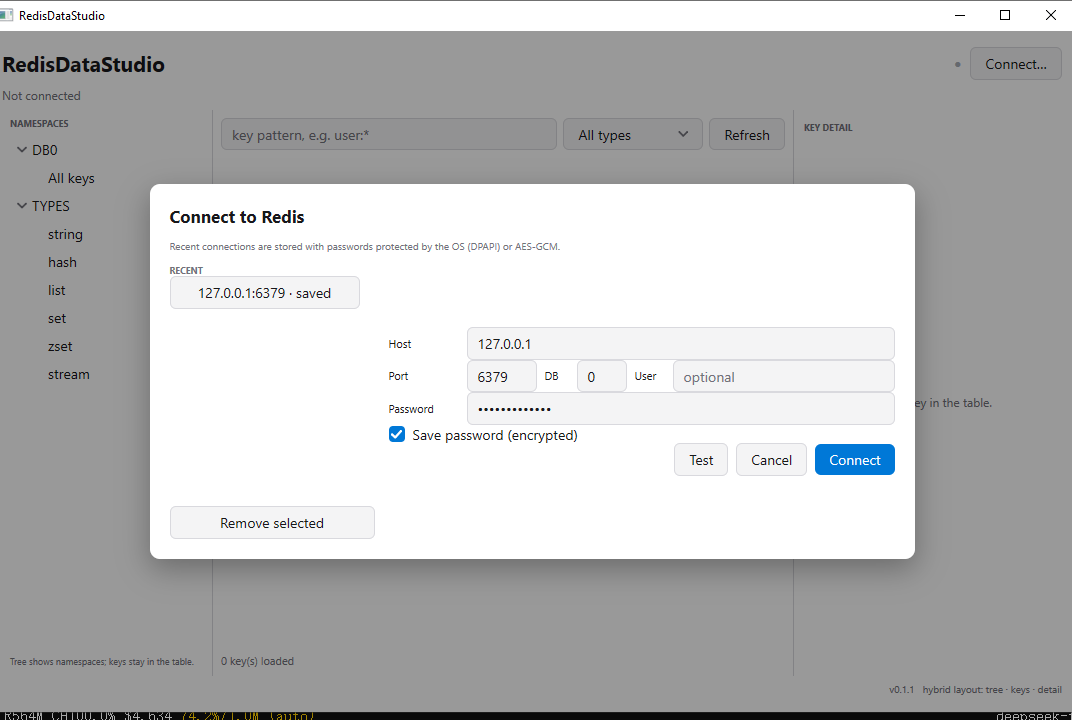
The main actions now live in a real menu bar instead of being scattered across buttons, the application can start with Windows, and recent connections are remembered, so a session begins with the server you actually use rather than a form to fill in again.
6. The Same Engine on the Command Line (Linux)
RedisDataStudioCmd performs the same exports and imports the dialogs do: --key or --pattern/--namespace, --type, --format, --out/--in, --mode append|replace|skip, --files per-key, --no-header and --json-columns. Passwords come from stdin or the environment rather than the command line, and --log FILE keeps a timestamped record of what ran, which matters when the job runs from cron and nobody is watching. There is no built-in scheduler, and the command line is Linux only; the Windows and macOS downloads are the GUI.
About RedisDataStudio
RedisDataStudio edits Redis data and moves it between Redis, files and databases — locally, without writing a script.
- Browse keys by pattern, type or namespace, with TTL in the list
- Edit string, hash, list, set, sorted set and stream keys, and RedisJSON documents
- Import and export xlsx, csv, tsv and json
- Move data to and from SQLite, MySQL, PostgreSQL, SQL Server and Oracle
- Readable snapshot: one file per key, with a manifest
- Scoped operations: one key, a pattern, or a whole namespace; one file or one file per key
- Append, Replace and Skip existing import modes
- Command line on Linux, with
--logand password on stdin - GUI on Windows, Linux and macOS; nothing is uploaded to a server
Upgrade Today
RedisDataStudio 3.0 is ready for download: https://www.withdata.com/redis-data-studio/download.html. Existing users may update directly. New users can download a free trial to browse, edit, import and export Redis data before deciding.
Withdata Software continues improving RedisDataStudio based on feedback from people who work with Redis data every day.
Convert your data online, free
Free in-browser converters for CSV, Excel, JSON, XML and SQL: Withdata Online Data Conversion. Large files, batch conversion or scheduling? See the offline desktop apps, or browse all data conversion tools.