Looking for a reliable way to import images to SQL Server VARBINARY, insert image into SQL Server VARBINARY column, or upload image file to SQL Server VARBINARY? Withdata DBBlobEditor is a professional tool to easily store image data in SQL Server VARBINARY columns without complex SQL coding, supporting batch operations on Windows, macOS and Linux.
How to Import Images to SQL Server VARBINARY and Upload Image File to SQL Server VARBINARY
Whether you need to import image (JPG/PNG/GIF/TIFF/WEBP/etc.) to SQL Server VARBINARY column for a single file or batch insert images into SQL Server VARBINARY table for multiple entries, Withdata DBBlobEditor provides a user-friendly GUI to complete the process quickly. Below is the step-by-step guide:
Step 1: Connect to Your SQL Server Database
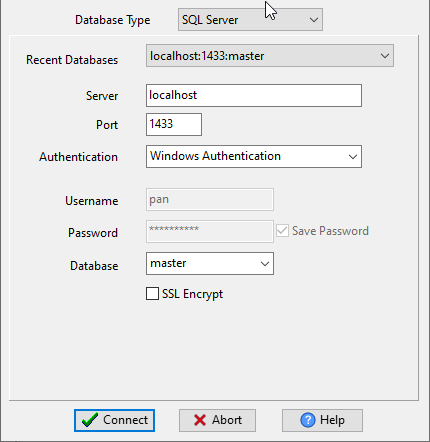
Launch Withdata DBBlobEditor and enter your SQL Server database credentials to establish a connection. This is the first step before you can import images to SQL Server VARBINARY or insert image into SQL Server VARBINARY column.
Step 2: Create a New Import Task
After successful connection, click “Start New Task – Import LOB From Files” to create a new task.

Step 3: Configure Image Import Settings
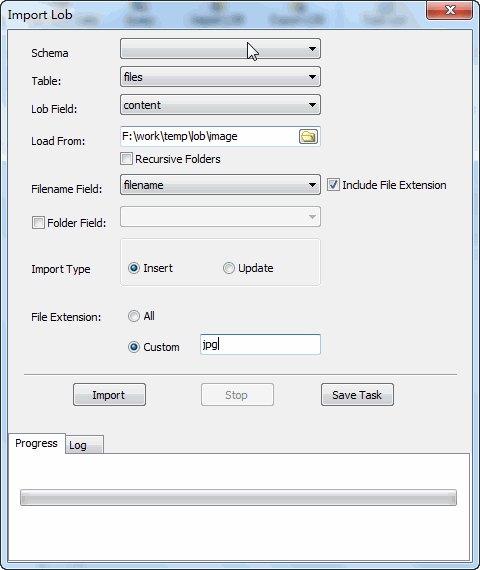
Choose the SQL Server table and VARBINARY column where you want to upload image file to SQL Server VARBINARY.
Select the local image (JPG/PNG/GIF/TIFF/WEBP/etc.) folder (files) you want to import.
Choose the import type: select “Insert” to SQL Server VARBINARY insert image for new entries, or select “Update” to update image data in SQL Server VARBINARY for existing records.
Step 4: Import Images to SQL Server VARBINARY and Verify
Click “Import” to store image data in SQL Server VARBINARY column. It’ll batch insert images into SQL Server VARBINARY table efficiently.
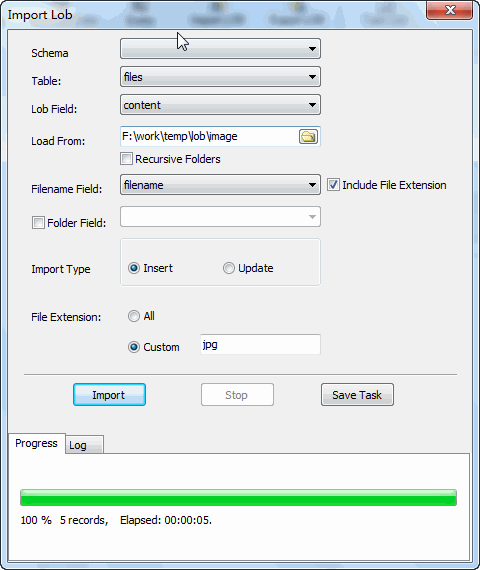
After completion, you can verify the imported image content directly in DBBlobEditor to confirm the images are successfully inserted into SQL Server VARBINARY column.

Key Features for Importing Images to SQL Server VARBINARY
- Batch insert images into SQL Server VARBINARY table to save time on bulk import operations
- Support JPG/PNG/GIF/TIFF/WEBP and other common formats to import images to SQL Server VARBINARY
- Retain original image quality when you upload image file to SQL Server VARBINARY
- Cross-platform (Windows, macOS, Linux) to import image (JPG/PNG/GIF/TIFF/WEBP/etc.) to SQL Server VARBINARY column anywhere
- No SQL coding required to insert image into SQL Server VARBINARY column or store image data in SQL Server VARBINARY
Withdata DBBlobEditor is the best solution to import images to SQL Server VARBINARY, insert image into SQL Server VARBINARY column, and upload image file to SQL Server VARBINARY. It simplifies the process to batch insert images into SQL Server VARBINARY table and store image data in SQL Server VARBINARY, making SQL Server VARBINARY image management efficient and error-free.
Download Withdata DBBlobEditor

