Sometime you need a tool to convert text to speech line by line, each line to a seperate audio file(mp3/wav).
For example, you have a poem: Ode to the West Wind (By Percy Bysshe Shelley), you wan to convert each line to a seperate MP3 Audio File:
O wild West Wind, thou breath of Autumn's being,
Thou, from whose unseen presence the leaves dead
Are driven, like ghosts from an enchanter fleeing,

Yellow, and black, and pale, and hectic red,
Pestilence-stricken multitudes: O thou,
Who chariotest to their dark wintry bed

The winged seeds, where they lie cold and low,
Each like a corpse within its grave, until
Thine azure sister of the Spring shall blow

Her clarion o'er the dreaming earth, and fill
(Driving sweet buds like flocks to feed in air)
With living hues and odours plain and hill:

Wild Spirit, which art moving everywhere;
Destroyer and preserver; hear, oh hear!
TTSBatchConverter is the tool, easily and fast, just a few mouse clicks!
Here you can download and install TTSBatchConverter.
Convert Text to Speech Line by Line
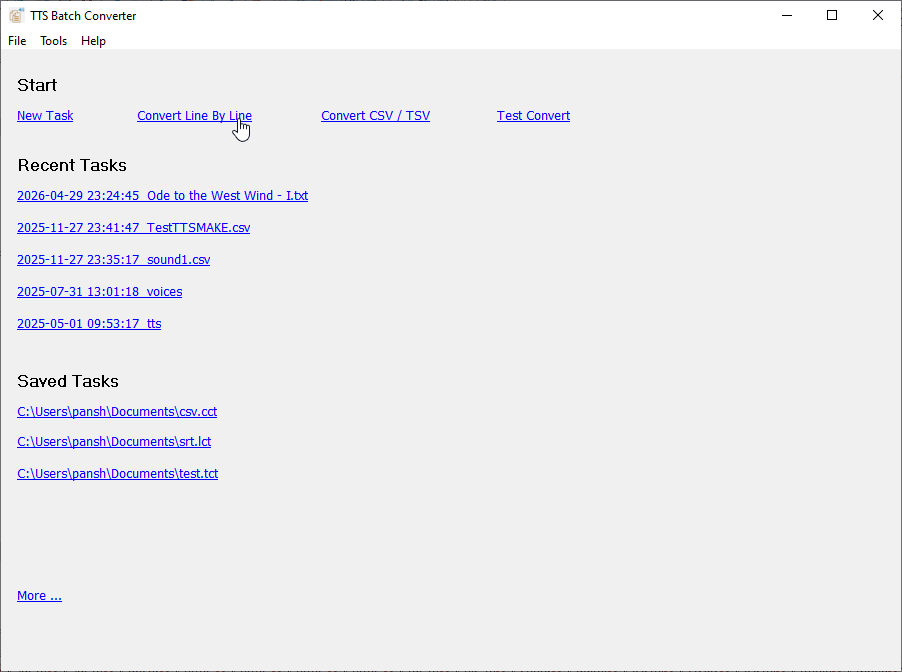
Start TTSBatchConverter, click “Convert Line By Line”.
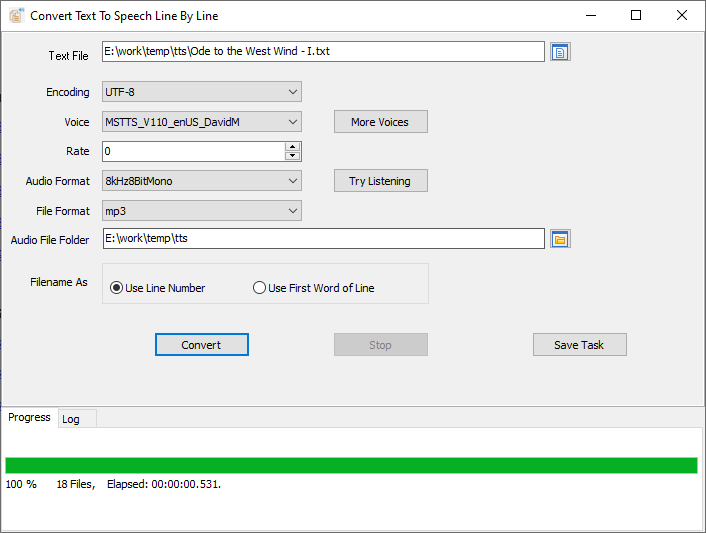
then show the converting form, choose a TXT file to convert, click “Convert” to convert each line to a seperate MP3 file.
Set “Name Column” for audio file name.
Set “Text Column” for text to convert to speech.
Choose “Voice”.
Adjust “Rate”.
Choose “Audio Format”.
Choose “File Format”, .wav or .mp3.

