I see a post How to convert XML into CSV using XSL, the poster has a test XML like this:
<Tester author="Name" id="16384543">
  <insert tableName="sampletable">
    <column name="id" valueNumeric="2"/>
    <column name="name" value="kathy"/>
    <column name="active" valueBoolean="true"/>
    <column name="age" valueNumeric="2"/>
  </insert>
  <insert tableName="sampletable">
    <column name="id" valueNumeric="23"/>
    <column name="name" value="Queen"/>
    <column name="active" valueBoolean="true"/>
    <column name="age" valueNumeric="29"/>
  </insert>
  <insert tableName="sampletable">
    <column name="id" valueNumeric="25"/>
    <column name="name" value="varshan"/>
    <column name="active" valueBoolean="false"/>
    <column name="age" valueNumeric="5"/>
  </insert>
</Tester>
He want to convert it to CSV like this:
id,name,active,age
2,kathy,TRUE,2
23,Queen,TRUE,29
25,varshan,FALSE,5
So the XML attributes need to be converted CSV columns. I used Data File Converter, figured out converting this XML, in a minute.
1. Open XML in DataFileConverter, set XML options.

2. Set XML custom columns, map XML attributes to columns.
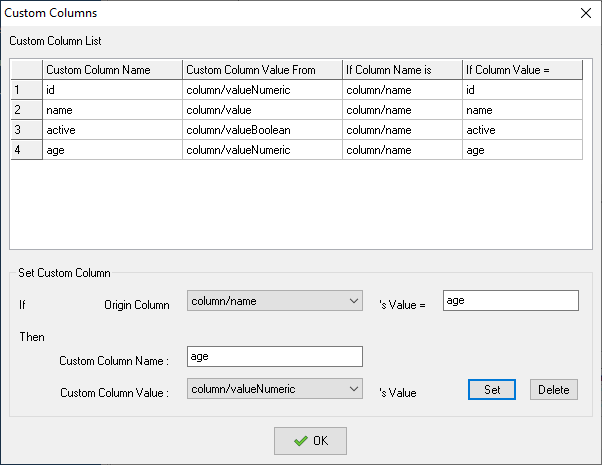
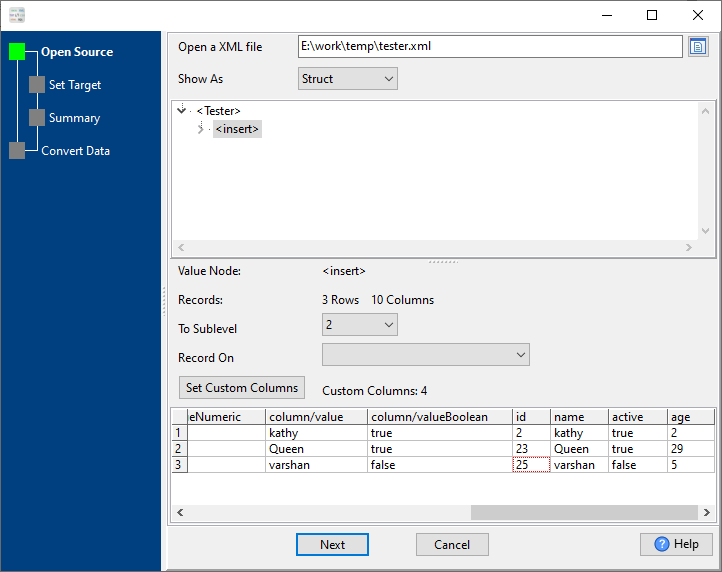
3. Set CSV options.
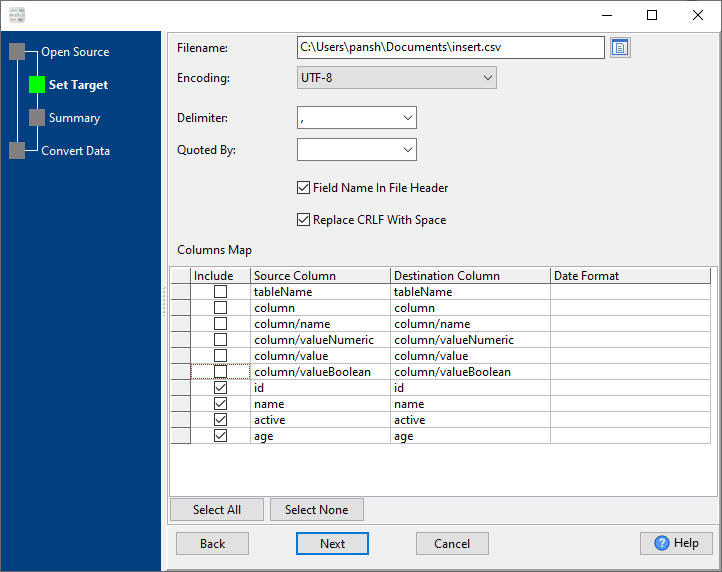
4. “Next” and “Next”, convert, get the output CSV file.
XML → CSV reference
Type mapping
| Value kind | in XML | in CSV |
|---|---|---|
| Int | <int>1234</int> | 1234 |
| Bigint | <bigint>9007199254740993</bigint> | 9007199254740993 |
| Decimal | <decimal>1234.56</decimal> | 1234.56 |
| Float | <float>1.234e10</float> | 1.234e+10 |
| Text | <char>text</char> | quoted only when it contains a comma or a quote |
| Long text | <text>multi-line text</text> (entities for & <) | must be quoted; line breaks inside force multi-line records |
| Date | <date>2026-09-18</date> (xs:date with an XSD) | 2026-09-18 |
| Datetime | <datetime>2026-09-18T14:30:00Z</datetime> (xs:dateTime) | 2026-09-18 14:30:00 |
| Binary | <blob>base64...</blob> (xs:base64Binary) | not representable - base64 or hex string |
| Boolean | <bool>true</bool> | TRUE / FALSE, or 1 / 0 depending on the writer |
| JSON | escaped inside an element, or its own sub-tree | the whole JSON value quoted, with internal quotes doubled |
Dialect differences
Both XML and CSV are file formats, so what differs below is how each one chooses to represent a value.
| Property | in XML | in CSV |
|---|---|---|
| identifiers | Attribute values in quotes; entities (& < >) for ... | Double quotes; a literal quote is doubled ("" ) |
| dates | Text (xs:date / xs:dateTime when an XSD is in play) | Conventional text: 2026-09-18 or 2026-09-18 14:30:00 |
| binary | base64Binary / hexBinary inside text | Not supported |
| separator | Tags, not delimiters | Comma "," |
| encoding | Declared in the XML declaration | No declaration - UTF-8 works only with a BOM |
| typing | None in the markup itself | None - every field is text |
| shape | Arbitrary tree | Flat table, optional header row |
| ceiling | Whole document is usually parsed into memory | No formal limit; row count bounded by memory |
Convert your data online, free
Free in-browser converters for CSV, Excel, JSON, XML and SQL: Withdata Online Data Conversion. Large files, batch conversion or scheduling? See the offline desktop apps, or browse all data conversion tools.


