DataFileSplitter » Use cases » One file per branch
Download DataFileSplitter Free Trial » Buy DataFileSplitter Now »
The situation
The report exports everything into one file: every branch, every region, every sales rep, every customer - one CSV, and it is 2 GB. What each of them actually needs is their own file: the region manager wants the region's rows, the rep wants the rep's.
Filtering the file once per value by hand works until there are a hundred values, and it is the kind of job that gets done slightly differently every time - a row missed here, a file named differently there.
What you do
- Choose the file (CSV, TSV, TXT, Excel, JSON, JSONL, XML or SQL) and the column to split on -
branch,region,rep_id, whatever it is called. - Run the split. Every distinct value in that column becomes its own output file, named after the value.
- Send each file to the person it belongs to.
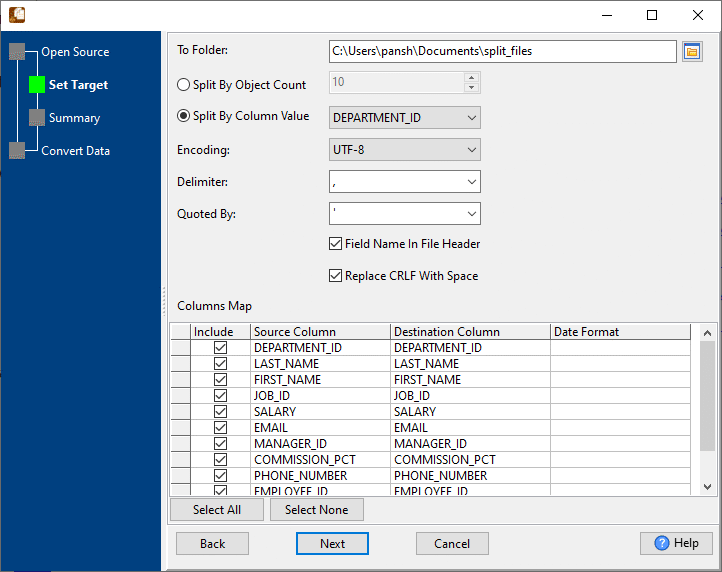
Two things make this practical on a real export. The file does not have to be sorted first - a branch whose rows are scattered through the file still ends up in one output file. And the split happens on the records inside the file, so every output row is still a valid row and the header is handled for you.
What it will not do
- It does not filter or transform. It divides the rows that are there. Dropping columns, changing values or calculating anything is a different job.
- It is not an archive splitter. It works on the records inside a CSV, TSV, TXT, JSON, JSONL, XML, SQL or Excel file. To cut a plain text file, a log or an arbitrary file into equal byte-sized parts, use BigTextFileSplitter.
- It does not connect to a database. It reads and writes files. Loading the parts into a database afterwards is FileToDB.
Related
Splitting by value: split by column value, split JSON by column value, split XML by column value. Splitting by count instead: split by record count. In the browser: split CSV, split JSON.