DataFileSplitter » Use cases » One JSON/XML document per customer
Download DataFileSplitter Free Trial » Buy DataFileSplitter Now »
The situation
An export produced one JSON file with every customer's records in it - or an XML file with every tenant's elements under a single root. Each customer, tenant or account should receive their data as a document they can process, and ideally nobody gets anybody else's rows.
Cutting a JSON or XML file by size or by position does not work: a fragment of a JSON array is not valid JSON, and an XML document that has been cut in the middle is not well formed. Splitting has to happen at the level of the records, not the bytes.
What you do
- Choose the JSON, JSONL or XML file, and the field to split on -
customer_id,tenant,account. - Run the split. Every distinct value becomes its own file, named after that value, containing that customer's objects or elements.
- Hand each file to the person or system it belongs to.
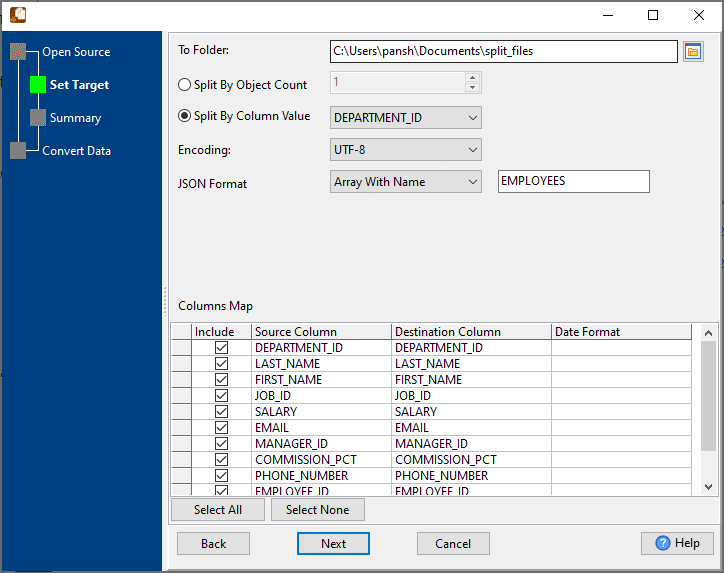
Every output document is well formed: each JSON file is a complete array of that customer's objects, each XML file is a complete document with its root element - not a fragment. The input file does not have to be sorted by the field first, so records scattered through the file still land in the same output file.
What it will not do
- It does not anonymise. Each file contains that customer's real data. If a file has to be scrubbed before it leaves, that is a separate step.
- It does not nest by several fields. One split field, one file per distinct value. Splitting by customer and month means splitting twice, or splitting by a combined value.
- It does not convert formats. JSON in, JSON out. To turn the parts into CSV or another format, use DataFileConverter.
- It does not deliver the files. It writes them to a folder; sending them is your step.
Related
Guides: split JSON by column value, split XML by column value. Splitting tables instead: split by column value. Converting the parts: DataFileConverter. In the browser: split JSON, split XML.