DataFileSplitter » Use cases » Split for a fixed batch size
Download DataFileSplitter Free Trial » Buy DataFileSplitter Now »
The situation
Something downstream takes a fixed batch: a bulk loader that imports 50,000 records per run, an API that accepts 10,000 objects per request, an upload form that caps a file at a certain number of rows. The export you have is one file with a million rows in it.
Cutting it by file size is the wrong tool here - bytes per file say nothing about rows per file, and a part that happens to contain 50,001 rows still fails. What is needed is a split by record count.
What you do
- Choose the file and set the number of records per output file - for example 50,000.
- Run the split. Every output file holds exactly that many records, and the header is repeated so each part is a complete, importable file on its own.
- Feed the parts to the loader in order.
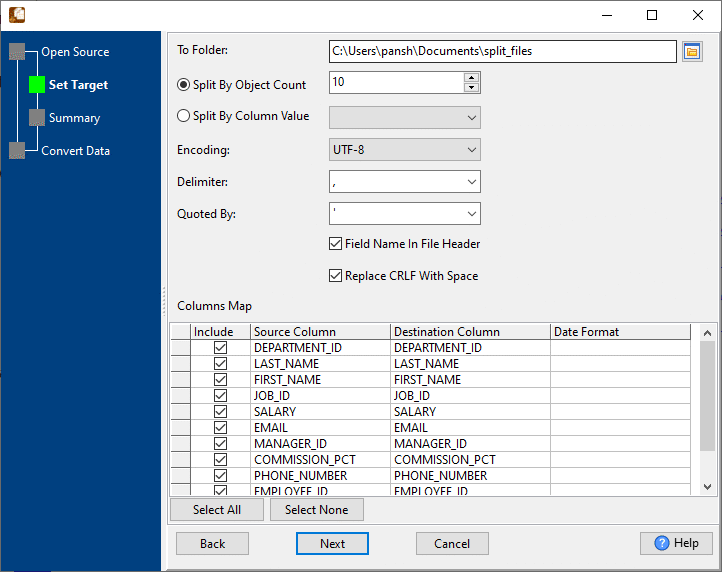
The result is flat and predictable: no part is bigger than the limit, every part has the same shape as the original, and the parts are roughly equal in size. For JSON and XML the same setting splits by object or element count instead of rows, and each output document stays well formed.
What it will not do
- It does not respect record boundaries you care about. A split at 50,000 rows can land in the middle of a group - if rows for one customer must stay together, split by column value instead.
- It does not reorder or sort. The parts follow the order the rows were in.
- It does not load anything. It writes files; importing them is your step - or FileToDB.
- It is not an archive splitter. It splits the records inside a data file; for cutting a plain text file into equal byte-sized pieces, use BigTextFileSplitter.
Related
Splitting by count: split by record/object count. Splitting by value instead: split by column value, split JSON by column value. Loading the parts: FileToDB. In the browser: split CSV, split TXT.