ExcelDataTransformer » Use cases » Split a sheet by department
Download ExcelDataTransformer Free Trial » Buy ExcelDataTransformer Now »
The situation
Finance exports one worksheet with every department's transactions in it. Each department head should get only their own rows, and the sheet is a single tab - so splitting it into files means filtering and saving once per department, or sending everybody the whole thing.
The same sheet, with a different column, is the region manager's problem, the store manager's problem, and the project manager's problem: one export, many audiences, and everybody should only see their own rows.
What you do
- Choose the workbook and the worksheet.
- Choose the split by a column value, and pick the column -
Department,Region,CostCentre. - Run it. Every distinct value becomes its own Excel file, named after that value.
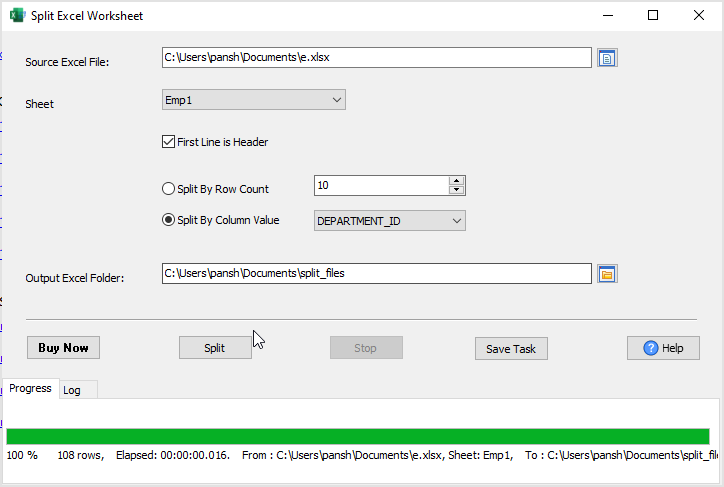
If instead the sheet is simply too large for the people who have to open it, the same worksheet can be divided by row count, so every output file holds a manageable number of rows. Either way the split happens inside the worksheet, and Microsoft Excel does not have to be installed.
What it will not do
- It does not filter by anything else. One column, one set of output files. Two conditions at once means splitting twice, or splitting on a combined value.
- It does not anonymise. Each file contains the real rows for that value - hiding a column, or masking a figure, is a separate step.
- It is not a spreadsheet editor. It splits; it does not change cells, formulas or charts.
- It does not send the files. Sending each department theirs is your step.
Related
Splitting: split an Excel worksheet, split an Excel workbook. In the browser: split Excel file. Cutting other data files by column value: DataFileSplitter.