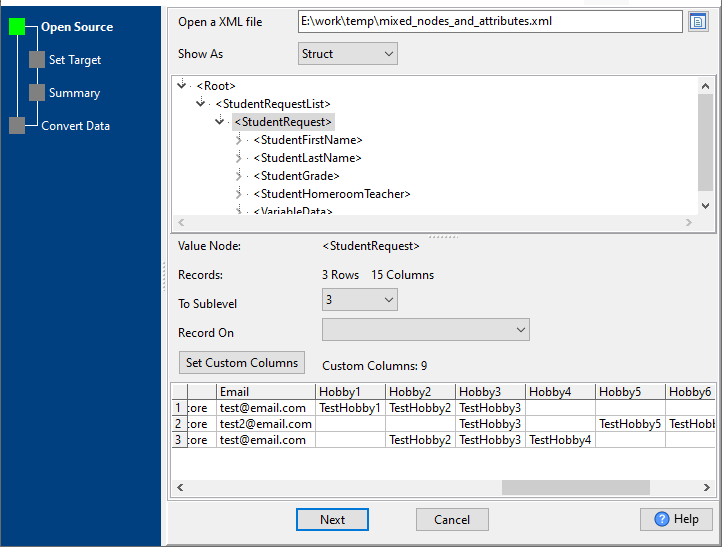
Open a XML file: open a XML file to load data.
Show As: Struct / File, "Struct" shows tree view, "File" shows content.
Node Tree: when "Show As" is "Struct", the node tree shows.
Value Node: show the node name choosed in node tree.
Records: show the child node count of "Value Node".
To Sublevel: the sub-level child nodes of "Value Node" to load. An example.
Record On: array or object child of "Value Node", may have more than 1 record to load. An example.
Set Custom Columns: An example as below
<?xml version="1.0" encoding="utf-8"?>
<Root>
<StudentRequestList count="3">
<StudentRequest>
<StudentFirstName>Test1</StudentFirstName>
<StudentLastName>TestLastName</StudentLastName>
<StudentGrade>3</StudentGrade>
<StudentHomeroomTeacher>WhiteTest1</StudentHomeroomTeacher>
<VariableData>
<Variable name="Email">test@email.com</Variable>
<Variable name="Hobby1">TestHobby1</Variable>
<Variable name="Hobby2">TestHobby2</Variable>
<Variable name="Hobby3">TestHobby3</Variable>
<Variable name="satscore">satscoreTest1</Variable>
<Variable name="kprepscore">krepscore1</Variable>
</VariableData>
</StudentRequest>
<StudentRequest>
<StudentFirstName>Test2</StudentFirstName>
<StudentLastName>TestLastName2</StudentLastName>
<StudentGrade>3</StudentGrade>
<StudentHomeroomTeacher>WhiteTest1</StudentHomeroomTeacher>
<VariableData>
<Variable name="Email">test2@email.com</Variable>
<Variable name="Hobby5">TestHobby5</Variable>
<Variable name="Hobby6">TestHobby6</Variable>
<Variable name="Hobby3">TestHobby3</Variable>
<Variable name="satscore">satscoreTest2</Variable>
<Variable name="kprepscore">krepscore2</Variable>
</VariableData>
</StudentRequest>
<StudentRequest>
<StudentFirstName>Test1</StudentFirstName>
<StudentLastName>TestLastName</StudentLastName>
<StudentGrade>3</StudentGrade>
<StudentHomeroomTeacher>WhiteTest1</StudentHomeroomTeacher>
<VariableData>
<Variable name="Email">test@email.com</Variable>
<Variable name="Hobby4">TestHobby4</Variable>
<Variable name="Hobby2">TestHobby2</Variable>
<Variable name="Hobby3">TestHobby3</Variable>
<Variable name="satscore">satscoreTest3</Variable>
<Variable name="kprepscore">krepscore3</Variable>
</VariableData>
</StudentRequest>
</StudentRequestList>
</Root>
for "VariableData", set 9 custom columns.
1) "Email", for data like: <Variable name="Email">test@email.com</Variable>
2) "Hobby1", for data like: <Variable name="Hobby1">TestHobby1</Variable>
3) "Hobby2", for data like: <Variable name="Hobby2">TestHobby2</Variable>
4) "Hobby3", for data like: <Variable name="Hobby3">TestHobby3</Variable>
5) "Hobby4", for data like: <Variable name="Hobby4">TestHobby4</Variable>
6) "Hobby5", for data like: <Variable name="Hobby5">TestHobby5</Variable>
7) "Hobby6", for data like: <Variable name="Hobby6">TestHobby6</Variable>
8) "satscore", for data like: <Variable name="satscore">satscoreTest1</Variable>
9) "kprepscore", for data like: <Variable name="kprepscore">krepscore1</Variable>
