OraCmd - Oracle access without client tool »
Unload Oracle data from other schema table(s)
OraCmd can unload all tables data in other schema at one time, or single table's data in other schema.
A Short Example for unload single table in other schema
This section contains a short example showing how OraCmd unload single table in other schema.
OraCmd commmand
	unload schema=system table=help datafile="E:\temp\help.txt"
	delimiter="|" quote="'" header=y;

Or a batch file(replace the userid with your own database user info. The lines wrap in this page, but in the file is 1 line.):
	"C:\Program files\OraCmd\OraCmd" userid=hr/hr@localhost:1521:xe task=unload
	schema=system table=help datafile="E:\temp\help.txt"
	delimiter="|" quote="'" header=y
	quit=y log="E:\temp\unload_system_help.log";
A Short Example for unload all tables data in other schema
This section contains a short example showing how OraCmd unload all tables data in other schema.
OraCmd commmand
unload schema=xdb table=all folder="E:\temp\all" delimiter="|" quote="'" header=y;
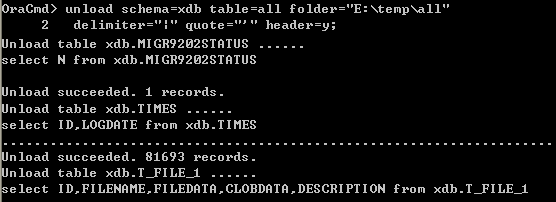
Or a batch file(replace the userid with your own database user info. The lines wrap in this page, but in the file is 1 line.):
	"C:\Program files\OraCmd\OraCmd" userid=hr/hr@localhost:1521:xe task=unload
	schema=xdb table=all folder="E:\temp\all" delimiter="|" quote="'" header=y
	quit=y log="E:\temp\unload_xdb_schema.log";
The OraCmd parameter descriptions are as follows:
delimiter: delimiter char ("|",",","#","TAB","WHITESPACE")

quote: quote char (quote="'" => single quotes, quote="chr(34)" => double quotes)

recorddelimiter: record delimiter, default is CRLF

header: y|n, print field name at first line

exportclob: y|n, export clob data to file

table: table name ("all" for unload all table)

query: sql query string (can not use multi-line sql)

sqlfile: sql script file contains the query you want to unload

schema: schema name, use this prameter to unload specific schema's data, if not set, use logon user's default schema

datafile: data file name

folder: data files folder (for unload all table)

dateformat: date format (e.g. "YYYY-MM-DD HH24:MI:SS")

timestampformat: timestamp format (e.g. ''YYYY-MM-DD-HH24.MI.SS.FF6'')

buffer: Number of rows that will be transferred across the network at the same time.
  This property can have a great impact on performance.
  So it is preferable to choose the optimal value of buffer for each SQL statement and software - hardware configuration experimentally.
  The default value is 25.

quit = y|n (quit OraCmd after run batch file)