SQLDumpSplitter » Use cases » Batch import a large SQL dump
Download SQLDumpSplitter Free Trial » Buy SQLDumpSplitter Now »
The situation
The dump file is 8 GB and the import has to happen through a client tool - phpMyAdmin, MySQL Workbench, pgAdmin, a web panel, or a hosted database that only accepts a file. The import starts, runs for a while, and then stops: a timeout, a memory error, a packet-size error, or a panel that quietly caps the upload.
The data is fine. The problem is that one enormous file is being handed to a loader that expects a smaller one, in one long transaction that has to survive from the first line to the last.
What you do
- Split the dump into files the loader can actually take:
- By file size - for example 200 MB per file, comfortably under an upload cap or memory limit.
- By row count - when the limit is on rows per statement rather than bytes.
- By table - when one or two huge tables are what break the import, and the rest can go in one file.
- Import the parts one after another. Each one is a separate, ordinary import that finishes.
- If the same dump arrives again next month, save the split as a task and repeat it - or run it from the command line.
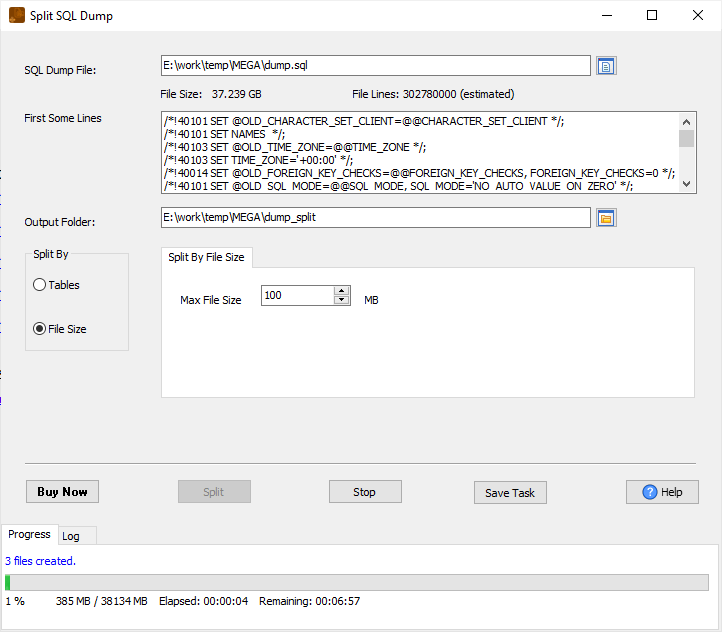
Why the parts still import
SQLDumpSplitter understands SQL: it splits the dump along statement boundaries, not at an arbitrary byte offset. That is the whole point - a naive split of a mysqldump file at 100 MB can cut a multi-row INSERT in half and produce a file that will not run at all.
Because the cut lands between statements, every output file is still valid SQL and can be executed on its own, in order. The original dump is never modified, and the file's encoding is preserved, so nothing is re-encoded on the way.
What it will not do
- It does not connect to a database. It is a splitter, not a loader - it never opens a connection and never imports. You still run the parts with your usual client.
- It does not change the SQL. No rewriting, no filtering, no ordering, no de-duplicating rows. If you need data removed before import, that is a DBA's job on the target side.
- It does not re-join the parts. There is no merge back into one file.
- Your statements have to be recoverable. It recognises standard dump structure; an exotic file that is not actually valid SQL may not split along the boundaries you expect - check the first part before importing the rest.
Related
Splitting the same dump: by file size, by row count, by table, or the general guide. Automating it: command line, scheduled task, saved session. Producing the dump from a live database: DBToFile.