SQLDumpSplitter » Use cases » Provisioning development environments
Download SQLDumpSplitter Free Trial » Buy SQLDumpSplitter Now »
The situation
A new developer joins, or a test environment has to be rebuilt, and the fastest way to get a realistic database is to copy production. But the production dump is 40 GB, most of it is the orders and events tables that nobody needs in development, and importing it takes an afternoon per environment.
The tables that actually matter - the schema, the configuration, the reference and lookup data - are a small fraction of the file. The rest is weight, and (see below) it is also the part you may not want to hand out.
What you do
- Split the production dump by table. Each table becomes its own SQL file.
- Build the environment from the files it needs: the schema and reference tables, plus a slice of the big tables if the code needs realistic data to run against.
- For the slice, split the big tables by row count and keep one part.
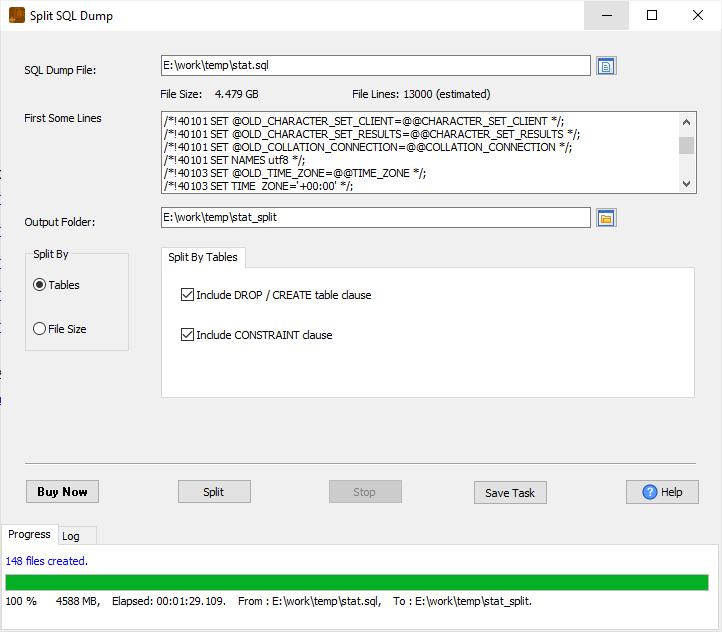
Every output file is valid SQL and runs on its own, so provisioning becomes "run these four files" instead of "import 40 GB and wait". The original dump is untouched, and the split can be repeated for each new environment.
Splitting is not anonymisation
This matters, and it is easy to get wrong: SQLDumpSplitter does not remove, mask or anonymise data. If a table you include carries real customer rows, the split file carries those same rows. Leaving a table out is not the same as cleaning it.
If development must use production data, the split gets you a smaller file to work with - then anonymise or mask it with a tool or script built for that, before the file leaves your machine. Splitting reduces volume, not sensitivity.
What it will not do
- No masking or anonymisation, as above.
- No filtering by value. It splits by table, by size or by row count; it does not select rows by customer, date or region. For value-based splitting of structured data, use DataFileSplitter.
- No database connection. It never opens one, and never imports.
Related
Splitting: by table, by row count, the general guide. Scripting the same split for every new environment: command line and saved session. Cutting data files by value: DataFileSplitter.