Download Tail4win Free Trial » Buy Tail4win Now »
If you want to monitor MySQL log on windows, you need config your my.ini file first.
The error log, information written to log: Problems encountered starting, running, or stopping mysqld.
Like this:
Add "log-error=D:\Program Files\MySQL\MySQL Server 5.0\data\error.log" to my.ini, then information will be written to "D:\Program Files\MySQL\MySQL Server 5.0\data\error.log"
The general query log, information written to log: Established client connections and statements received from clients.
Like this:
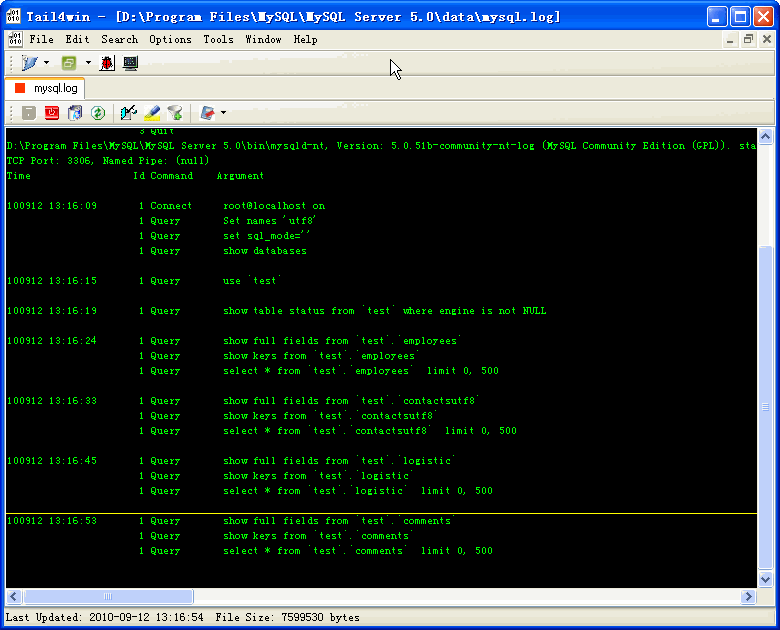
Add "log=D:\Program Files\MySQL\MySQL Server 5.0\data\mysql.log" to my.ini, then information will be written to "D:\Program Files\MySQL\MySQL Server 5.0\data\mysql.log"
The binary log, information written to log: All statements that change data (also used for replication).
Like this:
Add "log-bin=D:\Program Files\MySQL\MySQL Server 5.0\data\mysql-bin.log" to my.ini, then information will be written to "D:\Program Files\MySQL\MySQL Server 5.0\data\mysql-bin.log"
The slow query log, information written to log: All queries that took more than long_query_time seconds to execute or didn't use indexes.
Add this two lines to my.ini:
long_query_time=2
log-slow-queries=D:\Program Files\MySQL\MySQL Server 5.0\data\slowquery.log
then information will be written to "D:\Program Files\MySQL\MySQL Server 5.0\data\slowquery.log"
You can use Tail4win to monitor log file.