Why Choose Our HTML to TSV Converter
Cross-Platform
Native support for Windows, Linux, macOS – no compatibility issues
GUI + CLI Modes
Easy GUI for manual use, powerful CLI for automation & scripts
100% Local & Private
All conversions run on your device, no data upload to cloud
Ultra Fast & Large File
Process millions of rows, support files over 4GB smoothly
3 Conversion Modes
Single file, batch convert, merge multiple HTML to one TSV
Full Customization
Column mapping, encoding, date format, delimiter control
3 Core Conversion Modes for All Needs
1. Single HTML to TSV
Convert one HTML table file to TSV with preview and customization
- Start new conversion and select HTML source / TSV target
- Load HTML file and preview the first 10 rows
- Set output path, encoding (UTF-8) and TAB delimiter
- Customize column mapping and date formats
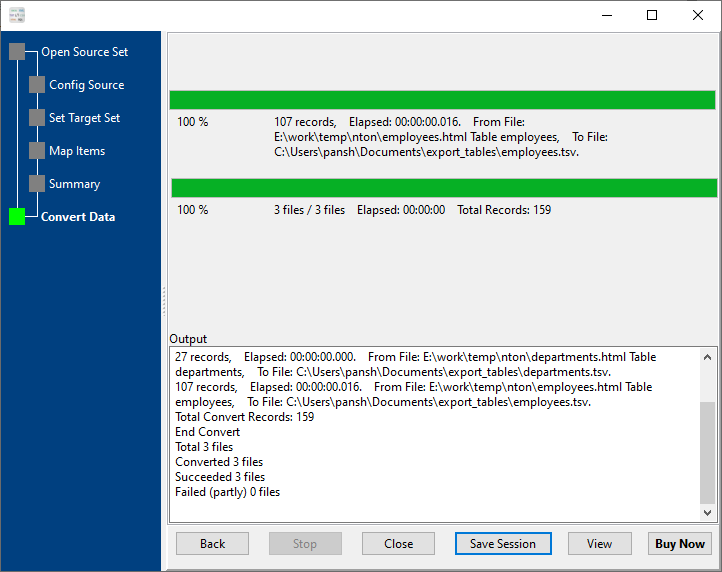
- Click convert and get TSV file instantly
2. Batch Convert HTML to TSV (1:1)
Auto-convert bulk HTML files to separate TSV files in one click
- Select source folder with multiple HTML files
- Enable recursive folder scanning for subdirectories
- Set unified output folder for TSV files
- Apply consistent column mapping to all files
- Run batch conversion with one click
3. Merge Multiple HTML into One TSV
Combine multiple HTML table files into a single clean TSV file
- Select all HTML files you want to merge
- Configure header and field matching options
- Map consistent columns across all HTML files
- Merge data with full integrity and no duplicates
- Export merged TSV for Excel, databases, analytics
Key Features
- Step-by-step GUI wizard – no technical skills required
- CLI automation: save sessions, schedule tasks, batch scripting
- Large file support (>4GB) with high performance
- Advanced column mapping: select, rename, reorder, format
- Multiple encoding support (UTF-8, ANSI, Unicode, etc.)
- Real-time data preview before conversion
- Detailed error logging and conversion reports
Quick Start Guide
Frequently Asked Questions
How long does HTML to TSV conversion take?
Millions of rows are processed within one minute; small files finish in milliseconds. The tool supports ultra-fast processing for files over 4GB without lag.
Is my data safe when converting HTML to TSV?
Yes. All conversions run locally on your computer – no data is sent to online servers or cloud platforms. Your data privacy is fully protected.
Can I use the HTML to TSV converter on Linux and macOS?
Yes. The converter provides native versions for Windows, Linux, and macOS operating systems, with full cross-platform compatibility.
Can I automate HTML to TSV conversions?
Yes. Use the CLI mode with saved sessions to create batch scripts (.bat/.sh), and schedule tasks via Crontab (Linux/macOS) or Windows Task Scheduler for automatic conversions.
Does the tool support batch convert and merge HTML files?
Yes. It supports three core modes: single HTML to TSV, batch convert (1 HTML → 1 TSV), and merge multiple HTML files into one single TSV file with full data integrity.
Start Converting HTML to TSV Today
Fast, secure, and professional HTML to TSV conversion for all platforms
Download DataFileConverter Now