Windows has no tail. That is the whole problem. A service writes its only account of what it just did into a log file, the file grows while you read it, and the closest thing the OS ships is opening it in Notepad and hitting Ctrl+End every few seconds — or Get-Content -Wait in a terminal that was never built for logs.
If you have ever gone looking for a “tail for Windows”, you have met the same four names. Here is how they actually differ, and how to pick one.
Disclosure: Tail4win is our own product. It gets its own section at the end, after the alternatives. The comparison table below includes it so you can see all the options in one place.
How to judge a tail tool for Windows
Before the tools, the criteria that matter:
- Does it truly follow? A
tail -freplacement must show new lines as they are written, on a refresh interval, with no reloading. - Highlighting and filtering. Can it colour lines by keyword, and filter like
tail -f | grep, ideally with regular expressions, while still following? - More than one file. Servers come in pairs (app log + error log). Tabs, each with its own rules?
- Large files. Does it read the whole file into memory — or only the end? This is what separates a log tool from a text editor.
- Line endings and encodings. Logs are often CR-only (old Mac/
\rprogress output) or mixed; a tool that splits on\nalone shows one giant line. - Native, or a workaround? A real Windows build, or a console one-liner / WSL / Cygwin?
- Sessions. Can you save “these three logs, this filter” and reopen it tomorrow?
The comparison
| Tool | Best for | Price | Watch out |
|---|---|---|---|
| BareTail | the simplest classic tail | Free; Pro $25 (removes the splash) | Last released 2016 — small, old, no real filtering |
| LogExpert | power users who want columns and plugins | Free (MIT, v1.50.0) | Windows only; feature-dense, steep |
| Klogg | searching a huge log fast | Free (GPL-3.0, v22.06) | A log explorer more than a follower |
PowerShell Get-Content -Wait |
no install, one file, now and then | Free (built in) | No highlight/tabs/filter; slow on big files |
| Tail4win | following live logs with tabs, highlight and regex filtering | Trial; from $45 | Desktop install |
Table covers the alternatives; our product is covered below.
BareTail
The one everybody installs first. Free, tiny, and it does the one thing: shows the tail and follows it. The registered build ($25) just removes the startup splash. The catch is age — the site’s last update is May 2016, so expect a no-frills tool with no filtering and a Windows-only, decade-old feel.
LogExpert
A Windows feature-rich tail and analyser, and the most configurable of the group: tabs, regex search, bookmarks, highlight rules, a flexible filter view with filter-to-tab, a columnizer for structured logs, and triggers. Free and open source. If you are happy on a single OS and want to slice logs into columns, this is the power option.
Klogg
Where LogExpert parses, Klogg searches. Based on the older glogg project, it is built to open very large files and find things fast, with regex and filtering, on Windows, Linux and macOS. It is a log explorer: excellent when you need to dig through a 2 GB log, less aimed at the “leave it open and watch it grow” workflow.
PowerShell Get-Content -Wait
The zero-install baseline. Get-Content .\app.log -Wait -Tail 50 tails a file with no download at all. It is genuinely useful in a pinch, but it is a console stream: no highlighting, no tabs, no filters that keep following, and it is not happy with very large files. Good for a quick look; not a daily driver for a server.
Tail4win — for following live logs, not just searching them
Tail4win is a GUI tail -f for Windows, Linux and macOS (version 6.0, September 2026). Where the tools above lean either “simple” (BareTail) or “search” (Klogg), Tail4win is built for the watching case:
- Only the end of the file is read, so the last lines appear immediately and new ones arrive as they are written — no Ctrl+End, no whole-file wait.
- Several files in one window, each with its own highlight rules, saved as a session you reopen next time.
- Filter like
tail -f | grep, with regular expressions, while still following. - Plus CR / CRLF / LF all treated as line breaks (so
\r-heavy or legacy logs do not collapse into one line), a real command line, OutputDebugString capture on Windows, and drag-and-drop / Explorer integration.
Free trial, then from $45 — see Tail4win.
Which one to pick
- Just want to see the tail, once:
Get-Content -Waitor BareTail. - You live in log columns and triggers, Windows only: LogExpert.
- You need to find something in a 2 GB file: Klogg.
- You keep logs open and watch them — several at once, with highlighting and a filter that keeps following: Tail4win.
How to tail a log file on Windows with Tail4win
- Download Tail4win and open a log with File → Open (or drag it from Explorer).
- It shows the last lines and follows the file; set the refresh interval under settings.
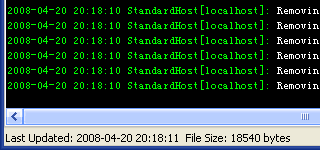
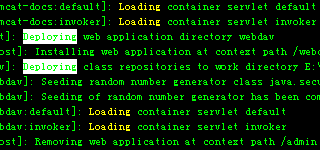
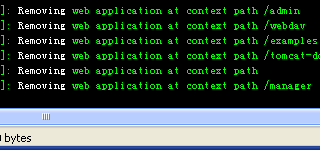
- Add highlight rules per file, and a filter (regex) if you only care about certain lines.
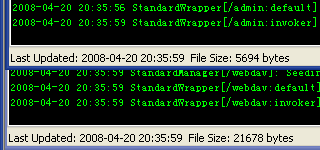
- Open a second file as a new tab, then save the session to reopen the same set next time.
FAQ
Is there a tail -f for Windows?
Not built in. PowerShell’s Get-Content -Wait is the closest native option; for a real GUI with highlighting and multiple files, use a dedicated tool such as Tail4win, LogExpert or Klogg.
Are these tools free?
BareTail, LogExpert, Klogg and Get-Content -Wait are free (BareTail’s Pro build is $25). Tail4win is paid, with a free trial and a price from $45.
Can I tail several log files at once?
Yes — LogExpert, Klogg and Tail4win all support multiple files; Tail4win keeps them as tabs and can save the set as a session.
Why does my log show up as one long line?
It probably uses CR (\r) or mixed line endings. Tail4win treats CR, CRLF and LF as line breaks, so those logs split correctly.
Does it work outside Windows?
LogExpert and BareTail are Windows-only. Klogg and Tail4win run on Windows, Linux and macOS.
Final thought
Pick by what you do most: search a log once (Klogg), watch logs live with rules (Tail4win), or keep it minimal and free (BareTail / PowerShell). Windows not shipping a tail is the only reason this list exists.
Facts checked October 2026. Prices and versions change — verify on each vendor’s page before buying.
Sources: BareTail (page last updated 2016) · LogExpert · Klogg · PowerShell Get-Content -Wait · Tail4win 6.0.
Convert your data online, free
Free in-browser converters for CSV, Excel, JSON, XML and SQL: Withdata Online Data Conversion. Large files, batch conversion or scheduling? See the offline desktop apps, or browse all data conversion tools.

