DataFileConverter » Use cases » Excel to JSON for an app
Download DataFileConverter Free Trial » Buy DataFileConverter Now »
The situation
Somebody needs the data as JSON - an application's seed file, an API payload, a configuration file, a fixture for a test - and the data lives in an Excel workbook or a CSV export. Writing a one-off script is the usual answer, and it is also where the time goes: quoting, headers, empty cells, numbers that came back as strings.
If it is a repeating job (a price list refreshed monthly, a product catalogue) the script has to be maintained too, which is more work than the conversion itself.
What you do
- Choose the Excel file and the sheet to convert.
- Set JSON as the destination, and check the preview - the mapped columns are shown before anything is written.
- Convert. For many files, use batch mode and point it at a folder.
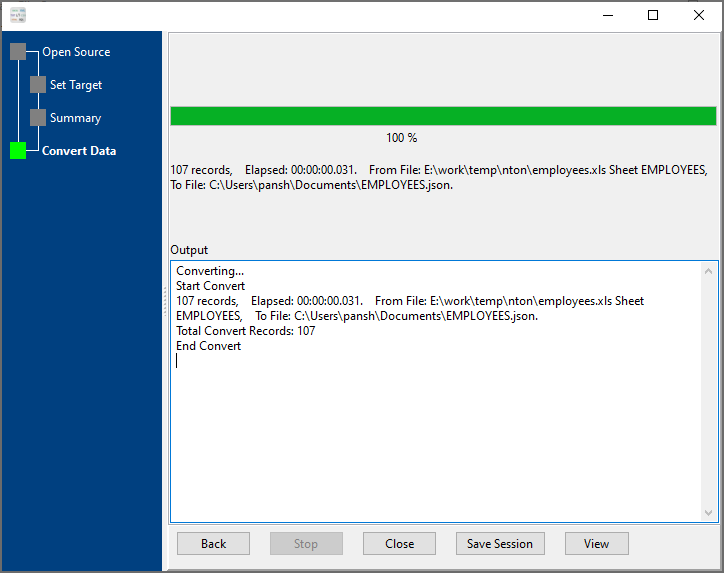
The column names become JSON keys, values keep their type, and nested data in a cell is parsed into JSON structure rather than left as a string. The workbook is never modified, and everything runs locally - the file does not have to be uploaded to a converter website.
What it will not do
- It does not validate against a schema. It converts the data you have; whether it satisfies your application's expected JSON Schema is something you check afterwards.
- It does not call the API. It writes a file. Uploading it, or posting it, is your step.
- It does not guess meaning. It maps columns to keys; renaming a key, nesting it differently or dropping a field is a mapping decision you make, not something the tool infers.
If the shape is not what the app expects
Two common next steps: adjusting the mapping (see converting between multiple formats), or asking whether the application would be happier with CSV or SQL. If the destination is a database rather than an app, FileToDB loads files into databases directly.
Related
Converting Excel to JSON in the browser: Excel to JSON. Step-by-step guide: Excel to JSON. Other directions: JSON to CSV, CSV to JSON. Batch conversion: batch convert.