DBToFile » Use cases » Export only the rows you need
Download DBToFile Free Trial » Buy DBToFile Now »
The situation
Whoever asked for the data wants a slice of it: this month's orders, one customer's invoices, three columns out of thirty, or several tables joined so the spreadsheet has names instead of codes. Exporting the whole table and deleting rows in a spreadsheet is how mistakes get into reports - and it is a lot of data to move for an answer that is small.
What you do
- Open a query rather than a table: SQL against the connection you already have, with the
WHERE, the column list and anyJOINyou need. - Run it once to see the result in the grid, and check the row count is what you expect.
- Send that result to a file - CSV, Excel, JSON, XML, HTML or SQL - exactly as a table export would.
- Save it as a session when the same slice is wanted again next month.
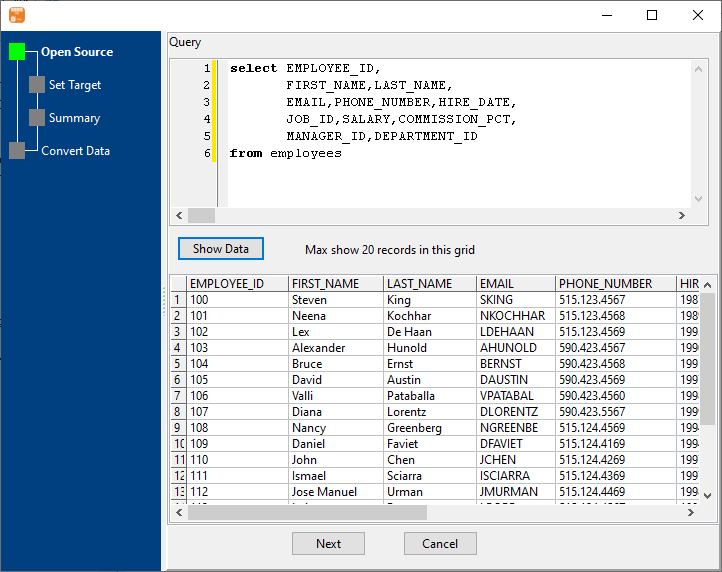
Because the filtering happens in the database, only the rows that survive travel to your machine. A "one month" export stays a one-month file, and the reader cannot accidentally see the other eleven.
What it will not do
- It does not build the query for you. There is no visual query designer here - you write the SQL (or you can point it at a stored query that already exists in the database).
- It does not add calculated columns beyond what the query returns. Formulas, running totals and formatting belong in the spreadsheet or in the SQL.
- It runs the query each time. The file is a snapshot of the moment the task ran, not a live link.
- A slow query is still slow. The export waits for it; there is no partial result to save halfway through.
Related
The mode itself: query to file. A whole table instead: table to file. Several similar tables merged into one file: similar tables to one file. Repeating it: sessions, command line, on a schedule.