DBToMongo » Use cases » Reshape the fields
Download DBToMongo Free Trial » Buy DBToMongo Now »
The situation
A mechanical copy gives you the old schema wearing a new hat: CUST_NBR instead of customerNumber, a date stored as a string, a column that was only ever used by the old application, a numeric code that the new service expects as text. The documents load, and then every query has to work around the names and types.
Fixing it after the migration means an update pass over the whole collection - a second copy of the problem.
What you do
- Open the mapping for the table you are migrating (Table to Collection).
- For each source column, set the destination field: rename it, and change its type if the target wants something else.
- Untick the columns that should not travel at all - legacy flags, internal IDs, duplicated columns.
- Preview, then run. The documents are written in the shape you mapped, on the first pass.
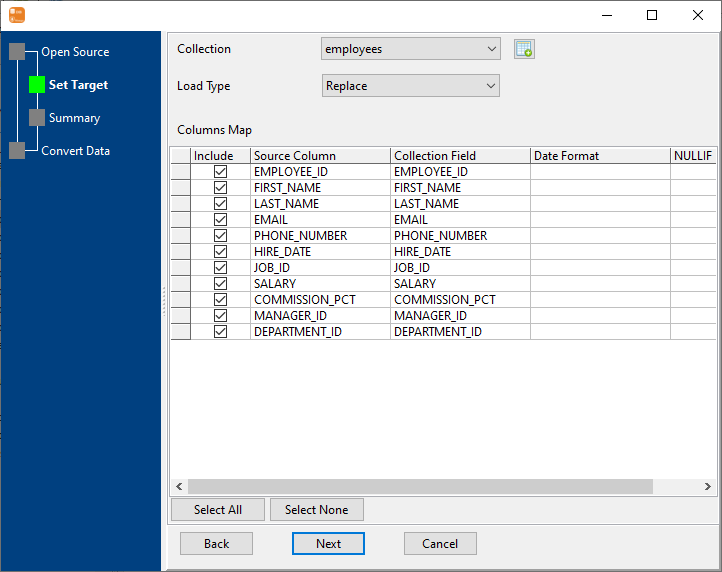
Because the mapping belongs to the task, a migration that has to be repeated - the next release, the next tenant, the test environment - produces the same shaped documents every time instead of depending on someone remembering the rules.
What it will not do
- It renames and re-types fields; it does not restructure documents. There is no embedding of child tables into parent documents and no array building. Making a row into a nested document is a different job.
- It does not calculate values. Concatenating two columns, parsing a composite code or deriving a field from a rule is SQL or application work, not a mapping.
- It does not clean the data. A date stored as a string with four different formats is still four formats unless you fix the source or post-process.
- The target does not get validation rules or indexes from the mapping. Those are configured on the MongoDB side.
Related
The mode: table to collection, and the same mapping across many tables: similar tables to one collection. The whole database: migrate a database. From a query with the columns already reduced: query to collection.