DBToMongo » Use cases » Migrate a database to MongoDB
Download DBToMongo Free Trial » Buy DBToMongo Now »
The situation
The application is moving to MongoDB, or a copy of the relational database is needed there for a new service. Either way the shape changes: there are no tables, there are collections, and there are no rows, there are documents. A script per table is the usual answer, and it is forty scripts that each have to be kept in step with a schema that keeps moving.
What you do
- Connect to the relational database (MySQL, SQL Server, Oracle, PostgreSQL, SQLite, Access, DB2 or DBF) and to the MongoDB server.
- Open Tables to Collections: the tables are listed with their automatic destination collection names, and you can accept them or change them.
- Check the field mapping for the tables you care about - a row becomes a document, a column name becomes a field name.
- Run. Progress and row counts are shown per table, so a problem in table 31 does not need a restart of the first thirty.
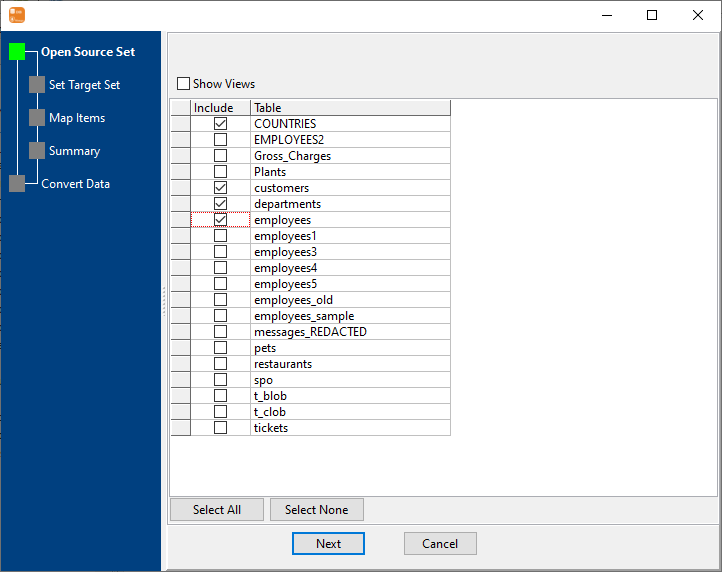
Everything runs from your machine to the two servers you name: no cloud service in the middle, no export file to store or clean up, and the credentials never leave the local configuration. Once it is set up, the whole migration is a saved session - one click, or one command for the next environment.
What it will not do
- It does not design your documents. The default conversion is faithful to the old schema: one row per document, columns as fields. It will not invent nesting, embedding or a different data model for you.
- It does not run continuously. A migration is a snapshot of the source when it runs. Ongoing changes are handled by re-running, or by the scheduled-task route - see keeping a collection in sync.
- It does not migrate relationships. Foreign keys are values, not links. Joins have to be resolved by the application, or by reshaping the data yourself.
- Indexes and validation rules on the MongoDB side are yours. They are not created from the relational schema.
Related
Tables that were split and should be one collection: combine split tables. Field names and types to fix first: reshape the fields. One table only: table to collection. From a query: query to collection. Keeping it current: on a schedule, sessions, command line.