FileToDB » Use cases » Import a SQL file
Download FileToDB Free Trial » Buy FileToDB Now »
The situation
A vendor ships a reference table as a .sql script, a colleague sends a data extract as INSERT statements, or your own export from another machine left a file behind. What you have is text that a database is supposed to swallow, and a database you can reach - but the file is on your laptop and the database is somewhere else.
Some databases' command-line clients can run a local script; some cannot read a file from where you are sitting; some simply are not installed on this machine.
What you do
- Open the file in FileToDB as a SQL File source. The statements are parsed into tables, not run as one opaque blob.
- Look at the preview and see which tables the file contains.
- Connect to the target database, give each source table its destination table, and map the fields.
- Run. The rows are written over the connection your machine already has.
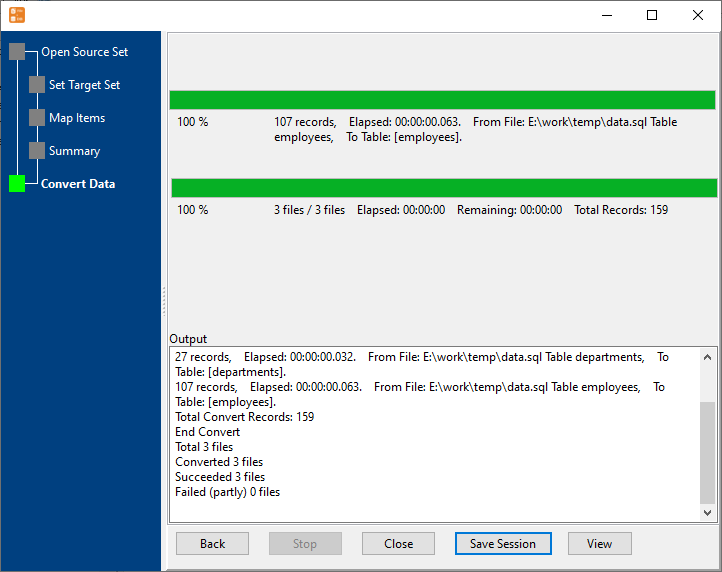
Because the file is read as data rather than piped to a client, a file written for one engine can still be loaded into another - the values are inserted by FileToDB, which knows how to talk to all of them. A file with several tables in it is one file into many tables.
What it will not do
- It is not a general SQL runner. It is built for the data-carrying statements a script of this kind contains -
CREATE TABLEandINSERT. Procedures, triggers, grants, transactions and engine-specific control statements are not executed for you. - It will not repair a script meant for another dialect beyond the mechanics of loading rows. If the file uses syntax the target cannot insert, the run fails and reports it.
- It creates a table, not a schema. Columns come from the file; indexes, primary keys, constraints and defaults do not.
- Re-running is up to you. There is no "skip what is already there" logic - a second run inserts the rows a second time unless you clear the table or use an update mode.
Related
Several tables in the file: one file into many tables. CSV or Excel instead: file to table. A whole folder at once: folder to table. Doing it repeatedly: sessions, command line. Producing such a file from a database: DBToFile.