FileToDB » Use cases » One file into many tables
Download FileToDB Free Trial » Buy FileToDB Now »
The situation
The handover is a single file, but it is not a single table. A .sql script sets up a whole small schema - countries, departments, employees. One HTML page carries three separate tables. An XML or JSON document has several collections in it. A workbook has a sheet per entity.
Loading that one table at a time means opening the file, finding where table two starts, and repeating the mapping you already did - and getting the same mapping wrong the second time.
What you do
- Open the file as its type - SQL File, HTML Table, XML, JSON or Excel.
- FileToDB lists what it found: the tables or sheets inside the file, each as a source item.
- On the Map Items step, tick the ones you want and give each a destination table - one line per table, all visible at once.
- Configure the fields for each destination ("Click To Config"), then run. Every mapped table is written in the same run.
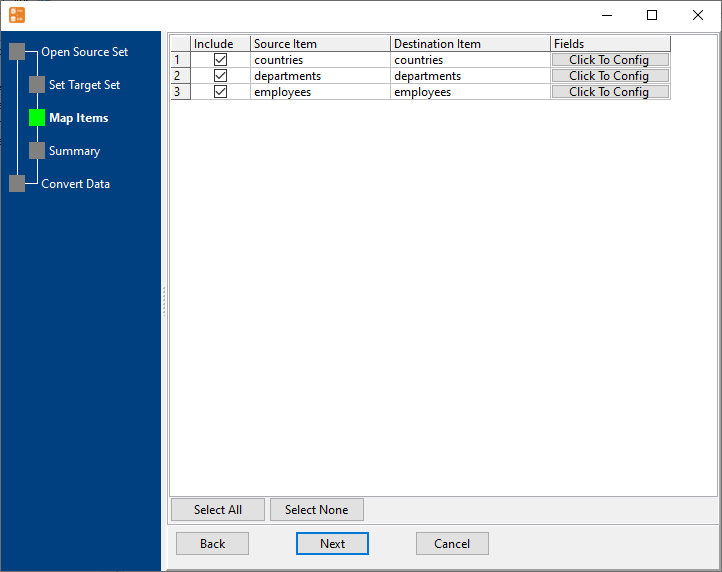
Because the source and its tables are kept apart, you can also load just one of them now and the rest later without re-reading the file by hand. Saved as a session, the whole multi-table load is one command for the next delivery.
What it will not do
- It does not discover a schema for you. The destination tables come from what is in the file; relationships between them, foreign keys and load order are not managed. If order matters, run it in the order you need.
- A file with no structure inside has nothing to split. A single CSV with mixed rows is one table, not several - that is a different job.
- It creates tables, not a schema. Columns come from the file; indexes, primary keys, constraints and defaults are not created for you.
- It does not fix mismatched shapes. If one of the tables in the file has different columns than its destination, that table's mapping has to be corrected - it will not be guessed.
Related
A SQL script in particular: import a SQL file. HTML tables: import HTML tables. One table only: file to table. Going the other way - one table out to many files: tables to files.