MongoToDB » Use cases » Save as a SQL file
Download MongoToDB Free Trial » Buy MongoToDB Now »
The situation
Plenty of moves are not allowed to touch the target directly. The production database is behind a change-control process and somebody else runs the scripts. The machine that can reach MongoDB is not the machine that can reach the database. The target is a customer's system, and what they accept is a file, not a connection.
In each of those cases the work is the same - decide the columns, convert the documents - but the output has to be a script rather than rows.
What you do
- Set the migration up as usual: the collection or collection set, and the destination table with its field mapping.
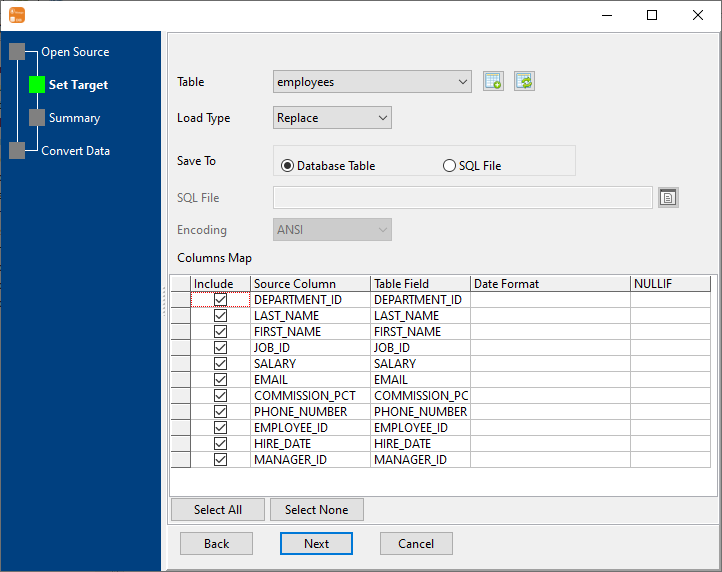
- On the Set Target step, choose Save To: SQL File instead of Database Table, and give the file a name.
- Choose the encoding the receiving side expects (for example UTF-8 where the data contains accented or non-Latin text), and the load type for the script.
- Run. The
.sqlfile is written locally, and the mapping is visible in the Columns Map in the same dialog before you commit to it.
Hand the file to whoever runs the changes, or take it to the machine that can reach the database. The conversion work - flattened fields, renames, types, date formats, NULLIF - is already done at the moment the file is written, so the other side just runs it.
What it will not do
- It does not run the script for you. The file is written; executing it against the target database is the receiving side's step.
- It is a data script, not a database backup. What it contains follows the mapping you configured for this migration. Do not treat it as a restorable copy of the database or as a replacement for a proper backup.
- It does not adapt itself to the target's dialect. The file is written for the database you selected as the target; a script aimed at the wrong engine is still a script aimed at the wrong engine.
- Large collections make large files. Every value is text in the file, so a multi-gigabyte collection produces a multi-gigabyte script. Prefer the direct route when you have it, or migrate in parts with a query.
Related
The direct route: migrate MongoDB to SQL, collection to table. Sub-documents before anything is written: flatten nested documents. From a query instead of a whole collection: query to table.