MongoToDB » Use cases » Flatten nested documents
Download MongoToDB Free Trial » Buy MongoToDB Now »
The situation
This is the part of a MongoDB-to-SQL move that has nothing to do with copying bytes. A document is allowed to hold another document, or a list of them: an order with its lines inline, a customer with an address object, a product with a list of tags. A table allows none of that - every row has the same flat set of columns.
So somebody has to decide what those sub-fields become, and the answer decides whether the resulting table is usable or not.
What you do
- On the source step, open the collection and look at the preview grid to see what the documents actually look like.
- Turn on Use Complex Data when the documents contain sub-documents or arrays. The sub-fields are flattened, so a document with a nested object becomes a row whose columns include those sub-fields.
- Go to the target step and check the Columns Map: the source fields (flattened names included) on the left, the table columns on the right. Rename, drop or re-type anything that should not land as-is.
- Run, and open the resulting table to confirm the shape is what you expected.
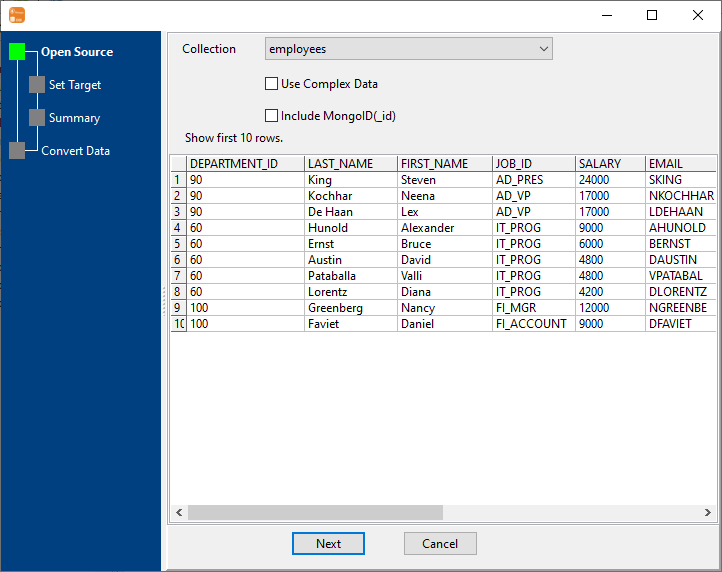
Because the destination table is created from the documents, you get to see the flattened shape before anything is written and change it where it is wrong - which is a much shorter loop than migrating first and reshaping the table afterwards.
What it will not do
- It does not model the data for you. Flattening gives you columns; it does not turn a list of order lines into an
order_linestable with a foreign key. That mapping - one document in, several rows out across tables - is not what this does. - It does not normalise repeated groups. A nested array becomes columns (or is handled by the complex-data option) rather than being exploded into rows; how far that goes is the tool's behaviour, not your business rule.
- It does not fix a collection with no consistent shape. Where documents vary wildly from one to the next, the resulting table will be mostly empty columns. That is a data model problem, not a conversion problem.
- It does not invent column types. A type is chosen per field from the data; where that choice is wrong for your schema, correct it in the mapping.
Related
The migration as a whole: migrate MongoDB to SQL. One collection: collection to table. Writing to a file instead of a database: export the result as a SQL file. Collections that share a shape: similar collections to one table.