MongoToFile » Use cases » Export every night
Download MongoToFile Free Trial » Buy MongoToFile Now »
The situation
Something downstream picks up files: an ETL job that watches a folder, a BI tool with a file source, a reporting script, a partner who fetches a CSV from a share every morning. The data lives in MongoDB, and nobody is going to be there at 4 a.m. to click export.
Exporting collection by collection by hand also guarantees that eventually one is missed - usually the one that matters.
What you do
- Open Collections to Files: the collections are listed with their destination file names, so the whole set is set up once.
- Choose the format and a file-name pattern, so each collection lands in its own file in the folder the reader is watching.
- Save it as a session and run it once by hand to check the output.
- Hand the command to Task Scheduler, cron or your pipeline. It runs headless, with a log of what was read and written.
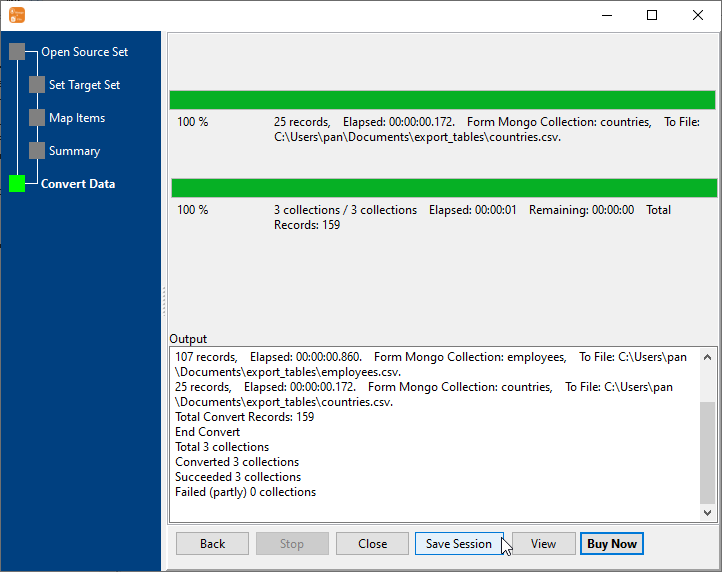
Large collections are streamed to disk while they are read, so a nightly job is not limited by the RAM of the machine it runs on, and the files are overwritten in place so the reader never has to look for a new name.
What it will not do
- It is not a scheduler. MongoToFile runs the export when it is called; the timing, the retries and the "only after the source job finished" logic belong to the scheduler or the script.
- It does not track what it wrote last night. There is no state - each run writes the files again. If the reader expects dated files, that belongs in the file-name pattern.
- It does not alert anyone. A failed export shows up in the exit code and the log; wiring that into monitoring is a separate step.
- It writes files, not deliveries. Uploading to the warehouse, emailing the partner or pushing to cloud storage is your step - or your scheduler's.
Related
The batch mode: collections to files. A single collection: collection to file, or from a query: query to file. Formats: Excel and CSV. Running headless: command line, sessions. Why not mongoexport: MongoToFile or mongoexport.