pg-cmd » Use cases » Data in and out of files
Download pg-cmd Free Trial » Buy pg-cmd Now »
The situation
The database is not the only place the data has to exist. A table needs to reach a spreadsheet or a warehouse; a file that arrived from somewhere has to become rows; an application wants JSON rather than a result grid. What is needed is a transfer that respects the details - the delimiter the receiving system expects, the quote character, whether the first line is a header - without writing a program to do it.
What you do
- Export:
pg-cmd dsn="user:pass@host:5432/db" task=unload table=employees datafile=emp.csv delimiter=, header=y quit=y- CSV, TSV, TXT or JSON, from a table or from a query. - Import: the same shape with
task=load table=employees datafile=emp.csv filetype=csv delimiter=, quote=" header=y. - Set the details that decide whether the receiving side can read the file: delimiter, quote character, header row, encoding.
- Do it from the interface when you are exploring, or from a script when it has to happen every night - the parameters are the same.
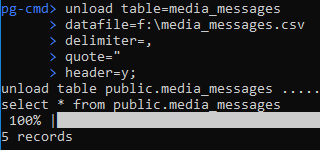
JSON is handled in the same way, in both directions, which is what makes the tool useful in a pipeline rather than only at a desk: a file of JSON records can be loaded into a table, and a table can be written out as JSON for whatever reads it next. The guide covers the file-type specific options.
What it will not do
- It does not transform the data. Rows are written as they are read. Renaming columns, changing types or filtering rows belongs in the query you export, not in the file.
- It does not validate against a schema on import. A file whose columns do not match the table produces an error or unexpected values - checking the file first is worth the minute.
- It does not merge or de-duplicate. Loading the same file twice loads it twice, unless you arrange otherwise in the table.
- The trial limits sizes. The free trial caps import and export at 1000 rows; unlimited rows need a licensed edition - see pricing.
Related
The modes: import from a file, export to a file, import JSON, export JSON. Running it unattended: shell scripts, batch mode. Working interactively: interactive SQL.