pg-cmd » Use cases » Shell scripts
Download pg-cmd Free Trial » Buy pg-cmd Now »
The situation
Half of the work with a database is not interactive at all: a nightly import from a feed, a weekly export for a report, a check that runs after a deployment, a migration step in a pipeline. Those jobs have to run in a script, on a schedule, without a terminal and without a person.
An interactive client is the wrong shape for that - and so is a tool whose only interface is a screen.
What you do
- Pass the whole job on the command line: the connection string, the task, and the parameters of that task.
- For an import:
pg-cmd dsn="user:pass@host:5432/db" task=load table=media datafile=data.txt filetype=txt delimiter=, quote=" header=y quit=y - For an export: the same shape with
task=unloadand an output file. - Put the line in a shell script, a batch file or a scheduled task. There is no window to dismiss and no prompt waiting for input - the process runs, reports and exits.
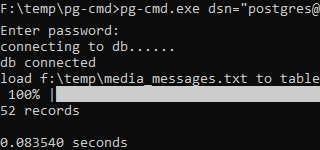
The result of a task can be kept as a file and inspected afterwards, which is what makes a scripted job auditable: the log says what was read and what was written, and the exit status tells the caller whether to continue. The same command works on Windows, Linux and macOS - see the same commands everywhere.
What it will not do
- It is not a scheduler. pg-cmd runs the job when it is called. Timing, retries and dependency handling belong to cron, Task Scheduler or your pipeline.
- It does not keep state between runs. Each invocation is a fresh connection and a fresh task; there is no queue and no memory of what the previous run did.
- It does not hide credentials well by itself. A password on a command line is visible in a process list; keep the script's permissions tight, or use an account whose exposure you accept.
- It does not parse the output for you. The result and the log are text; extracting fields from them is the script's job.
Related
The modes: batch mode, scripts, interactive mode. The result file: viewing results. Moving data: JSON and CSV, load, unload. On a server with nothing installed: portable copy.