Download free trialBuy TextMerger
How to merge JSONL shards into one file
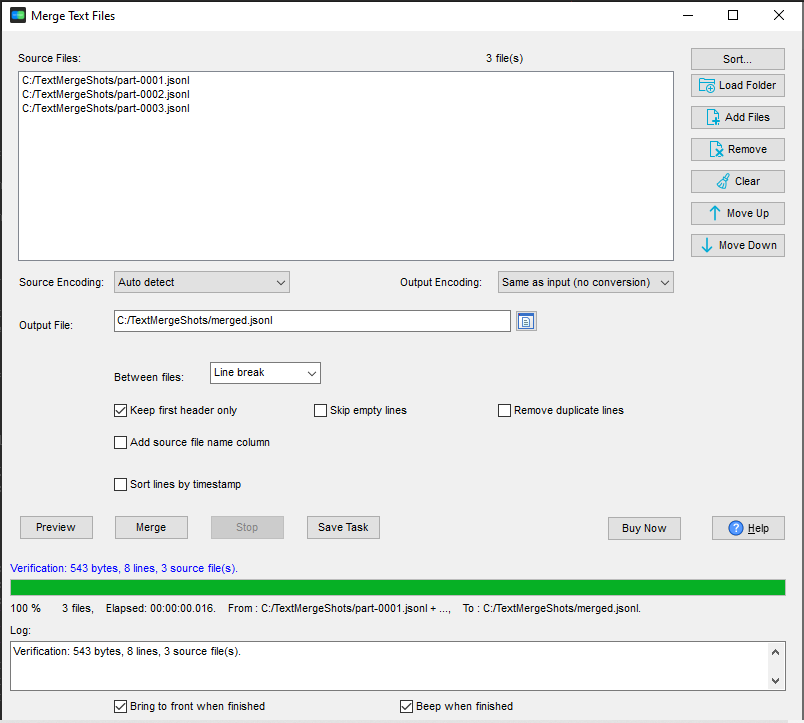
- Open TextMerger and click New Task.
- Use Add Folder... on the folder of shards -
.jsonland.ndjsonfiles are read as plain text, so every part is picked up. - Check the order. Numbered shards usually want to stay in their numeric order; drag the list if the file names sort the wrong way.
- Click Merge and write the single output file.
Why concatenation is enough for JSONL
JSONL - also written NDJSON - is one JSON object per line, and the format has no outer brackets or commas to keep track of. That means merging shards is a plain concatenation: the last line of part-0001.jsonl is followed by the first line of part-0002.jsonl, and the result is still valid JSONL. Nothing has to be re-parsed, re-indented or re-encoded.
TextMerger does exactly that, and preserves line breaks and the original encoding, so the merged file is the shards in one place rather than a rewritten version of them.
When the order matters - and when it does not
If the shards are partitions of a set, the order usually does not matter; if they are numbered parts of a sequence, it does, and file-name sorting is not always the order you mean. Drag the list into place, and save it as a session if the same merge has to be repeated whenever the job runs again.
An honest limit: this is a merge, not a sort. If entries from different shards interleave in time and you need them in timestamp order, sort them after merging with the tool that produced them.
Why not an online merger
JSONL is usually data you are not allowed to hand to a third party. TextMerger runs locally on Windows, Linux and macOS: no upload, no size limit, no cap on the number of files.
Related tools
Loading the merged file into a database: FileToDB. Converting it to CSV or another format: DataFileConverter. Working with newline-delimited JSON as a format: JSON Lines tools. Full reference: merging text files.