Download free trialBuy TextMerger
How to merge SQL script fragments into one
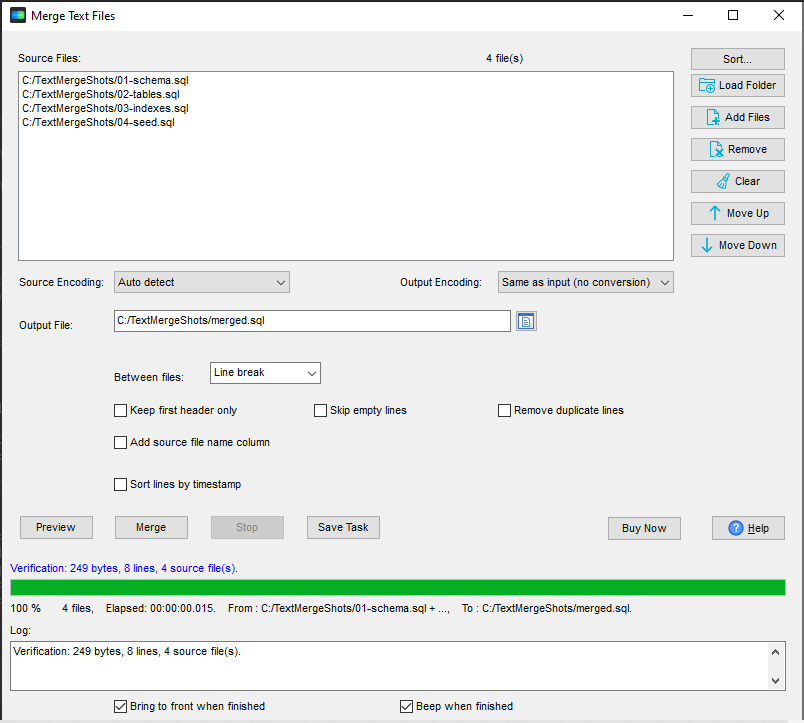
- Open TextMerger and click New Task.
- Add the fragments - or Add Folder... on the directory that holds them.
- Drag the list until the order is the order the database has to be built in. This is the step that matters: schema before tables, tables before indexes, data last.
- Add a separator between files if the target server wants one (a blank line, or a
GOline for SQL Server batches). - Click Merge and save the result as a single
.sqlfile.
Why the order - and the session - matters
File names are a poor substitute for order. 10- sorts before 2- if the prefixes are not padded, and a fragment added later lands at the end alphabetically rather than where it belongs. Dragging the list puts the files where they have to run, and saving the list as a session means the next release of the database merges in exactly the same order, without redoing it.
What it does not do
It concatenates and nothing more: it does not parse SQL, does not check syntax, and does not know that a batch separator is needed for a particular database. A comment opened in one fragment and closed in another is still open where the files meet - so keep fragments self-contained. What it does guarantee is that line breaks, encoding and layout come through unchanged, so the merged script is the fragments, not a rewritten version of them.
Why not an online merger
Schema and seed data are rarely something to upload to a stranger's server. TextMerger is a desktop application for Windows, Linux and macOS: the files never leave your computer, and there is no size limit on the merge.
Related tools
Going the other way - cutting a big .sql dump into separate files per table: SQLDumpSplitter. Loading data into the database after the schema is in place: FileToDB. Full reference: merging text files.