TTSBatchConverter » Use cases » Listen to a folder of documents
Download TTSBatchConverter Free Trial » Buy TTSBatchConverter Now »
The situation
A folder of text documents - reports, notes, chapters, the written material for a course - and no time to read them at a desk. Audio would fit the commute, the gym, or the housework, and for some people it is not a convenience but the only practical way to get through the material.
Doing it one file at a time means opening each file, pasting the text into a text-to-speech tool, waiting, naming the output and saving it. For a folder of two hundred files that is not a job, it is a week.
What you do
- Choose the folder. Sub-folders are included, so one folder per chapter or per subject works as it is.
- Pick a voice, and set the speech rate, volume and pitch if you want something other than the defaults.
- Choose MP3 or WAV, and start. Each text file becomes one audio file, with its name kept.
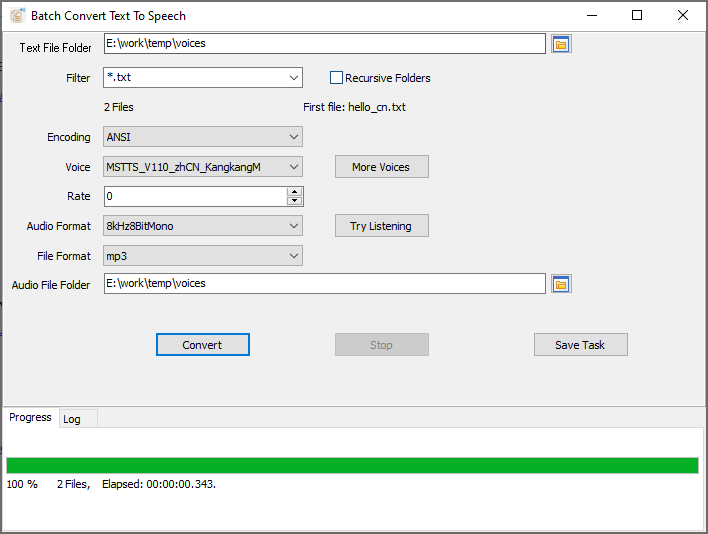
Because it is one file in, one audio file out, the folder keeps its structure: chapter-01.txt becomes chapter-01.mp3, and a whole library turns into a playlist. Everything runs on your own machine, which matters when the documents are internal reports rather than public web pages.
What it will not do
- It converts text, not PDFs. TXT files, and CSV/TSV with a text column. A PDF, a Word document or a scanned page has to be turned into text first.
- It is not an AI voice service. It uses the voices installed on the system (and any you add from Microsoft's speech platform). There is no voice cloning and no cloud TTS API.
- It does not edit audio. No trimming, cross-fading, background music or normalisation. It produces the narration; an audio editor does the rest.
- It runs on Windows only (Windows 10 and 11, 32- and 64-bit). Mac and Linux are not supported.
Related
Starting out: convert text files to speech. Adding more voices: add voices. Doing it unattended: on a schedule. Course material in particular: audio versions of course materials.