TTSBatchConverter » Use cases » Unattended text-to-speech on a schedule
Download TTSBatchConverter Free Trial » Buy TTSBatchConverter Now »
The situation
Something produces text on a regular basis - a nightly report, an export from another system, a folder that a colleague drops documents into - and the audio version is wanted without anybody sitting at the machine to make it. Doing it by hand means it happens on the days somebody remembers.
The other version of the same problem: the conversion has to be a step in a bigger process, and the process cannot click buttons.
What you do
- Set the conversion up once - source folder, voice, output format - and save it as a session or a task.
- Run it from the command line, so it can be called by a script, a scheduler, or another tool.
- Or schedule it in the tool: daily, weekly or monthly, at a chosen time. New files in the source folder are converted while nobody is there.
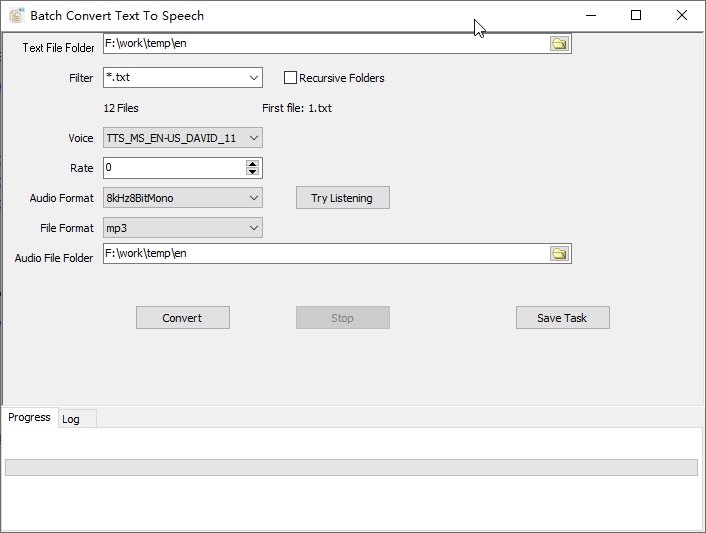
Recursive folder scanning is what makes this practical as a standing job: the source folder can grow sub-folders over time, and the next run picks them up. Everything is local - the text is not sent to a speech service to be converted, which is usually a requirement when the documents are internal.
What it will not do
- It does not watch for changes in real time. It converts what is in the folder when the task runs. Waiting for a file to appear means running the task more often, not a real-time watcher.
- It does not queue or distribute work. One machine, one job - there is no worker pool and no central service.
- It does not call a cloud TTS API and does not need one; it uses the voices installed on the system.
- Windows only (Windows 10 and 11). Scheduling and the command line are Windows features here, not cron on Linux.
Related
Command line: running it from a script. Saved setup: sessions. The job itself: convert text files to speech. A folder that keeps growing: listen to a folder of documents.