TTSBatchConverter » Use cases » One audio file per line
Download TTSBatchConverter Free Trial » Buy TTSBatchConverter Now »
The situation
Sometimes the audio is needed in pieces rather than as one file: a phrase list for language practice, a dialogue where each line is a separate clip, a set of short announcements, or the lines of a script that will be placed on a timeline individually.
Making those by hand is painful - one line per conversion, then renaming each output - and the count is usually in the hundreds.
What you do
- Put the lines in a text file, one line per output file.
- Choose the line-by-line mode instead of the single-file mode.
- Convert. Every line becomes its own audio file.
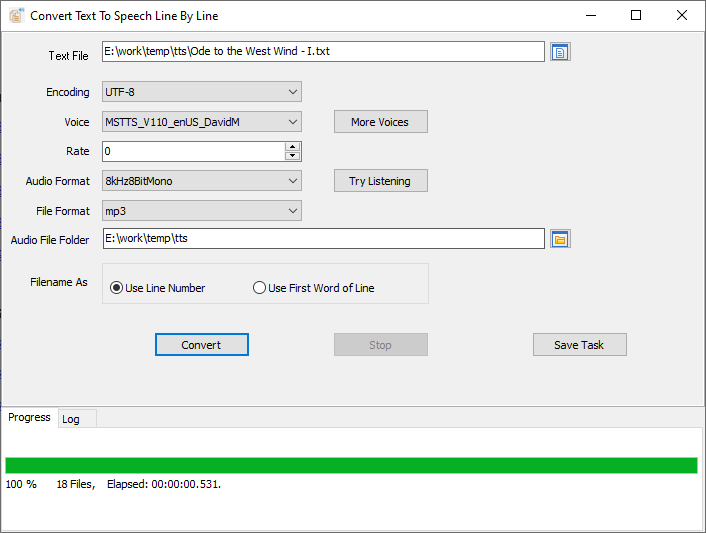
Each file is a complete, standalone clip: no leading silence to trim, no need to cut one long recording into pieces afterwards. For a folder of files, the same mode applies to every file in the batch.
What it will not do
- It does not read a subtitle file. SRT and similar formats contain timecodes and blank lines that would become "lines" themselves. Strip the file down to the text you want spoken - one line each - first.
- It does not number or rename cleverly. The output naming follows the input; if you need a specific clip name per line, put that structure in the input, or use the CSV/TSV mode with a name column.
- It does not time the clips to a video. It produces the audio; fitting each clip to its moment on a timeline is editing work.
- It does not trim silence or normalise volume - that is an audio editor's job.
- Windows only (Windows 10 and 11).
Related
If the file names and texts live in a spreadsheet, the CSV/TSV batch mode takes a name column and a text column instead: convert text files to speech. Whole files instead of lines: listen to a folder of documents. The general job: convert text files to speech.