BatchImageConverter » Use cases » Convert HEIC photos to JPG
Download BatchImageConverter Free Trial » Buy BatchImageConverter Now »
The situation
Photos taken on an iPhone are saved as .heic, and on many machines that is where the trouble starts: Windows has no built-in support on older versions, a page designer says the file "cannot be opened", an older version of an editing tool refuses it, and an upload form quietly rejects it.
The images themselves are fine. The extension is the problem, and the fix is to convert them to a format everything reads.
What you do
- Point BatchImageConverter at the folder of HEIC photos - sub-folders included.
- Choose JPG (or PNG, or WebP) as the output format.
- Run it. Every photo in the folder is converted in one pass, with its name kept.
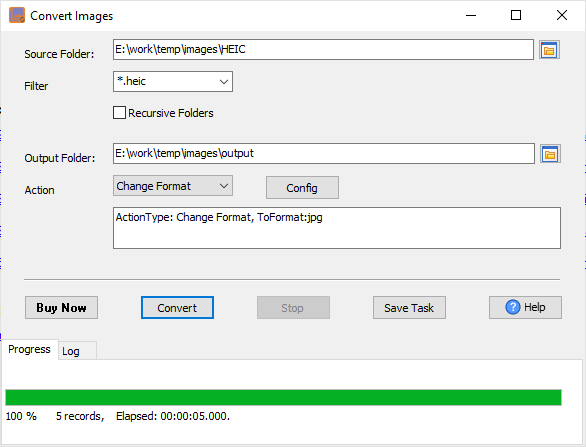
The conversion happens on your machine, so a folder of personal photos never has to be uploaded to a converter website to be readable. HEIC is one of 20+ formats the tool reads, alongside BMP, GIF, JPG, PNG, TIFF, WebP, PDF and camera RAW.
What it will not do
- It is not a photo editor. No cropping, straightening, retouching or colour adjustment - it converts the format.
- It does not recover data. The HEIC file is not "improved"; it is re-encoded into a format that opens.
- A JPG is a lossy re-encode. Converting to JPG trades a little quality for universal compatibility. Keep the HEIC originals if you may want the original data - and choose PNG if you need a lossless output.
- It does not fix the camera's setting. To stop the phone producing HEIC in the first place, change the setting on the device.
Related
Converting a mixed folder of images: batch convert images. Camera RAW files: convert RAW photos for review. Making the files smaller: compress photos for an upload. Repeating the same conversion next time: saved session, command line.