BatchImageConverter » Use cases » Convert RAW photos for review
Download BatchImageConverter Free Trial » Buy BatchImageConverter Now »
The situation
A shoot comes back as RAW files - .ARW from Sony, .CR2 from Canon, .NEF from Nikon, .ORF from Olympus, .PEF from Pentax. Each one is 25 to 50 MB, and the person who has to look at them does not have a RAW-capable application - they have a browser, a phone, or a review form that accepts JPG.
Sending two hundred RAW files is not an option, and neither is a screenshot of each one.
What you do
- Point BatchImageConverter at the folder of RAW files - it picks the camera type, and sub-folders are included.
- Choose JPG (small, universally readable) or WebP (smaller) as the output.
- Run it. The whole shoot becomes a folder of viewable images, with the names kept, so a RAW file and its preview still correspond.
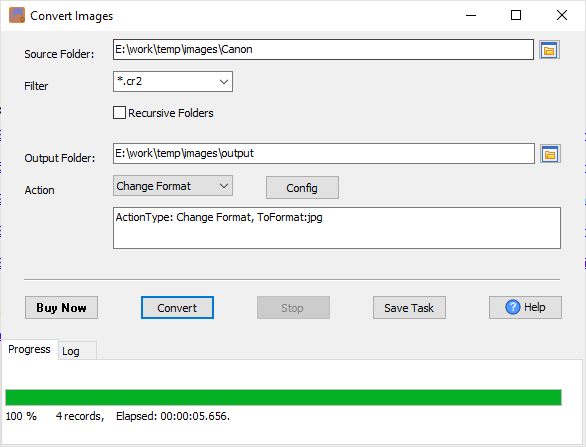
The originals are untouched - this produces a second, shareable copy of each frame rather than replacing anything. The conversion runs locally, which matters when the photographs are of a person, a property or a product that should not be uploaded to a random website to be made readable.
What it will not do
- It is not a RAW developer. No exposure, white balance, tone curve, lens correction or colour grading. It produces a viewable image; the edit still happens in a RAW editor.
- It does not produce the final image. A JPEG converted for review is a proof to look at, not the graded file you deliver.
- It does not recover a corrupt file. If the RAW itself will not open, the conversion will not either.
- Converting is lossy. The preview has less information than the RAW - again, the original is the one to keep.
Related
Preparing photos for a shop or a listing: prepare product photos. Making them smaller: compress photos for an upload. HEIC from a phone instead: convert HEIC to JPG. Automating a folder that fills up after every shoot: scheduled task.