BigTextFileSplitter » Use cases » Split JSONL by record
Download BigTextFileSplitter Free Trial » Buy BigTextFileSplitter Now »
The situation
A pipeline, an export or a query produced one enormous JSONL file - also written NDJSON or LDJSON - and the next step wants it in pieces: a worker per shard, a size limit per upload, parts that a single process can hold in memory, or a batch an embedding job can read at a time.
With JSON, splitting is awkward: cut a normal JSON array in the wrong place and the parts are no longer JSON. JSONL is different, and that difference is the whole reason it is used for streaming - one object per line, no enclosing brackets or commas to balance.
What you do
- Choose the JSONL / NDJSON file.
- Split by line count (for example 1,000,000 records per part) or into a fixed number of files.
- Split, and hand each part to a worker, or upload them one at a time.
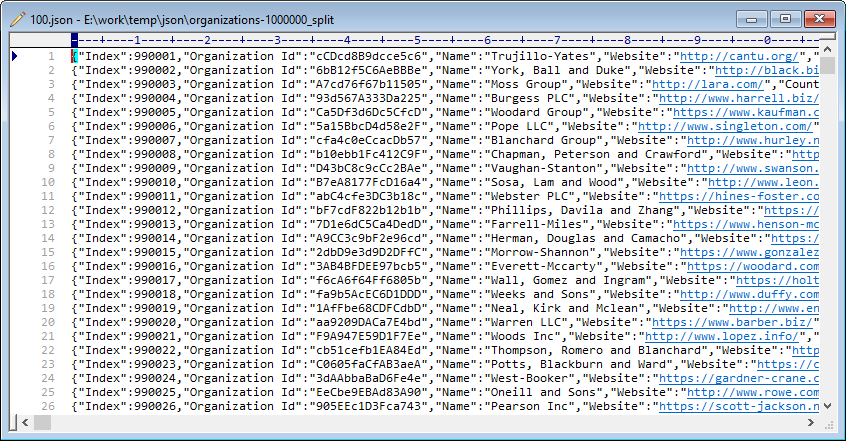
Every output file is still valid JSONL. Because the split happens between lines, no record is cut in half - each part is a complete sequence of whole JSON objects, and can be read on its own by any JSONL parser. The encoding and the line breaks are preserved as they were in the source.
Order and sharding
When the parts are shards of a set, the order usually does not matter - any worker can take any part. When they are numbered parts of a sequence, keep them in that order: the file list can be arranged as you like before splitting. The original file is never modified, so a bad split costs nothing but the disk space while you try again.
What it will not do
- It does not split by field value. It divides by lines or by size; it does not read the JSON. To write one file per tenant, per table or per field value, use DataFileSplitter, which understands structured data.
- It does not re-join the parts. If they have to become one file again, use TextMerger - merging JSONL is a plain concatenation, so the result is valid again.
Related
Splitting structured JSON by field value: DataFileSplitter. Working with newline-delimited JSON as a format: JSON Lines tools. Feeding an AI pipeline: JSONL for a RAG pipeline, data for a vector search app. Splitting in the browser: split JSON. How-to article: splitting JSONL / NDJSON. Related: batch splitting, command line.