DataFileConverter » Use cases » Merge JSON and XML exports
Download DataFileConverter Free Trial » Buy DataFileConverter Now »
The situation
An export ran per month, per region or per shard, and left a folder of files: twelve JSON files, or a few hundred XML documents. The next step - a report, an import, a colleague - wants one file, not forty.
Concatenating them naively gives the wrong result: JSON files each have their own array brackets, XML files each have their own root element, and even CSV files repeat their header row. The job is to combine the data, with one header and one schema, not to append the files.
What you do
- Point DataFileConverter at the folder of exports (JSON, XML, CSV or Excel).
- Choose the combine/merge conversion and pick the destination format - one CSV, one Excel sheet or one JSON file.
- Check the preview: the columns from all the files line up under a single header, and the rows follow.
- Convert, and save the task as a session if the same folder arrives again next month.
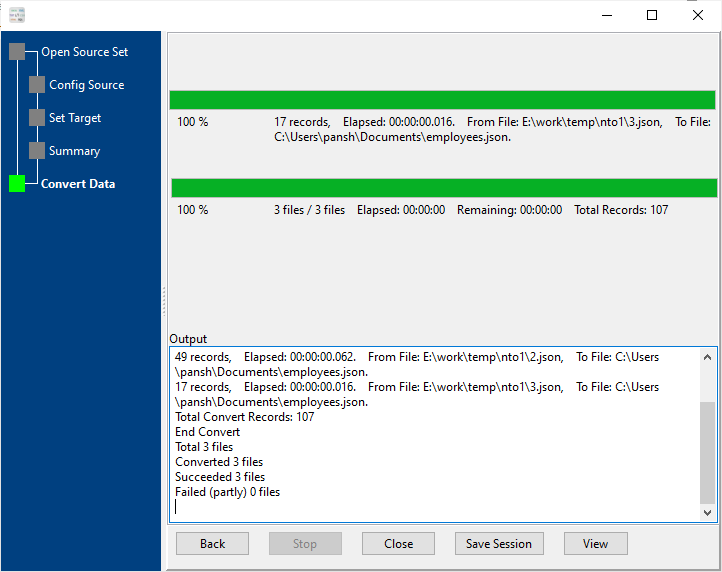
Because the merge happens at the data level, the output has one header and one schema rather than forty of each. Everything runs locally, and the source files are left untouched.
What it will not do
- It does not de-duplicate or sort. If the same record appears in two exports, it appears twice in the result. Combining is not reconciling.
- It does not resolve conflicting schemas. If the files have different columns or element names, the result reflects that - check the preview before you use it.
- It merges data files, not plain text. Merging arbitrary text files in a chosen order is a different job: see TextMerger.
Related
Merging in the browser: merge JSON files, merge XML files. Guide: merging JSON files into one CSV. Plain-text merges: TextMerger. Batch conversion without merging: batch convert.