DBCopier » Use cases » Migrate a database to a new server
Download DBCopier Free Trial » Buy DBCopier Now »
The situation
The database has to move: a new on-premise server, a cloud instance, or a different engine altogether. The usual route is a dump on one side and a restore on the other - which means a file large enough to fill the disk, a restore that has to run in one go, and a second copy of the data in a .sql file somewhere in between.
If the source and target are different engines, the dump route gets worse: the restore script has to be adjusted by hand.
What you do
- Connect DBCopier to the source database and the target database - different engines are fine.
- Choose the tables to move (all of them, or a selection), and let it map the columns. Columns are matched by name, and you can see the mapping before anything is written.
- Preview the plan, then run it. Tables are copied one after another, with progress and a log.
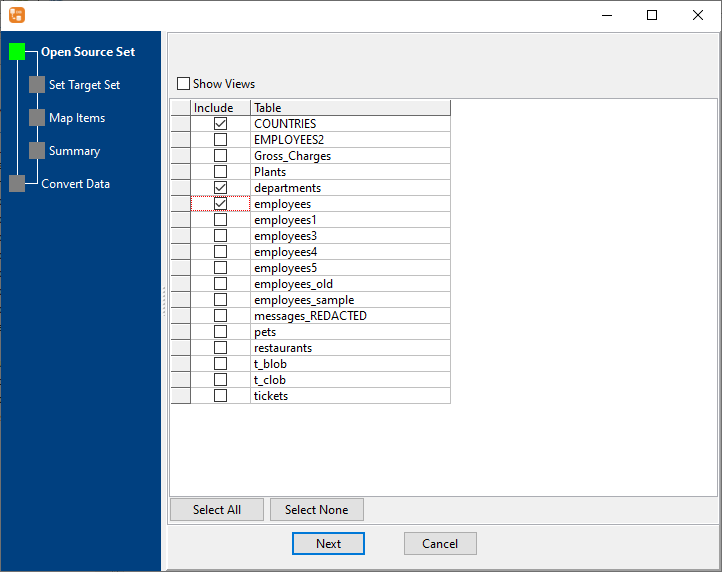
No intermediate dump file is created, and the copy can be re-run: with update/upsert it continues where it left off instead of loading everything again. Everything runs from your machine to the two databases you name - there is no cloud service holding the data, and no DBA account needed on a third system.
What it will not do
- It does not design or transform your schema. It matches columns by name and copies data. Differences in data types, defaults, constraints or identifiers are yours to reconcile.
- It is not a live migration. There is no change-data-capture and no continuous replication. It copies what is in the source when it runs; writes made during the copy are not tracked.
- It does not replace a dump for everything. Database-level objects that are not tables - users, grants, jobs, linked servers - are outside its scope.
- It needs a working connection to both databases, with the client drivers installed and an account that can read the source and write the target.
Related
Moving one table instead: copy a table without a dump. Several databases into one: consolidate databases. The modes themselves: all tables at once, table to table. Running it unattended: command line, scheduled task. Supported pairs: supported conversions.